If you’ve worked on developer docs for any real product, you’ve probably seen this pattern:
- Your “Getting Started” page mixes installation commands, conceptual theory, and API reference all in one scrolling wall of text.
- Engineers complain that “the docs are out of date” or “I can’t find anything.”
- Marketing wants more “tutorials,” support wants more “troubleshooting,” and nobody agrees what belongs where.
Underneath all of that is one root issue: the documentation doesn’t clearly separate different kinds of user needs. Newcomers, experienced integrators, SREs, and internal developers all come to your docs with different questions:
- “How do I do X?” – task-focused users need concise, stepwise instructions.
- “Teach me from scratch.” – beginners need a safe, guided learning path.
- “What does this option do?” – implementers need exact, complete reference.
- “Why does it work this way?” – advanced users need conceptual understanding.
The Diátaxis framework, created by Daniele Procida, is a practical way to structure developer docs around those needs instead of around your org chart or your codebase. It breaks documentation into four distinct types, each with a specific purpose and style:
- Tutorials – learning-oriented, step-by-step introductions.
- How-to guides – goal-oriented procedures for specific tasks.
- Reference – information-oriented, complete and accurate API or configuration descriptions.
- Explanation – understanding-oriented, conceptual or architectural deep-dives.
In my view, the power of Diátaxis is twofold:
- It gives your docs a spine – a stable information architecture you can map every page to.
- It gives your writers and engineers a shared language – “this is a how-to, not a tutorial” becomes a concrete, actionable guideline.
In this guide, I’ll treat your question as: “How do I actually apply the Diátaxis framework to my developer docs in a practical, hands-on way?” We’ll walk through:
- What Diátaxis is, beyond the textbook definition.
- How to audit your existing docs and map them into the four quadrants.
- How to design and implement a Diátaxis-based docs architecture step by step.
- How to test that it works for real users and iterate on it.
- Advanced topics: versioning, API docs, multi-product setups, and governance.
By the end, you’ll have a battle-tested blueprint you can apply to any dev-docs project—from a small SaaS API to a large multi-team platform. I’ll focus heavily on actionable structure, patterns, and examples, not just theory.
Prerequisites: What do you need before adopting Diátaxis?
Before you try to “Diátaxis-ify” your docs, you need a few foundational pieces in place. Otherwise you’ll get stuck halfway: your navigation might change, but your content quality and consistency won’t.
1. A clear primary audience and core user journeys
Diátaxis is user-need driven. If you’re not clear on who your main users are and what they’re trying to do, the framework will feel vague.
At minimum, define:
- Primary user persona: e.g., “Backend engineers integrating our REST API into a Node.js app.”
- Secondary personas: e.g., SREs operating the system, data engineers consuming events, etc.
- Top 5–10 user goals: e.g., “Send first API request,” “Implement webhooks,” “Configure SSO,” “Monitor failures.”
These goals will drive your tutorial and how-to guide design later.
2. A docs toolchain that supports structured content
You don’t need a fancy platform to adopt Diátaxis, but you do need some way to organize content into sections and maintain a hierarchy. Common setups include:
- Static site generators (Docusaurus, MkDocs, Hugo, Next.js-based docs) with a sidebar configuration file.
- Docs-as-code in Git (Markdown/MDX, reStructuredText, AsciiDoc) with clear directory structures.
- Hosted platforms (ReadMe, GitBook, Notion, Confluence) where you can at least define top-level sections.
Whichever stack you use, verify that you can:
- Create distinct top-level sections (Tutorials, How-to, Reference, Explanation).
- Link between pages reliably (for cross-linking tasks to reference, etc.).
- Search across all docs types (so users don’t get trapped in one quadrant).
3. Version and product boundaries
If your product has multiple versions or sub-products, plan how Diátaxis maps onto them:
- Per product:
/product-a/tutorials,/product-a/reference, etc. - Per version:
/v1/reference,/v2/reference, with shared explanation content where possible.
You don’t need to have versioning fully implemented yet, but you should know whether you’re going to slice by product, by version, or both. This directly affects navigation and URL design.
4. A basic content inventory
To apply Diátaxis, you’ll need to map existing content. That means at least a rough inventory:
- Export a list of current pages (URLs, titles) from your docs site.
- Optionally, pull analytics (page views, search terms) to identify high-value content.
- Mark obviously outdated or redundant pages to either rewrite or archive.
You don’t need a fully tagged content model, but you’ll want a single spreadsheet or doc listing everything you have so you don’t miss important pieces.
5. Stakeholder alignment on “why change?”
Re-architecting docs affects many people: devrel, support, product, engineering, sometimes marketing. If they’re not bought in, you’ll end up with half-migrated docs and new content that ignores the framework.
Get explicit agreement on:
- The pain points you’re solving (e.g., discoverability, consistency, onboarding time).
- The core principles of Diátaxis (four doc types, different purposes).
- What “good” looks like (e.g., a clean nav with clearly separated sections).
In practice, a short internal decision doc or RFC is enough. The goal is that when someone asks, “Why is this not in the ‘Getting Started’ page?” you can point to an agreed framework instead of personal preference.
Step-by-step Implementation: How do you actually apply Diátaxis?
Let’s walk through a practical implementation as if you’re restructuring the docs for a fictional product: AcmeAPI, a REST/GraphQL API for a SaaS platform.
Step 1: Design your Diátaxis-based information architecture
First, define the high-level skeleton of your docs. A common, effective pattern is:
- Overview (landing page, high-level intro)
- Tutorials (guided, end-to-end journeys)
- How-to Guides (task-focused recipes)
- Reference (API endpoints, schemas, CLI, SDKs)
- Explanation (architecture, design decisions, security model)
In a file-based docs system, you might structure directories like:
docs/
  overview/
    index.md
  tutorials/
    getting-started-acmeapi.md
    build-first-integration.md
  how-to/
    send-webhooks.md
    implement-oauth.md
    handle-rate-limits.md
  reference/
    api/
      authentication.md
      endpoints/
        users.md
        invoices.md
    sdks/
      javascript.md
      python.md
  explanation/
    architecture-overview.md
    data-model-philosophy.md
    rate-limiting-rationale.md
The key point: don’t overcomplicate this. Start with a simple, opinionated structure and refine over time.
Step 2: Classify your existing content into Diátaxis quadrants
Now take your content inventory and map each page to one of the four types. You can think of this as a simple workflow:
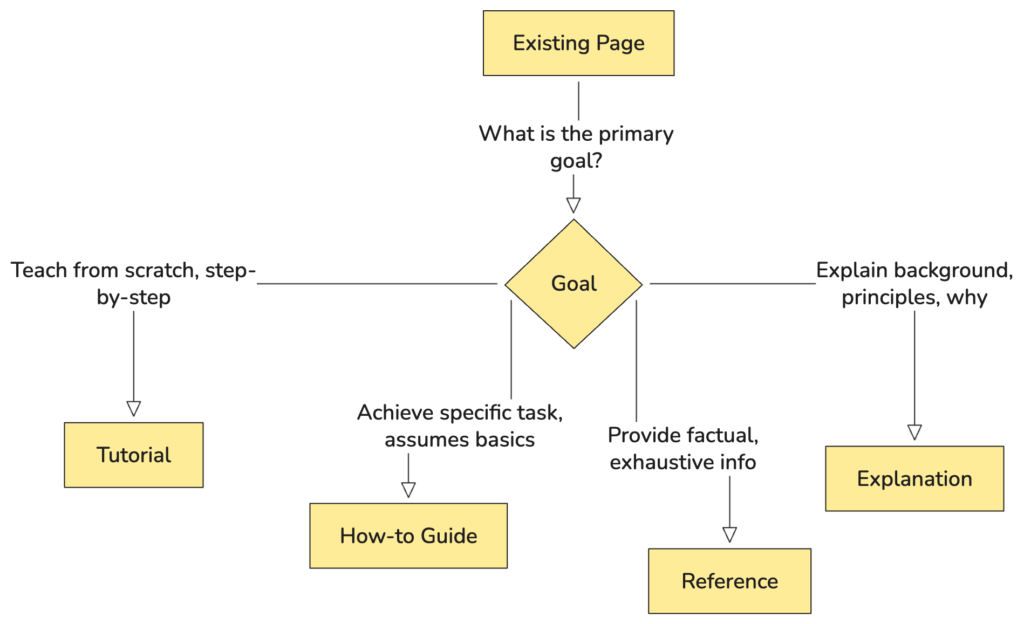
For each page, ask:
- Is the primary intent learning, doing, looking up, or understanding?
- Is it mixed? (Most legacy docs will be.) If so, mark it as “mixed” and note which content pieces belong where.
Example classification:
- “Quickstart: Create your first app” – Tutorial.
- “Configuring OAuth with Okta” – How-to.
- “POST /v1/invoices” – Reference.
- “Understanding AcmeAPI’s rate limits” – Explanation.
- “Authentication and Authorization” – likely mixed: concepts (Explanation) + configuration steps (How-to) + token formats (Reference).
Don’t try to fix everything yet; your goal here is clarity on the current state.
Step 3: Split and refactor mixed pages
This is where you start to see real wins for your users.
Take a typical messy page like “Authentication and Authorization,” which mixes everything. Refactor it into:
- Tutorial: “Authenticate your first request” – a beginner-friendly walkthrough.
- How-to guides:
- “Set up API key auth in Node.js.”
- “Implement OAuth 2.0 with Okta.”
- “Rotate API keys safely.”
- Reference:
- “Authentication methods” – canonical list and exact header formats.
- “OAuth token scopes” – list of scopes, constraints, examples.
- Explanation:
- “Why we chose these auth methods.”
- “Security considerations and threat model.”
When splitting, follow these guidelines:
- Don’t duplicate canonical data. Put exact header formats, parameter names, error codes in Reference and link to them from tutorials/how-tos.
- Keep tutorials linear and kind. No branching paths, no “you could also…”, minimal configuration choices.
- Keep how-to guides focused. One outcome per guide, ideally one page per task.
- Don’t hide critical usage constraints in Explanation. If something is required for correct usage, it belongs in Reference or a how-to, then you can expand the rationale in Explanation.
Step 4: Define content templates for each Diátaxis type
To keep things consistent, create lightweight templates for each of the four types. These can be simple HTML or Markdown skeletons your writers start from.
Tutorial template
<h1>[Tutorial title: verb + outcome, beginner-friendly]</h1>
<p>One-paragraph overview: what you'll build and who it's for.</p>

<h2>Prerequisites</h2>
<ul>
  <li>What the user needs to know (minimal).</li>
  <li>What they need to have installed/configured.</li>
</ul>

<h2>Step 1: ...</h2>
<p>Concrete action with clear instructions and expected outcome.</p>

<h2>Step 2: ...</h2>
...

<h2>Recap and next steps</h2>
<p>Summarize what they achieved and where to go next (how-tos, reference).</p>
How-to guide template
<h1>How to [do a specific task]</h1>
<p>Short summary of the task and when to use it.</p>

<h2>Before you start</h2>
<ul>
  <li>Assumptions (user already knows basics, has account, etc.).</li>
</ul>

<h2>Steps</h2>
<ol>
  <li>Step 1: ...</li>
  <li>Step 2: ...</li>
</ol>

<h2>Verification</h2>
<p>How to confirm the task worked.</p>

<h2>Related information</h2>
<ul>
  <li>Links to reference and explanation.</li>
</ul>
Reference template
<h1>[Entity name]: [Resource or API method]</h1>
<p>Very short summary (1-2 sentences), no fluff.</p>

<h2>Endpoint</h2>
<pre><code>POST /v1/invoices</code></pre>

<h2>Parameters</h2>
<table>
  <tr><th>Name</th><th>Type</th><th>Required</th><th>Description</th></tr>
  ...
</table>

<h2>Responses</h2>
...

<h2>Examples</h2>
<pre><code class="language-json">{ ... }</code></pre>
Explanation template
<h1>Understanding [concept or system]</h1>
<p>Context: why this concept matters.</p>

<h2>Problem and motivation</h2>

<h2>Design and trade-offs</h2>

<h2>How it relates to usage</h2>
<p>Links to how-tos and reference.</p>
These templates act as guardrails so new content doesn’t slip back into “frankendocs.”
Step 5: Implement cross-linking between the four doc types
Diátaxis really shines when you connect the quadrants. The goal is that a user can:
- Start with a tutorial.
- Move to a how-to for a specific task.
- Jump into reference to look up exact details.
- Read an explanation when they need deeper understanding.
A simple linking “workflow” for each page might look like:

In practice:
- At the end of a tutorial, add “Next steps” linking to 2–3 key how-tos.
- In how-tos, inline-link specific methods or parameters to reference pages.
- In reference pages, add a “See also” section with relevant how-tos and explanations.
- In explanations, add “If you want to implement this…” with links to how-tos/reference.
This cross-linking dramatically improves discoverability and makes your docs feel like a coherent system rather than a document dump.
Step 6: Create exemplary workflows for a core user journey
To make this concrete, let’s walk through one core journey for AcmeAPI: “New developer sends their first authenticated request and retrieves a resource.”
We’ll model the content flow using a Mermaid diagram to visualize how a user might navigate across Diátaxis types.
Here’s how this maps to concrete pages:
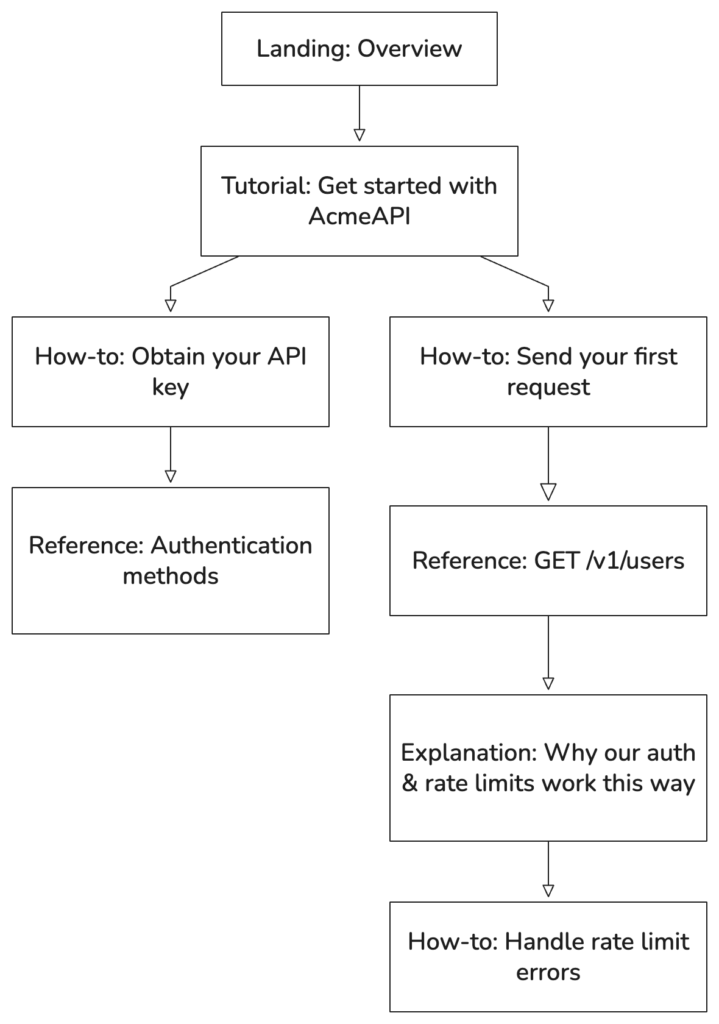
- Overview: “What is AcmeAPI?” – short, marketing-light overview.
- Tutorial: “Get started with AcmeAPI in 10 minutes.”
- Step 1: Sign up and create an API key.
- Step 2: Install HTTP client (e.g., curl, Postman, or SDK).
- Step 3: Send a test request.
- Step 4: Inspect response and errors.
- How-to: “Obtain your API key” – short task guide.
- How-to: “Send your first request” – explicit, copy-pasteable examples.
- Reference: “Authentication methods,” “GET /v1/users” endpoint page.
- Explanation: “Understanding authentication and rate limiting in AcmeAPI.”
Notice the pattern: the user doesn’t need to know that a page is “tutorial” vs “how-to,” but the structure ensures: learn → do → look-up → understand → refine.
Step 7: Roll out gradually, not as a big-bang rewrite
In real teams, you rarely get to “stop everything and refactor docs for three months.” Instead, adopt a progressive rollout strategy:
- Phase 1: Carve out the skeleton
- Create top-level sections (Tutorials, How-to, Reference, Explanation) in your nav.
- Move a few flagship pages into each to set examples.
- Phase 2: Refactor high-traffic content
- Use analytics to find the top 10–20 pages.
- Split mixed content and rehome it under the right sections.
- Phase 3: Bake Diátaxis into your contribution process
- Update your docs contribution guide to require authors classify each new page as one of the four types.
- Provide the templates and review checklists per type.
- Phase 4: Long tail cleanup
- During regular maintenance or when touching legacy features, refactor their docs into the framework.
This way, you avoid the trap of a stalled “docs overhaul” and still converge on a consistent, Diátaxis-based structure over time.
Testing & Output: How do you know your Diátaxis implementation works?
Once you’ve restructured your docs, you need to validate that it actually improves developer experience. Thinking like an engineer, treat this as a system with observable outputs and feedback loops.
Scenario 1: New developer onboarding test
Goal: Can a new developer, unfamiliar with your product, achieve a basic task using only the docs?
- Recruit 3–5 test users matching your primary persona (or use internal engineers from other teams).
- Give them a concrete task, e.g., “Sign up, obtain credentials, and fetch your user profile via the API.”
- Observe silently (or record session) as they navigate the docs.
- Measure:
- Time to first successful request.
- Number of pages visited.
- Where they got stuck or confused.
Expected outcomes if Diátaxis is working:
- They naturally land in a tutorial from the docs homepage or Overview.
- They complete the tutorial without needing to jump into deep reference early.
- When they want to know more, they discover how-tos and reference via inline links, not via random search.
If they instead bounce between random pages, your navigation or page labeling might not be clear enough.
Scenario 2: Task completion test for experienced users
Goal: Can a more experienced engineer quickly find a specific solution?
Example tasks:
- “Rotate an API key for a single user without downtime.”
- “Configure webhook retries after failures.”
Process:
- Ask them to solve the task using the docs.
- Track:
- Time to first relevant how-to guide.
- Whether/how they find related reference and explanation.
Expected behavior:
- They land in the How-to section (or a search result that takes them there).
- The how-to explicitly links to necessary reference pages.
- They don’t have to reverse-engineer behavior from reference alone.
Scenario 3: Search and navigation analytics
Quantitatively, you can use analytics to validate improvements:
- Internal search queries: Are users searching for “how to X” and getting how-to guides, not reference dumps?
- Bounce and exit rates: Do tutorials and how-tos have lower bounce and higher completion (scroll depth) compared to before?
- Path analysis: Are common paths now “Overview → Tutorial → How-to → Reference” instead of “Random page → 3 more random pages → Exit”?
Expected results after a good Diátaxis rollout:
- Increased traffic to tutorials from landing pages.
- Higher search success rate for task queries.
- Reduced tickets for “how do I [basic setup]?” as tutorials cover these.
Scenario 4: Support and community feedback loop
Finally, use qualitative signals:
- Support tickets:
- Tag tickets whose answers are (or should be) in the docs.
- For each tag, decide: does this belong as a how-to, reference clarification, or explanation?
- Community forums/Slack/Discord:
- Watch which doc links your support team shares most.
- Check if they’re linking to the right type of doc. If they often link to a reference page when the user needs a procedure, that’s a gap.
When you see patterns, use them to refine your doc types:
- Create new how-to guides where support is repeatedly explaining a process that’s currently scattered across reference and explanation pages.
- Add more examples to reference pages where users frequently misinterpret parameters.
- Write explanations for areas with repeated “why does it work like this?” questions.
Advanced Configuration: How do you scale Diátaxis in complex environments?
Once the basics are in place, the real challenge is keeping the system healthy as your product and org grow. This is where you treat Diátaxis as part of your docs “architecture,” with performance, security, and maintainability in mind—just like production systems.
1. Multi-product and microservice ecosystems
If you have multiple products or microservices, you’ll face a key design question: per-product Diátaxis vs. global Diátaxis.
- Per-product:
/product-a/tutorials,/product-a/how-to, etc./product-b/tutorials, and so on.
- Global:
- One
/tutorialssection with product-specific subsections. - One
/referencewith product-specific namespaces.
- One
Trade-offs:
- Per-product:
- Pros: Clear isolation; each product team owns its own docs; easier mental model for product-focused users.
- Cons: Cross-product flows (like integrations) can become fragmented; repeated structure.
- Global:
- Pros: Single place for each doc type; easier for platform-wide audiences.
- Cons: Navigation can get deep; ownership boundaries blur.
In my experience, a hybrid often works best: per-product Reference and Tutorials, with some global Explanation for cross-cutting concerns (like authentication, data model, global quotas).
2. Versioning and backward compatibility
Versioning can easily break a neat Diátaxis structure if you’re not careful. A sustainable approach is:
- Tutorials: Generally target the latest stable version only. Add callouts if major differences exist for LTS versions.
- How-to guides: Note version-specific behavior (e.g., v1 vs v2 APIs) with tabs or callouts.
- Reference: Fully versioned; each version gets its own reference set.
- Explanation: As version-agnostic as possible, but note historical context where relevant.
Implementation pattern in URLs:
/docs/v1/reference/...,/docs/v2/reference/.../docs/tutorials/...(implicitly latest; add a banner if user is viewing old version docs)
Make sure your nav and in-page alerts clearly show which version the user is viewing and how to switch.
3. Governance: keeping new content aligned
Without governance, Diátaxis will decay. A few lightweight practices help a lot:
- Contribution guidelines:
- Require authors to specify: doc type (Tutorial/How-to/Reference/Explanation), target persona, and primary user goal.
- Review checklist for each type:
- For tutorials: Is it linear? Are there any “optional” branches that should be in how-tos?
- For how-tos: Is there exactly one outcome? Does it link to reference?
- For reference: Is it canonical and complete? Any opinionated guidance that should move to how-tos or explanations?
- For explanations: Does it avoid duplicating reference? Does it answer “why” clearly?
- Periodic audits:
- Every quarter, sample a few pages from each section; check they still fit their doc type.
4. Performance: optimizing for developer efficiency
In docs, “performance” is about how quickly a user can go from a query to a correct answer. A Diátaxis-aligned system can still perform badly if your implementation is sloppy.
Key optimizations:
- Search tuning:
- Boost tutorials and how-tos for queries that start with “how,” “setup,” “configure,” “install,” etc.
- Boost reference for queries containing endpoint names, HTTP verbs, or SDK method names.
- Snippets and previews:
- Ensure page titles and descriptions make the doc type clear: e.g., “Tutorial: Build your first integration,” “How-to: Rotate API keys,” “Reference: GET /v1/users.”
- Fast navigation:
- Provide a sticky sidebar or in-page TOC so users can jump between steps, sections, and related pages.
5. Security and access control in docs
Many organizations mix public and private docs: public developer docs plus internal runbooks, SRE procedures, etc. Diátaxis still applies, but you must think about access control:
- Public docs:
- Most Tutorials, How-tos, Reference, some Explanation.
- Internal docs:
- Operator runbooks (How-to for SREs).
- Internal architecture decisions (Explanation).
- Internal-only API reference.
Best practices:
- Use separate spaces or roots for internal docs (e.g.,
/internal), but keep the same Diátaxis structure inside. - Ensure anything security-sensitive (internal endpoints, credentials, architecture diagrams) is properly access-controlled.
- Avoid copying internal-only content into public explanations; keep architectural depth appropriate for the audience.
6. Monitoring, logging, and maintenance strategies
Treat your docs as a living system:
- Monitoring:
- Dashboards for page views by doc type.
- Search success and “no results” queries.
- Error rates for embedded code examples (if you have live code sandboxes).
- Logging changes:
- Use version control for docs; require meaningful commit messages referencing tickets or features.
- Tag commits by doc type for easier audits.
- Maintenance:
- When deprecating features, mark reference pages as deprecated and update related how-tos and tutorials at the same time.
- Periodically prune outdated tutorials that no longer reflect best practices.
The goal is to keep the four quadrants in sync as your product evolves, avoiding a common failure mode where reference stays current but tutorials and how-tos rot.
Conclusion: What should you actually do next?
Diátaxis isn’t a silver bullet, but it is a very practical, battle-tested framework for untangling messy developer docs. Instead of arguing ad hoc about where content belongs, you use four clear lenses:
- Tutorials – “Teach me from scratch, gently.”
- How-to guides – “Help me achieve this specific goal quickly.”
- Reference – “Show me the exact, complete API details.”
- Explanation – “Explain why it works this way.”
In my view, the most important mindset shift is this: each doc type serves a different kind of user need, and mixing them in one page is what makes docs hard to use. Once you internalize that, the rest is mostly disciplined execution.
Concrete next steps you can take this week:
- Map your current docs into the four Diátaxis types using a simple inventory spreadsheet.
- Design a minimal information architecture with clear sections for Tutorials, How-to, Reference, and Explanation.
- Refactor one core user journey (e.g., “Get started” → “First integration”) fully into Diátaxis, including cross-links between pages.
- Create and share templates for each doc type with your team.
- Run a small usability test with 2–3 developers and watch how they move through the new structure.
If you do those five things, you’ll already be far ahead of most dev-docs stacks. Over time, you can layer on more advanced patterns—versioned reference, multi-product architectures, governance processes—but the core will stay the same.
The real goal isn’t to “be compliant with a framework.” It’s to help developers get unstuck faster, learn better, and trust your product more. Diátaxis just gives you a robust, proven way to do that systematically.
FAQs: Common questions about using Diátaxis for developer docs
1. How do I decide if a page should be a tutorial or a how-to guide?
This is probably the most common confusion, and it’s understandable because both are “step-by-step.” The distinction is about intent and audience more than format.
- Tutorial:
- Audience: Beginners or new users to your product or a feature.
- Goal: Help them learn through doing, build confidence, and complete a small, coherent project.
- Characteristics:
- Linear; no branching; highly guided.
- Often uses “toy” examples designed for learning, not production.
- Avoids complex decision points; “we choose X for you.”
- How-to guide:
- Audience: Users who already know the basics and have a concrete task.
- Goal: Help them achieve a specific outcome as efficiently as possible.
- Characteristics:
- Task-focused; one outcome per guide.
- Assumes some setup is done; links to reference when needed.
- May include branching based on configuration or environment.
A practical rule of thumb: if the primary reader is new to your product/feature and the main value is learning and confidence-building, it’s a tutorial. If they come in saying “I already know what this product is; just tell me how to do X,” it’s a how-to.
2. Where do troubleshooting and error-handling docs fit in Diátaxis?
Most troubleshooting content should be modeled as how-to guides, sometimes clustered under a “Troubleshooting” category.
Examples:
- “How to fix 401 Unauthorized errors when calling the API.”
- “How to decode and resolve webhook signature verification failures.”
- “How to troubleshoot slow queries.”
These are all task-oriented: “I have this error, I want to resolve it.” They should:
- Describe the symptoms and possible causes.
- Provide a structured diagnostic sequence (“Check A, then B, then C”).
- Link to relevant reference (error codes, configuration options) and explanations (e.g., why rate limiting works the way it does).
In some cases, an Explanation page is also valuable, e.g., “Understanding error classes and retry behavior,” that provides conceptual background. But the first thing you write should usually be a how-to like “Handle retryable vs non-retryable errors in the client.”
3. How do I handle API docs that mix examples, concepts, and reference in one place?
This is extremely common. Many auto-generated API docs (from OpenAPI/Swagger, for example) produce a single, dense reference page per endpoint with parameter tables, schemas, and possibly a few examples.
Here’s how I recommend structuring it:
- Reference pages for each endpoint or resource:
- Endpoint path and method.
- Authentication requirements.
- Parameter tables (query, path, body, headers).
- Response schemas and status codes.
- One or two minimal request/response examples.
- How-to guides for common API tasks:
- “How to paginate list endpoints.”
- “How to create and update a user.”
- “How to filter resources by date range.”
- Explanation for cross-cutting concepts:
- “Understanding pagination strategies (offset vs cursor).”
- “How we designed our API resources and relationships.”
Then cross-link aggressively:
- How-to guides link to specific endpoint reference sections.
- Reference pages link to how-tos showing common uses of that endpoint.
- Explanation pages link to both where relevant.
This keeps auto-generated reference clean and allows you to add richer, use-case-driven content without cluttering the canonical API definition.
4. What if my team resists the framework or finds it too “theoretical”?
Resistance often comes from two sources: unfamiliarity and fear of extra work. The best approach in my experience is to demonstrate value with a small, concrete pilot instead of pushing a big-bang “we’re doing Diátaxis now” change.
Try this:
- Pick a single high-impact area (e.g., “Getting Started” and basic integration).
- Apply Diátaxis just there:
- One or two clean tutorials.
- A handful of focused how-tos.
- Tightened reference.
- One or two explanations.
- Run usability tests or gather feedback from new hires.
- Share the results with the team (shorter time to first success, fewer support questions, etc.).
Once people see developers moving through the new structure more smoothly, the framework stops being “theoretical” and becomes a practical set of patterns.
Also, keep the language pragmatic. You don’t have to say “Diátaxis” all the time; you can say “Let’s make this a task guide” or “This should be in reference, not the tutorial.” The framework is a tool, not a dogma.
5. How does Diátaxis interact with AI/LLM-based answer engines (ChatGPT, Perplexity, etc.)?
This is a big one right now. Even if you don’t think in SEO terms, you almost certainly care that AI tools surface correct answers from your docs.
A Diátaxis-structured doc set actually plays very well with LLMs, because:
- Reference pages provide clear, canonical data for the model to quote (endpoints, parameters, constraints).
- How-to guides give the model end-to-end patterns (“To do X, follow steps A → B → C”) that map well to user queries.
- Tutorials show learning paths the model can compress into shorter guidance for beginners.
- Explanation pages give the model conceptual grounding, reducing hallucinated rationales.
Practically, for Answer Engine Optimization (AEO):
- Use question-like titles for how-tos (“How do I rotate an API key?”) because that matches how users talk to AI tools.
- Make sure your reference pages are clean and machine-parseable (well-structured tables, consistent headings, no duplicated or conflicting info).
- Cross-link doc types so models can follow the graph of related content—this improves the quality of synthesized answers.
The better structured and less mixed your docs are, the easier it is for AI systems to extract the right snippet for the right question. Diátaxis essentially gives both humans and machines clearer signals about what each page is for.