Most “agent” examples online fail in one of two ways:
- You get a chat loop that works until the first weird tool call.
- You get a pretty graph diagram, then your code turns into a tangle of conditionals and hidden state.
LangGraph fixes the second problem. It makes the control flow explicit. And that’s the difference between a demo and something you can debug when reality shows up. This is a practical, step-by-step build: a small agent that can call tools, keep state, and decide whether to continue or stop.
The naive approach (and why it breaks)
Here’s what people usually do first: a while-loop around an LLM.
<!-- PSEUDOCODE (naive) -->
let state = { messages: [] };

while (true) {
  const output = llm.call(state.messages);

  state.messages.push(output);

  if (!output.tool_call) break;

  const toolResult = tools[output.tool_call.name](output.tool_call.args);
  state.messages.push({ role: "tool", content: toolResult });
}
This looks fine until you need any of these:
- You want to cap steps reliably (and report why you stopped).
- You want predictable transitions (LLM output → tool execution → next LLM call).
- You want to inspect state between nodes.
- You want to handle “tool call but args are invalid” without corrupting the run.
LangGraph lets you model those as nodes and edges instead of “hope the loop does the right thing”.
What we’re building
An agent that:
- Accepts a user message.
- Asks the LLM whether it needs a tool.
- If the model requests a tool, runs it.
- Keeps track of messages and a step counter.
- Stops when no tool is needed or when a limit hits.
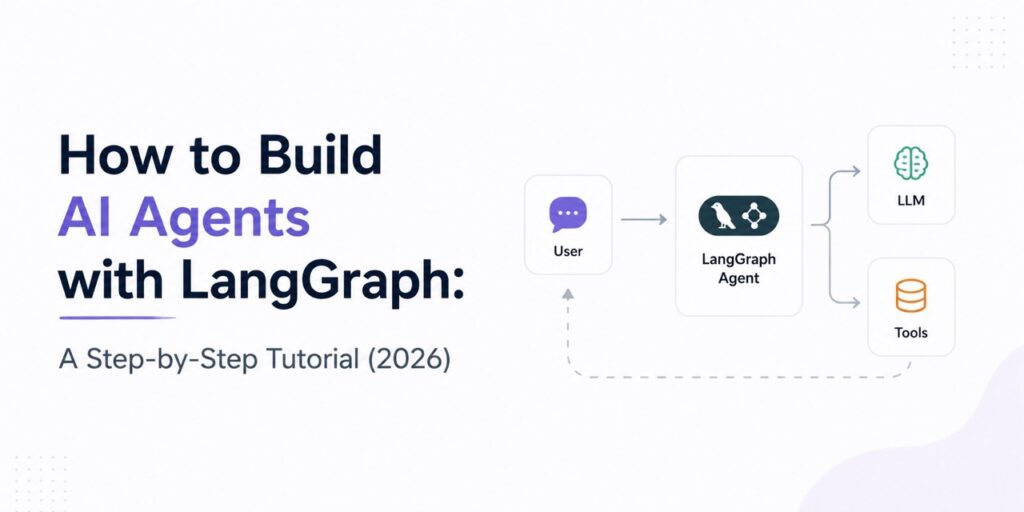
Technically, this is a graph with three nodes: “call model”, “run tool”, and a conditional edge that chooses the next step.
Set up the project
You’ll need a Node/TypeScript or Python environment. The exact import paths can shift across LangGraph versions, so treat the API calls as “shape” not “magic”. The logic below is the key part.
In Node (example):
npm init -y
npm i langgraph langchain zod
You also need an LLM provider and credentials. Use whatever provider you already use. The agent graph below doesn’t depend on one vendor conceptually—only on “a model that can request tools” and “a way to run those tools”.
Source note: The LangGraph core idea (StateGraph, nodes, edges, conditional routing) comes from the LangGraph project documentation. For exact import names for your installed version, check your local LangGraph docs/release notes.
Define state (this is where debugging becomes possible)
If you don’t define state, you’ll end up stuffing everything into “whatever variable happens to exist”. Then your conditional logic gets unclear fast.
Define a state object that includes:
- messages: the conversation history (including tool results)
- steps: how many model/tool iterations have happened
Example (TypeScript-like shape):
const initialState = {
  messages: [],
  steps: 0,
};
In practice you’ll store messages in whatever format your model/tool integration expects. The key is that the graph transitions read/write the same state.
Create tools
Keep tools boring for the first run. For example: a weather lookup stub and a calculator. Real apps add network calls, but the control flow stays the same.
const tools = {
  add: ({ a, b }) => a + b,
  get_time: () => new Date().toISOString(),
};
Two gotchas you’ll hit quickly:
- Tool args must be validated. The model will eventually produce malformed JSON.
- Tools must return strings (or a predictable schema) that you append into the message history.
Node 1: call the model
This node takes the current state, calls the LLM, and appends the model output to messages.
The exact “tool calling” mechanics depend on your LLM wrapper, but the graph logic stays the same: the model either requests a tool or it doesn’t.
async function callModel(state) {
  const { messages } = state;

  const modelOutput = await llm.invoke(messages);

  return {
    ...state,
    messages: [...messages, modelOutput],
  };
}
Why keep it as a node? Because later you’ll branch based on whether the model asked for a tool. That branching belongs in the graph, not hidden in a loop.
Node 2: run the tool
Tool execution node reads the last model message, extracts the tool name + args, runs it, then appends the tool result.
async function runTool(state) {
  const last = state.messages[state.messages.length - 1];

  const toolCall = last.tool_call; // shape depends on your wrapper
  if (!toolCall) {
    throw new Error("runTool called but no tool_call exists.");
  }

  const toolName = toolCall.name;
  const rawArgs = toolCall.args ?? {};

  // Validate args (use zod or similar in real code)
  const toolFn = tools[toolName];
  if (!toolFn) {
    throw new Error(`Unknown tool: ${toolName}`);
  }

  const result = await toolFn(rawArgs);

  const toolMessage = {
    role: "tool",
    content: String(result),
    tool_name: toolName,
  };

  return {
    ...state,
    messages: [...state.messages, toolMessage],
  };
}
This is also where you decide how to recover from errors. For now, we’ll fail loudly. In real agents, you often convert tool errors into a tool message and let the model decide how to proceed.
Conditional routing (the part people skip—and then can’t debug)
You need a routing function that decides:
- If the model asked for a tool, go to runTool.
- If it didn’t, stop.
- If you hit a step limit, stop (and record why).
function routeNext(state) {
  const last = state.messages[state.messages.length - 1];

  const steps = state.steps + 1;

  const hasToolCall = Boolean(last.tool_call);
  const limitHit = steps >= 8;

  return {
    next: hasToolCall && !limitHit ? "tool" : "end",
    steps,
    limitHit,
  };
}
Yes, you can do this more compactly. But when you’re debugging production runs, explicitness beats cleverness.
Wire it together with a LangGraph StateGraph
The graph itself connects nodes and edges. You define:
- entry point
- node implementations
- conditional edge based on state
Example (conceptual TS-like code):
const graph = new StateGraph({
  channels: {
    messages: { /* merge behavior */ },
    steps: { /* update behavior */ },
  },
})
  .addNode("model", callModel)
  .addNode("tool", runTool)
  .setEntryPoint("model")
  .addConditionalEdges("model", (state) => {
    const { next, steps } = routeNext(state);
    state.steps = steps; // or return updated state via graph update mechanics
    return next === "tool" ? "tool" : "__end__";
  })
  .addEdge("tool", "model");

const app = graph.compile();
The exact “channels” and update mechanics depend on your LangGraph version. That’s normal. The mental model stays stable:
- State flows through nodes.
- Edges decide what node runs next.
- Conditional routing is the control plane.
If you want this to feel less mystical, run with logging. Print state before and after each node. Once you trust the transitions, you can start adding smarter logic.
Run it
Typical flow:
const result = await app.invoke({
  messages: [{ role: "user", content: "What time is it, and what is 2+3?" }],
  steps: 0,
});

console.log(result.messages.map(m => m.content));
If your tool calling integration is wired correctly, you’ll see:
- model output requesting get_time
- tool result appended
- model output requesting add
- final model answer
Edge cases you’ll hit immediately
1) The model asks for a tool with broken args
This is the #1 real-world failure. Validate args (zod/schema), and decide a policy:
- Fail the run (simple, good for early development)
- Convert validation errors into a tool error message and let the model recover
2) Tool outputs aren’t in the format the model expects
If your wrapper expects tool messages in a specific schema, “just stringify it” can silently degrade quality. Start with predictable content and correct role/type fields.
3) You don’t cap steps
Without a step limit, an agent can loop forever when the model keeps requesting tools or keeps “trying” something that fails. The routing function should own that limit.
A small practical bonus: make runs reproducible
When you debug an agent, you don’t want to chase randomness. Add:
- a fixed random seed if your provider supports it
- capture the full state (messages) per node
- log the routing decision (“model asked for tool” vs “stopped”)
Once you do this, you stop guessing why the agent behaved a certain way. You’ll still dislike what you find sometimes. But it won’t be mysterious.
The reframing
LangGraph isn’t “another agent framework”. It’s a way to stop treating agent control flow like side effects hidden inside a loop.
When you model the transitions explicitly, you can change behavior without breaking the entire run. That’s what makes it feel reliable after the demo stage.
Next time you add a second tool or a new stopping rule, do it as an edge condition—not as another nested if inside your loop.