To change the LaTeX font size, use one of the ten size commands, from \tiny to \Huge, inside braces: {\large some text}. To change the size of the whole document, set it in the class options: \documentclass[12pt]{article}. For an exact size such as 40pt, use \fontsize{40}{48}\selectfont. This guide lists the exact point size of every LaTeX font size command, shows how to scope a size change correctly, and covers sizes above \Huge, maths, headings and captions.
Every example on this page was compiled with Tectonic 0.17 (a self-contained TeX engine based on XeTeX) on 25 November 2026. The point sizes in the tables were printed by LaTeX itself, not copied from another site. The code is standard LaTeX and works the same in Overleaf. New to LaTeX? Start with our beginner’s LaTeX tutorial.
TL;DR: How to Change Font Size in LaTeX
| You want | Use |
|---|---|
| A few words in another size | {\small a few words} |
| A whole paragraph in another size | \begin{large} ... \end{large} |
| The whole document bigger | \documentclass[12pt]{article} (10pt, 11pt or 12pt) |
| 14pt, 17pt or 20pt body text | \documentclass[14pt]{extarticle} |
| An exact size, such as 40pt | {\fontsize{40}{48}\selectfont text} |
Bigger than \Huge | \usepackage{moresize}, then \HUGE |
| Smaller or larger headings and captions | titlesec and caption packages |
LaTeX Font Size Commands and Their Point Sizes
LaTeX has ten size commands. They are relative: what \large means depends on the base size of the document. We printed the actual size and line spacing (baselineskip) for every command in the standard article class at each of its three base sizes, using LaTeX’s internal \f@size and \f@baselineskip values. The same numbers apply to report and book. The LaTeX2e reference on font sizes lists the same table.
| Command | 10pt (default) | 11pt | 12pt |
|---|---|---|---|
\tiny | 5pt | 6pt | 6pt |
\scriptsize | 7pt | 8pt | 8pt |
\footnotesize | 8pt | 9pt | 10pt |
\small | 9pt | 10pt | 10.95pt |
\normalsize | 10pt | 10.95pt | 12pt |
\large | 12pt | 12pt | 14.4pt |
\Large | 14.4pt | 14.4pt | 17.28pt |
\LARGE | 17.28pt | 17.28pt | 20.74pt |
\huge | 20.74pt | 20.74pt | 24.88pt |
\Huge | 24.88pt | 24.88pt | 24.88pt |
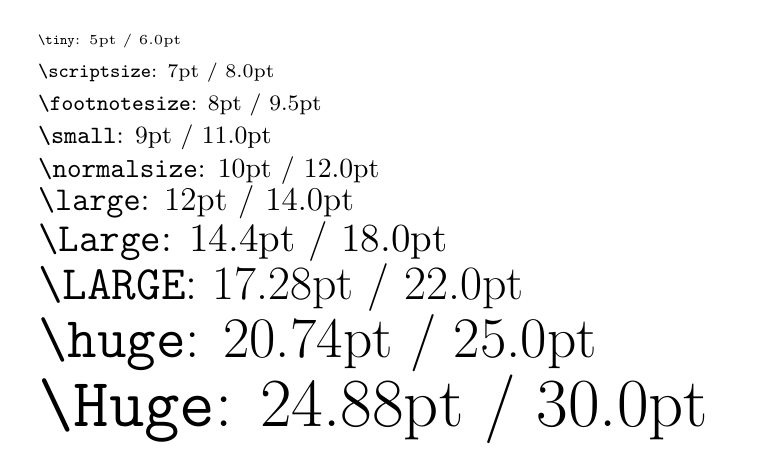
Two things stand out. In a 12pt document, \huge and \Huge are the same size (24.88pt), so \Huge does not get any bigger. And in an 11pt document, \normalsize is 10.95pt, not exactly 11pt. This is normal: LaTeX uses a fixed scale of sizes (each step is about 1.2 times the last).
This is the code we used. You can paste it into any document to print the sizes your own class uses:
\documentclass[10pt]{article}
\makeatletter
\newcommand\showsize[1]{{#1\texttt{\string#1}: \f@size pt / \f@baselineskip}\par}
\makeatother
\begin{document}
\showsize\tiny
\showsize\scriptsize
\showsize\footnotesize
\showsize\small
\showsize\normalsize
\showsize\large
\showsize\Large
\showsize\LARGE
\showsize\huge
\showsize\Huge
\end{document}
Change the Font Size of Part of the Text
Size commands are switches: everything after them changes size until the end of the current group. So always put them inside braces or an environment, or the rest of your document changes too:
\documentclass{article}
\begin{document}
Normal text, then {\small a few small words} and back to normal.

\begin{large}
This whole paragraph is set in large type
because it sits inside the large environment.
\end{large}

{\footnotesize This footnotesize paragraph ends with par inside the braces,
so its line spacing also shrinks to match the smaller type.\par}
\end{document}
In the PDF, only “a few small words” were small, the second paragraph was set in large type, and the third paragraph was in footnotesize with tighter line spacing.
Why the \par matters
LaTeX sets the line spacing of a paragraph when the paragraph ends. If you write {\footnotesize long paragraph text} and close the brace before the paragraph ends, the text is small but the line spacing is still the spacing of normal text, so the lines look too far apart. Put \par before the closing brace, as in the third paragraph above, or use the environment form, which ends the paragraph for you.
Change the Font Size of the Whole Document
Set the base size in the class options. The standard classes (article, report, book) accept three sizes:
\documentclass[12pt]{article}Every size command scales with it, as the table above shows. Headings, footnotes and captions grow too.
14pt in LaTeX: why [14pt]{article} does nothing
The standard classes only know 10pt, 11pt and 12pt. Anything else is silently ignored. We compiled this:
\documentclass[14pt]{article}
\begin{document}
Is this 14pt?
\end{document}
The document built without an error, but the text was still 10pt, and the log said:
LaTeX Warning: Unused global option(s):
    [14pt].
For larger body text, use the extsizes bundle, which adds extarticle, extreport, extbook and extletter with 8pt, 9pt, 10pt, 11pt, 12pt, 14pt, 17pt and 20pt options:
\documentclass[14pt]{extarticle}
\makeatletter
\begin{document}
Body text is \f@size pt.
\end{document}
This printed “Body text is 14.4pt.”: the “14pt” option uses the nearest step on LaTeX’s size scale. For an exact size on every page, combine a standard class with \fontsize right after \begin{document}.
Set an Exact Font Size With \fontsize
\fontsize{size}{baselineskip} sets any size you want. It must be followed by \selectfont, or nothing changes. The second number is the line spacing: about 1.2 times the font size is a good default. See the low-level font commands in the LaTeX2e reference.
\documentclass{article}
\begin{document}
{\fontsize{40}{48}\selectfont Big title}

{\fontsize{9}{11}\selectfont Small print set at 9pt on an 11pt baseline.\par}
\end{document}
Both lines printed at the requested sizes. The units are points (pt) by default, and other units work too, for example \fontsize{5mm}{6mm}.
With Tectonic (XeTeX) and the default Latin Modern fonts, any size worked without warnings, even when we switched to the older OT1 font encoding. On a pdfLaTeX setup that uses fonts available only in fixed sizes, you may see a warning such as Font shape `OT1/cmr/m/n' in size <40> not available, and LaTeX uses the nearest size instead. Loading anyfontsize (or \RequirePackage{fix-cm} before \documentclass) fixes that. We did not run pdfLaTeX for this guide, so treat that warning as something to watch for, not something we reproduced.
Font Sizes Bigger Than \Huge (and Smaller Than \tiny)
There is no \HUGE in standard LaTeX. Using it stops the build with Undefined control sequence, which is what Tectonic reported for us. The moresize package adds \HUGE (bigger than \Huge) and \ssmall (between \tiny and \scriptsize):
\documentclass{article}
\usepackage{moresize}
\makeatletter
\begin{document}
{\HUGE HUGE is \f@size pt}

{\ssmall ssmall is \f@size pt}
\end{document}
In a 10pt document this printed “HUGE is 29.86pt” and “ssmall is 6pt”. For anything bigger, such as a poster title, use \fontsize.
Font Size in Math Mode
Text size commands do not work inside maths. This compiles, but the formula is not resized:
\documentclass{article}
\begin{document}
$x = \tiny y$
\end{document}
The log showed LaTeX Font Warning: Command \tiny invalid in math mode on input line 3. Three methods work instead:
\documentclass{article}
\usepackage{amsmath}
\begin{document}
Inline: $a + \text{\small small text} + b$.

{\Large Whole formula larger: $E = mc^2$}

Script style: $\scriptstyle x^2 + y^2$ versus $x^2 + y^2$.
\end{document}- Put the size command outside the maths:
{\Large ... $E = mc^2$}scales the formula with the text around it. - Use
\text{}from amsmath to put resized words inside a formula. - Use the math style commands:
\displaystyle,\textstyle,\scriptstyleand\scriptscriptstylechange the size of maths the way LaTeX does for superscripts.
Change the Font Size of Headings and Captions
Do not put \small or \Large inside every \section{}. Change the style once in the preamble. The titlesec package sets the heading format, and the caption package sets the caption size:
\documentclass{article}
\usepackage{titlesec}
\titleformat*{\section}{\large\bfseries}
\titleformat*{\subsection}{\normalsize\bfseries}
\usepackage[font=small,labelfont=bf]{caption}
\begin{document}
\section{A smaller section heading}
\subsection{And a normal-size subsection}
Body text.
\begin{table}[h]
\centering
\caption{This caption is set in small type.}
\begin{tabular}{ll} a & b \end{tabular}
\end{table}
\end{document}
In the output, the section heading was set in large bold instead of the default Large, the subsection in normal-size bold, and the table caption in small type with a bold label. To change the size of a table’s contents, put a size command right after \begin{table}: for example, \small or \footnotesize makes a wide table fit the page. For the lines in tables, see our guide to the LaTeX horizontal line.
Common Font Size Mistakes
- A size command without braces.
\Large Titleon its own makes the rest of the document Large. Wrap it:{\Large Title}. - Using
[14pt]or[16pt]with article. It is ignored. Use extarticle or\fontsize. - Forgetting
\selectfont.\fontsizeon its own changes nothing. - Closing the brace before the paragraph ends. The text shrinks but the line spacing does not. Add
\parbefore}. - Using size commands in maths. They are ignored with a warning. Use the methods above.
- Typing
\HUGEwithout moresize. The build fails with “Undefined control sequence”.
Conclusion
For a few words, wrap a size command in braces. For the whole document, set 10pt, 11pt or 12pt in \documentclass, or switch to extarticle for 14pt and up. For an exact size, use \fontsize{size}{skip}\selectfont. Change heading and caption sizes once in the preamble rather than in every command. Next, learn how to control page numbering in LaTeX. If you write in Overleaf, our Overleaf guide covers the editor.
What is the default font size in LaTeX?
The standard classes (article, report and book) use 10pt by default. You can change it with the class option 11pt or 12pt, for example \documentclass[12pt]{article}.
What are the font size commands in LaTeX, from smallest to largest?
\tiny, \scriptsize, \footnotesize, \small, \normalsize, \large, \Large, \LARGE, \huge and \Huge. In a 10pt document they range from 5pt to 24.88pt.
How do I use 14pt font in LaTeX?
The standard classes ignore [14pt] with an “Unused global option” warning. Use \documentclass[14pt]{extarticle} from the extsizes bundle, or set the size with \fontsize{14}{17}\selectfont.
How do I make text bigger than \Huge in LaTeX?
Load the moresize package and use \HUGE, or set any size with {\fontsize{40}{48}\selectfont text}.
Why does \fontsize not change my font size?
\fontsize only stores the new size. You must follow it with \selectfont, for example \fontsize{16}{19}\selectfont.
How do I change the font size of an equation in LaTeX?
Text size commands do not work inside maths. Put the size command around the whole formula, such as {\Large $E = mc^2$}, or use \displaystyle and \scriptstyle inside it.