To make a LaTeX table, use the tabular environment: give one letter per column (l, c or r for left, centre or right), separate cells with & and end each row with \\. Wrap it in a table environment when you need a caption and a number. This guide covers both, then shows how to merge cells with \multicolumn and \multirow, style tables with booktabs, fit wide tables on the page, split long tables across pages, and fix the errors you are most likely to hit.
Every example on this page was compiled with Tectonic 0.17 (a self-contained TeX engine based on XeTeX) on 27 November 2026, and the error messages are copied from the real build logs. The data in the examples is made up for illustration. The code is standard LaTeX and works the same in Overleaf. New to LaTeX? Start with our beginner’s LaTeX tutorial.
TL;DR: LaTeX Table Cheat Sheet
| You want | Use |
|---|---|
| A basic table | \begin{tabular}{lcr} ... \end{tabular} |
| A caption, number and label | Wrap it in \begin{table} ... \caption{} \label{} ... \end{table} |
| Vertical and horizontal lines | | in the column spec, \hline between rows |
| Text that wraps in a cell | p{5cm} column (or m{}/b{} with the array package) |
| A cell across columns | \multicolumn{2}{c}{text} |
| A cell across rows | \usepackage{multirow}, then \multirow{2}{*}{text} |
| Professional-looking rules | \usepackage{booktabs}: \toprule, \midrule, \bottomrule |
| A table as wide as the text | \usepackage{tabularx} with X columns |
| A table across several pages | \usepackage{longtable} |
Create a Basic Table With tabular
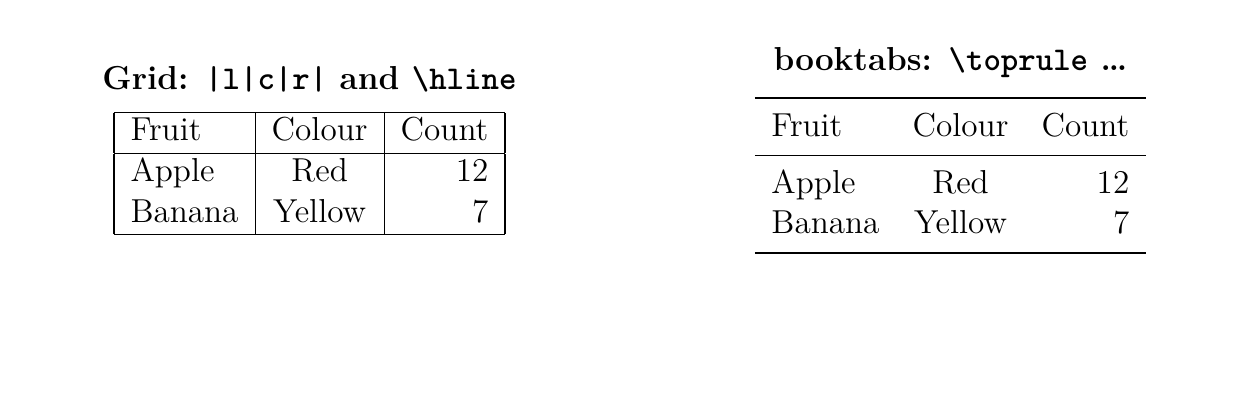
The argument after \begin{tabular} is the column spec: one letter per column. Add | between letters for vertical lines, and \hline for a horizontal line across the table. The LaTeX2e reference for tabular lists every option.
\documentclass{article}
\begin{document}
\begin{tabular}{l c r}
  Fruit  & Colour & Count \\
  Apple  & Red    & 12 \\
  Banana & Yellow & 7 \\
\end{tabular}

\bigskip
\begin{tabular}{|l|c|r|}
  \hline
  Fruit  & Colour & Count \\
  \hline
  Apple  & Red    & 12 \\
  Banana & Yellow & 7 \\
  \hline
\end{tabular}
\end{document}
The first table has no lines at all; the second is a full grid. Both have three columns: left-aligned, centred and right-aligned. If a row has fewer cells than the spec, LaTeX leaves the rest empty; if it has more, the build fails (see the errors section below).
Add a Caption and Label With the table Environment
tabular only draws the grid. To get “Table 1: …” and cross-references, put it inside a table float:
\documentclass{article}
\begin{document}
Table~\ref{tab:http} lists the most common status codes.

\begin{table}[htbp]
  \centering
  \caption{Common HTTP status codes}
  \label{tab:http}
  \begin{tabular}{cl}
    \hline
    Code & Meaning \\
    \hline
    200 & OK \\
    301 & Moved Permanently \\
    404 & Not Found \\
    \hline
  \end{tabular}
\end{table}
\end{document}
In the PDF, the text read “Table 1 lists the most common status codes.” and the caption printed above the table as “Table 1: Common HTTP status codes”. A few rules that save trouble:
- Put
\labelafter\caption. In our test, a label placed before the caption of Table 1 in Section 2 made\refprint “Table 2”: it picked up the section number, with no warning. - Use
\centeringinside the float, not thecenterenvironment, which adds extra vertical space. [htbp]lets LaTeX place the table here, at the top, at the bottom or on a float page. A table may move away from the spot where you wrote it; that is normal for floats.- Captions for tables usually go above the table, and captions for figures below.
Column Widths and Text Wrapping
l, c and r columns never wrap, so a long sentence pushes the table off the page. Use p{width} for a column with a fixed width and wrapping text. The array package adds m{} (vertically centred) and b{} (bottom-aligned), and lets you change the alignment inside a fixed-width column with >{...}:
\documentclass{article}
\usepackage{array}
\begin{document}
\begin{tabular}{|l|p{6cm}|}
  \hline
  Term & Definition \\
  \hline
  API & An application programming interface: a set of rules that lets one
        program ask another for data or actions. \\
  \hline
\end{tabular}

\bigskip
\begin{tabular}{|l|m{4cm}|>{\centering\arraybackslash}m{3cm}|}
  \hline
  Short & This cell is long enough to wrap onto several lines in the column. & Centred \\
  \hline
\end{tabular}
\end{document}
\arraybackslash is needed after \centering, \raggedright or \raggedleft in the last column, so that \\ still ends the row.
Merge Columns With \multicolumn
\multicolumn{n}{spec}{text} replaces n cells with one cell. The spec decides the alignment and lines of the merged cell, so include | there if your table has vertical lines. Use \cline{2-3} for a line under only some columns:
\documentclass{article}
\begin{document}
\begin{tabular}{|l|c|c|}
  \hline
  & \multicolumn{2}{c|}{Response time (ms)} \\
  \cline{2-3}
  Endpoint & p50 & p95 \\
  \hline
  /login  & 42 & 120 \\
  /search & 85 & 310 \\
  \hline
  \multicolumn{3}{|l|}{Example data, not a benchmark.} \\
  \hline
\end{tabular}
\end{document}
\multicolumn{1}{c}{...} also works on a single cell: it is the standard way to centre one header in a left-aligned column. Note in the output that the spanned header “Response time (ms)” is wider than the two columns under it, so LaTeX gives all the extra width to the last column (p95). If that looks unbalanced, give both columns a fixed width with p{}.
Merge Rows With \multirow
Merging rows needs the multirow package. \multirow{rows}{width}{text} goes in the first row of the group; the cells below it in that column are left empty. Use * for the width to keep the text’s natural width. See the multirow package documentation for the optional arguments:
\documentclass{article}
\usepackage{multirow}
\begin{document}
\begin{tabular}{|l|l|c|}
  \hline
  Team & Service & On call \\
  \hline
  \multirow{2}{*}{Platform} & Auth    & Yes \\
                            & Billing & No  \\
  \hline
  \multirow{3}{*}{Data}     & Ingest  & Yes \\
                            & Search  & Yes \\
                            & Reports & No  \\
  \hline
\end{tabular}
\end{document}
“Platform” was centred vertically across its two rows and “Data” across its three. Only draw full \hlines between groups: a \hline inside a group would cut through the merged cell.
Merge rows and columns at the same time
To merge a block of cells, put \multirow inside \multicolumn, and repeat an empty \multicolumn on the rows below so the block keeps its shape:
\documentclass{article}
\usepackage{multirow}
\begin{document}
\begin{tabular}{|c|c|c|c|}
  \hline
  \multicolumn{2}{|c|}{\multirow{2}{*}{Both}} & A & B \\
  \cline{3-4}
  \multicolumn{2}{|c|}{} & 1 & 2 \\
  \hline
  x & y & 3 & 4 \\
  \hline
\end{tabular}
\end{document}
The other order, \multirow{2}{*}{\multicolumn{2}{|c|}{Wrong}}, fails. Tectonic stopped with ! Misplaced \omit., because \multicolumn must be the very first thing in a cell.
Professional Tables With booktabs
Most style guides advise against vertical lines and double rules. The booktabs package gives you three rules with better spacing: \toprule, \midrule and \bottomrule, plus \cmidrule for a partial line under a group header:
\documentclass{article}
\usepackage{booktabs}
\begin{document}
\begin{table}[htbp]
  \centering
  \caption{Results by run (example data)}
  \begin{tabular}{lrr}
    \toprule
    & \multicolumn{2}{c}{Time (s)} \\
    \cmidrule(lr){2-3}
    Run & First & Second \\
    \midrule
    A & 4.1  & 0.9 \\
    B & 12.7 & 3.2 \\
    \bottomrule
  \end{tabular}
\end{table}
\end{document}
(lr) trims the \cmidrule a little at both ends so two neighbouring rules don’t touch. Do not mix booktabs rules with | columns: the rules have gaps around them, so vertical lines look broken. Our guide to the LaTeX horizontal line compares \hline, \cline and the booktabs rules in more detail.
Fit a Wide Table on the Page
If a table is too wide, LaTeX does not shrink it. It prints the table past the margin and writes a warning to the log. A seven-column table of short headings gave us:
Overfull \hbox (139.18011pt too wide) in paragraph at lines 3--6You have three good options, in this order.
1. Use tabularx for a table as wide as the text
tabularx takes the total width as its first argument. X columns share the leftover space and wrap their text:
\documentclass{article}
\usepackage{tabularx}
\begin{document}
\noindent
\begin{tabularx}{\textwidth}{|l|>{\raggedright\arraybackslash}X|>{\raggedright\arraybackslash}X|}
  \hline
  Step & What to do & Why \\
  \hline
  1 & Write the column spec with X for every column that should stretch. &
      X columns share the leftover width equally. \\
  \hline
\end{tabularx}
\end{document}
We first used plain X columns and got Underfull \hbox warnings, because justified text in narrow columns stretches the spaces between words. Making the X columns ragged-right, as above, removed the warnings and reads better.
2. Make the text smaller or the columns tighter
Put \small or \footnotesize right after \begin{table}, and reduce \tabcolsep (the space on each side of a column, 6pt by default). See our guide to LaTeX font size for all the size commands.
3. Scale the whole table as a last resort
\resizebox from graphicx scales the table to any width. It works, but the text in the table no longer matches the size of the text around it:
\documentclass{article}
\usepackage{graphicx}
\begin{document}
\begin{table}[htbp]
  \centering
  \small
  \setlength{\tabcolsep}{4pt}
  \begin{tabular}{lllll}
    Column one & Column two & Column three & Column four & Column five \\
  \end{tabular}

  \bigskip
  \resizebox{\textwidth}{!}{%
  \begin{tabular}{lllllll}
    Column one & Column two & Column three & Column four & Column five & Column six & Column seven \\
  \end{tabular}}
\end{table}
\end{document}
Both tables in this example compiled without an Overfull warning.
Tables Across Several Pages With longtable
A tabular cannot break across pages. The longtable package can, and it repeats a header on each page. Everything before \endfirsthead is the header on the first page, \endhead marks the header for later pages, and \endfoot/\endlastfoot do the same for footers. Do not put a longtable inside a table float; it takes its own \caption:
\documentclass{article}
\usepackage[paperheight=9cm,paperwidth=12cm,margin=1cm]{geometry} % small page only to force a break
\usepackage{longtable}
\begin{document}
\begin{longtable}{rr}
  \caption{Squares of 1 to 20}\\
  \hline
  $n$ & $n^2$ \\
  \hline
  \endfirsthead
  \hline
  $n$ & $n^2$ (continued) \\
  \hline
  \endhead
  \hline
  \multicolumn{2}{r}{Continued on next page} \\
  \endfoot
  \hline
  \endlastfoot
  1 & 1 \\
  2 & 4 \\
  3 & 9 \\
  4 & 16 \\
  5 & 25 \\
  6 & 36 \\
  7 & 49 \\
  8 & 64 \\
  9 & 81 \\
  10 & 100 \\
  11 & 121 \\
  12 & 144 \\
  13 & 169 \\
  14 & 196 \\
  15 & 225 \\
  16 & 256 \\
  17 & 289 \\
  18 & 324 \\
  19 & 361 \\
  20 & 400 \\
\end{longtable}
\end{document}
We used a small page size only to force a page break in a short example. The PDF had two pages: page 1 showed rows 1 to 12 with “Continued on next page” at the bottom, and page 2 started with the “n² (continued)” header before rows 13 to 20. Longtable may need two compile runs to get the column widths right; Tectonic reruns automatically, and Overleaf does too.
Row Colours, Row Height and Number Alignment
Load xcolor with the table option to colour rows. \rowcolors{2}{gray!15}{white} alternates colours from row 2, and \arraystretch makes every row taller:
\documentclass{article}
\usepackage[table]{xcolor}
\begin{document}
\renewcommand{\arraystretch}{1.4}
\rowcolors{2}{gray!15}{white}
\begin{tabular}{lr}
  \rowcolor{gray!40}
  Region & Users \\
  Europe & 1200 \\
  Asia   & 3400 \\
  Africa & 800 \\
  Americas & 2100 \\
\end{tabular}
\end{document}
For columns of numbers, the siunitx S column lines values up on the decimal point. table-format=4.2 reserves four digits before the point and two after. Wrap text headers in braces so siunitx doesn’t try to read them as numbers:
\documentclass{article}
\usepackage{siunitx}
\usepackage{booktabs}
\begin{document}
\begin{tabular}{l S[table-format=4.2]}
  \toprule
  Item & {Value} \\
  \midrule
  A & 3.5 \\
  B & 1204.25 \\
  C & 17.1 \\
  \bottomrule
\end{tabular}
\end{document}
In the output, 3.5, 1204.25 and 17.1 lined up on the decimal point. If your table has maths, our LaTeX symbols cheat sheet lists the commands for operators, Greek letters and arrows.
Common LaTeX Table Errors
| Error in the log | Cause | Fix |
|---|---|---|
Extra alignment tab has been changed to \cr | A row has more & cells than the column spec allows (we used 3 cells in an {ll} table) | Add a column to the spec or remove the extra & |
Misplaced \omit | \multicolumn is not the first thing in its cell, for example inside \multirow | Put \multirow inside \multicolumn |
Undefined control sequence on \multirow, \toprule or \rowcolors | The package is not loaded | Add multirow, booktabs or xcolor with [table] |
Overfull \hbox after a table | The table is wider than the text | Use tabularx, smaller text or \resizebox |
| No error, but the wrong table number in the text | \label placed before \caption: the label picks up the section number instead | Move the label after the caption |
Conclusion
Start every LaTeX table with tabular inside a table float, with a caption and a label. Use p{} or tabularx when text needs to wrap, \multicolumn and \multirow to merge cells, booktabs for clean rules, and longtable when the data runs past one page. If you write in the browser, our Overleaf guide covers the editor, which compiles all of the examples above.
How do I create a table in LaTeX?
Use \begin{tabular}{lcr} with one letter per column, separate cells with &, end rows with \\ and close with \end{tabular}. Put it inside a table environment to add a caption and label.
What is the difference between table and tabular in LaTeX?
tabular draws the rows and columns. table is a float that holds the tabular and adds a caption, a number and a label, and lets LaTeX place it on the page.
How do I merge cells in a LaTeX table?
Use \multicolumn{2}{c}{text} to merge columns. To merge rows, load the multirow package and use \multirow{2}{*}{text}, leaving the cells below it empty. For both, put multirow inside multicolumn.
How do I make a LaTeX table fit the page width?
Use the tabularx package with \begin{tabularx}{\textwidth}{lX}, reduce the font size with \small, or, as a last resort, scale the table with \resizebox{\textwidth}{!}{...}.
How do I add horizontal lines to a LaTeX table?
Use \hline for a full line and \cline{2-3} for part of a row. For publication-quality tables, use \toprule, \midrule and \bottomrule from booktabs.
How do I make a table span multiple pages in LaTeX?
Use the longtable package instead of tabular. Mark the repeated header with \endhead and the footer with \endfoot, and do not put it inside a table float.