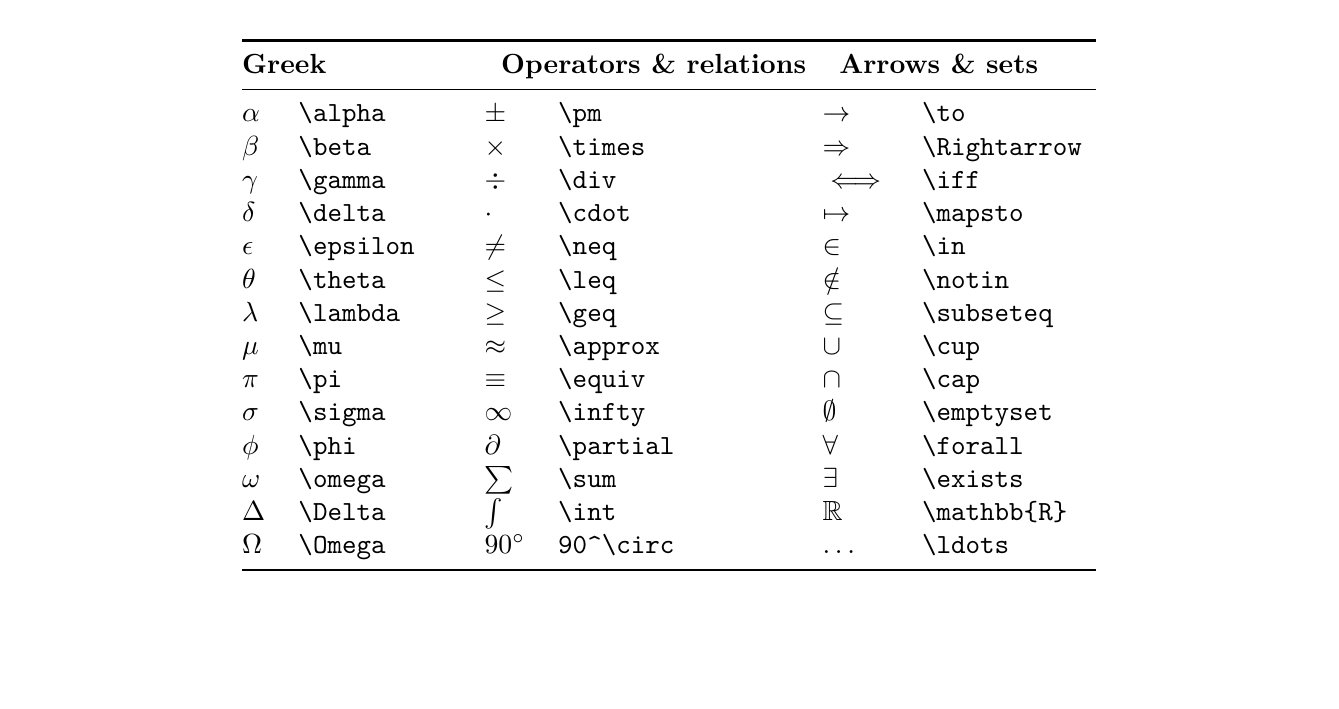
LaTeX symbols are commands that start with a backslash, such as \alpha for α or \rightarrow for →. Almost all of them work only in maths mode, so you write them between dollar signs: $\alpha + \beta$. A few, such as \mathbb{R} or \nexists, also need the amssymb package. This cheat sheet lists the LaTeX math symbols you will use most: Greek letters, operators, relations, sets and logic, arrows, sums and integrals, dots and accents, and the degree symbol.
Every snippet on this page was compiled with Tectonic 0.17 (a self-contained TeX engine based on XeTeX) on 27 November 2026, and the error messages are copied from the real build logs. The code is standard LaTeX and works the same in Overleaf. New to LaTeX? Start with our beginner’s LaTeX tutorial.
TL;DR: How to Type LaTeX Symbols
- Put symbols inside maths mode:
$\pi r^2$inline, or\[ ... \]on its own line. - Load the AMS packages in the preamble:
\usepackage{amsmath}and\usepackage{amssymb}. Many symbols below need one of them. - Uppercase Greek letters that look like Latin letters have no command: type
A, not\Alpha. - Can’t find a symbol? Draw it in Detexify, or search the Comprehensive LaTeX Symbol List (over 2,500 symbols).
Greek Letters in LaTeX
Write the name of the letter after a backslash. Lowercase names give lowercase letters, and a capital first letter gives the uppercase form. Some letters have a variant form, written with a var prefix:
\documentclass{article}
\begin{document}
Lowercase: $\alpha, \beta, \gamma, \delta, \epsilon, \varepsilon, \theta, \vartheta,
\lambda, \mu, \pi, \rho, \sigma, \tau, \phi, \varphi, \omega$

Uppercase: $\Gamma, \Delta, \Theta, \Lambda, \Pi, \Sigma, \Phi, \Psi, \Omega$

Uppercase that look like Latin letters: $A, B, E, Z, H, K, M, N, O, P, T, X$
\end{document}| Letter | Command | Letter | Command |
|---|---|---|---|
| α | \alpha | ν | \nu |
| β | \beta | ξ, Ξ | \xi, \Xi |
| γ, Γ | \gamma, \Gamma | π, Π | \pi, \Pi |
| δ, Δ | \delta, \Delta | ρ | \rho |
| ϵ, ε | \epsilon, \varepsilon | σ, Σ | \sigma, \Sigma |
| ζ | \zeta | τ | \tau |
| η | \eta | υ, Υ | \upsilon, \Upsilon |
| θ, ϑ, Θ | \theta, \vartheta, \Theta | ϕ, φ, Φ | \phi, \varphi, \Phi |
| ι | \iota | χ | \chi |
| κ | \kappa | ψ, Ψ | \psi, \Psi |
| λ, Λ | \lambda, \Lambda | ω, Ω | \omega, \Omega |
| μ | \mu |
Why \Alpha gives an error
Uppercase alpha, beta, epsilon, zeta, eta, iota, kappa, mu, nu, omicron, rho, tau and chi look exactly like the Latin letters A, B, E, Z, H, I, K, M, N, O, P, T and X, so LaTeX has no command for them. We compiled $\Alpha$ and the build stopped with:
! Undefined control sequence.
<recently read> \Alpha
Type a plain A inside maths instead. There is no \omicron either: use o.
Math Operators and Relation Symbols
These are the everyday symbols for arithmetic and comparison. None of them needs a package:
\documentclass{article}
\begin{document}
$a \pm b$, $a \mp b$, $a \times b$, $a \div b$, $a \cdot b$, $a \ast b$

$a = b$, $a \neq b$, $a < b$, $a \leq b$, $a \geq b$, $a \ll b$, $a \gg b$

$a \approx b$, $a \equiv b$, $a \sim b$, $a \simeq b$, $a \cong b$, $a \propto b$

$\infty$, $\partial$, $\nabla$, $\sqrt{x}$, $\sqrt[3]{x}$, $x^\prime$, $x'$
\end{document}| Symbol | Command | Symbol | Command |
|---|---|---|---|
| ±, ∓ | \pm, \mp | ≠ | \neq (or \ne) |
| × | \times | ≤, ≥ | \leq, \geq |
| ÷ | \div | ≪, ≫ | \ll, \gg |
| · | \cdot | ≈ | \approx |
| ∗ | \ast | ≡ | \equiv |
| ∞ | \infty | ∼, ≃, ≅ | \sim, \simeq, \cong |
| ∂ | \partial | ∝ | \propto |
| ∇ | \nabla | √x, ∛x | \sqrt{x}, \sqrt[3]{x} |
For multiplication, use \cdot for a centred dot and \times for a cross. A plain * prints a raised asterisk, which is rarely what you want in a formula.
Set and Logic Symbols
Set membership, unions and quantifiers are built in. The blackboard bold letters for number sets (\mathbb), \varnothing, \nexists, \therefore and \because come from amssymb:
\documentclass{article}
\usepackage{amssymb}
\begin{document}
$x \in A$, $x \notin A$, $A \subset B$, $A \subseteq B$, $A \supset B$,
$A \cup B$, $A \cap B$, $A \setminus B$, $\emptyset$, $\varnothing$

$\forall x$, $\exists y$, $\nexists z$, $\neg p$, $p \land q$, $p \lor q$,
$p \oplus q$, $\top$, $\bot$, $\therefore$, $\because$

$\mathbb{N}, \mathbb{Z}, \mathbb{Q}, \mathbb{R}, \mathbb{C}$
\end{document}| Symbol | Command | Symbol | Command |
|---|---|---|---|
| ∈, ∉ | \in, \notin | ∀ | \forall |
| ⊂, ⊆ | \subset, \subseteq | ∃, ∄ | \exists, \nexists |
| ⊃, ⊇ | \supset, \supseteq | ¬ | \neg (or \lnot) |
| ∪, ∩ | \cup, \cap | ∧, ∨ | \land, \lor |
| ∖ | \setminus | ⊕ | \oplus |
| ∅ | \emptyset, \varnothing | ⊤, ⊥ | \top, \bot |
| ℕ, ℤ, ℚ, ℝ, ℂ | \mathbb{N} … \mathbb{C} | ∴, ∵ | \therefore, \because |
If you forget amssymb, the build fails. Without the package, $\mathbb{R}$ gave us:
! Undefined control sequence.
<recently read> \mathbb
Arrows in LaTeX
Single arrows are lowercase, double arrows start with a capital letter, and long arrows add long. The logic arrows \implies, \impliedby and \iff and the stretchy arrows \xrightarrow and \xleftarrow need amsmath:
\documentclass{article}
\usepackage{amsmath}
\begin{document}
$\leftarrow$, $\rightarrow$ (same as $\to$), $\leftrightarrow$,
$\Leftarrow$, $\Rightarrow$, $\Leftrightarrow$

$\longrightarrow$, $\Longrightarrow$, $\longleftrightarrow$, $\mapsto$, $\longmapsto$

$\uparrow$, $\downarrow$, $\Uparrow$, $\Downarrow$, $\nearrow$, $\searrow$

$p \implies q$, $p \impliedby q$, $p \iff q$

$A \xrightarrow{f} B \xleftarrow[\text{below}]{\text{above}} C$
\end{document}| Symbol | Command | Symbol | Command |
|---|---|---|---|
| ←, → | \leftarrow, \rightarrow (or \to) | ⟶, ⟹ | \longrightarrow, \Longrightarrow |
| ↔ | \leftrightarrow | ↦, ⟼ | \mapsto, \longmapsto |
| ⇐, ⇒ | \Leftarrow, \Rightarrow | ↑, ↓ | \uparrow, \downarrow |
| ⇔ | \Leftrightarrow | ⇑, ⇓ | \Uparrow, \Downarrow |
| ⟸, ⟺ | \impliedby, \iff | ↗, ↘ | \nearrow, \searrow |
\implies and \Longrightarrow print the same arrow, but \implies adds extra space on both sides, which reads better in logic. \xrightarrow{f} stretches to fit its label, and the optional argument puts a second label below the arrow.
Sum, Product, Integral and Limit Symbols
Big operators take limits with _ and ^. In inline maths the limits sit to the side to keep the line height small; in display maths they go above and below:
\documentclass{article}
\usepackage{amsmath}
\begin{document}
Inline: $\sum_{i=1}^{n} i$, $\prod_{k=1}^{n} k$, $\int_0^1 x\,dx$, $\lim_{x \to 0} f(x)$

Display:
\[
\sum_{i=1}^{n} i = \frac{n(n+1)}{2} \qquad
\int_{0}^{\infty} e^{-x}\,dx = 1 \qquad
\iint_D f \,dA \qquad \oint_C \mathbf{F}\cdot d\mathbf{r}
\]
\[
\bigcup_{i=1}^{n} A_i \qquad \bigcap_{i=1}^{n} A_i \qquad \lim_{n\to\infty} \frac{1}{n} = 0
\]
\end{document}| Symbol | Command | Symbol | Command |
|---|---|---|---|
| ∑ | \sum | ∮ | \oint |
| ∏ | \prod | ⋃, ⋂ | \bigcup, \bigcap |
| ∫ | \int | lim | \lim |
| ∬, ∭ | \iint, \iiint (amsmath) |
Two small habits make integrals look right: put a thin space \, before dx, and use \limits (for example \sum\limits_{i=1}^{n}) only if you really want limits above and below in inline text.
Degree Symbol in LaTeX
There are three common ways to write the degree symbol. In maths, use a superscript circle. In text, use \textdegree, which is built into current LaTeX. For units, the siunitx package handles spacing for you:
\documentclass{article}
\usepackage{siunitx}
\begin{document}
Maths: $90^\circ$ and $25^{\circ}\mathrm{C}$

Text: 90\textdegree{} and 25\textdegree C

siunitx: \ang{90} and \qty{25}{\degreeCelsius}
\end{document}
All three compiled without warnings. In the output, siunitx put a thin space between 25 and °C, which follows the SI style; the manual versions have no space. Pick one style and use it across the document.
Dots and Accents
Use \ldots for dots on the baseline (lists) and \cdots for centred dots (between operators). With amsmath loaded, \dots picks the right one from the symbol that follows. Accents go over a single letter, and the wide versions stretch over several:
\documentclass{article}
\usepackage{amsmath}
\begin{document}
$1, 2, \ldots, n$ \quad $a_1 + a_2 + \cdots + a_n$ \quad $\vdots$ \quad $\ddots$

$x_1, x_2, \dots, x_n$ \quad $x_1 + x_2 + \dots + x_n$

$\hat{x}$, $\bar{x}$, $\overline{AB}$, $\vec{v}$, $\dot{x}$, $\ddot{x}$, $\tilde{x}$, $\widehat{xyz}$, $\widetilde{xyz}$
\end{document}| Output | Command | Output | Command |
|---|---|---|---|
| … (low) | \ldots | x̂ | \hat{x} |
| ⋯ (centred) | \cdots | x̄, AB with a bar | \bar{x}, \overline{AB} |
| ⋮ | \vdots | v⃗ | \vec{v} |
| ⋱ | \ddots | ẋ, ẍ | \dot{x}, \ddot{x} |
| x̃ | \tilde{x}, \widetilde{xyz} |
Symbols Outside Maths Mode
A few symbols have text-mode commands, so you can use them in a normal sentence without dollar signs:
\documentclass{article}
\begin{document}
\copyright{} 2026, \textregistered, \texttrademark, \S 3, \P, \dag, \ddag,
\textbullet, \textellipsis, \textendash, \textemdash
\end{document}
This printed ©, ®, ™, §, ¶, †, ‡, •, …, – and —. In text you can also type the en dash as -- and the em dash as ---.
The “Missing $ inserted” Error
This is the most common error with LaTeX symbols. It means a maths-only command was used in normal text. We compiled The angle \alpha is small. and got:
! Missing $ inserted.The fix is to put the symbol in maths mode: The angle $\alpha$ is small. The same error appears for _ and ^ in normal text.
Define Your Own Symbol Shortcuts
If you type the same symbol often, define a short command in the preamble. \DeclareMathOperator (from amsmath) creates upright operator names with correct spacing; the starred form puts limits underneath in display maths:
\documentclass{article}
\usepackage{amsmath}
\usepackage{amssymb}
\newcommand{\R}{\mathbb{R}}
\DeclareMathOperator*{\argmax}{arg\,max}
\begin{document}
Let $f\colon \R^n \to \R$ and $x^\ast = \argmax_{x \in \R^n} f(x)$.
\[ x^\ast = \argmax_{x \in \R^n} f(x) \]
\end{document}
Load amsmath before using \DeclareMathOperator. In our first try the package line came after it, and the build stopped with Undefined control sequence on the \DeclareMathOperator line.
How to Find Any Other LaTeX Symbol
- Draw it: Detexify recognises a hand-drawn symbol and suggests the command and package.
- Search the full list: the Comprehensive LaTeX Symbol List by Scott Pakin covers thousands of symbols and names the package each one needs.
- Check the reference: the LaTeX2e reference on math symbols lists every symbol in standard LaTeX.
To make a symbol bigger or smaller, see our guide to LaTeX font size; size commands do not work inside maths, but that guide shows what does.
Conclusion
Keep symbols inside maths mode, load amsmath and amssymb in every document that has formulas, and remember that uppercase Greek letters that look Latin are just Latin letters. For anything not on this cheat sheet, draw it in Detexify. Next, learn how to control line breaks in LaTeX, or read our Overleaf guide if you write in the browser.
How do I type Greek letters in LaTeX?
Use a backslash and the letter’s name inside maths mode, for example $\alpha$, $\beta$ or $\pi$. Capitalise the name for the uppercase letter, such as $\Delta$ or $\Omega$.
Why do I get “Undefined control sequence” for \Alpha?
LaTeX has no \Alpha, \Beta or \Epsilon, because these uppercase letters look the same as the Latin A, B and E. Type the Latin letter instead.
How do I write the degree symbol in LaTeX?
Use $90^\circ$ in maths, 90\textdegree in text, or \ang{90} and \qty{25}{\degreeCelsius} with the siunitx package.
Which package do I need for \mathbb{R}?
\mathbb comes from the amssymb package. Add \usepackage{amssymb} to the preamble, or the build stops with an undefined control sequence error.
What is the difference between \Rightarrow and \implies?
Both print a double arrow. \implies (from amsmath) is the long version with extra space around it, meant for logical implication. \Rightarrow is shorter and has normal relation spacing.
How do I find the LaTeX command for a symbol I can see?
Draw it in Detexify, which suggests the command and the package it needs, or search the Comprehensive LaTeX Symbol List.