A product requirements document (PRD) describes what a product or feature should do, who it is for, why it is worth building and how the team will know it worked. It is written by the product manager, read by design, engineering, QA and stakeholders, and it deliberately leaves the “how” (the design and the technical approach) to the people who will build it.
This guide covers what goes into a PRD, how it differs from an MRD, a BRD and a technical spec, how to write one step by step, and a complete example PRD you can copy the structure from. It also covers the mistakes that make a PRD useless, such as requirements nobody can test and goals with no number attached.
What Is a Product Requirements Document (PRD)?
A PRD is the single place where a team agrees on the problem and the expected outcome before work starts. A good one answers five questions:
- What problem are we solving? Stated from the user’s side, with evidence (support tickets, research, usage data).
- Who has the problem? The target users or personas, and who is explicitly not the target.
- Why now? The business reason: revenue, retention, a contract, a regulation, a competitor.
- What must the product do? The requirements, each one prioritised and testable.
- How will we know it worked? Success metrics with a baseline and a target.
Everything else (designs, architecture, tickets) is linked from the PRD rather than written inside it. That keeps the document short enough that people actually read it.
Who writes a PRD and who uses it
| Role | What they do with the PRD |
|---|---|
| Product manager | Owns and writes it, gets it reviewed, keeps it current |
| Designers | Use the problem, users and user stories to design flows |
| Engineers | Check feasibility, estimate, and write the technical design against it |
| QA / test | Turn acceptance criteria into test cases |
| Stakeholders (sales, support, leadership) | Confirm scope and know what will and won’t ship |
| Technical writers | Plan help docs and release notes from the feature list |
PRD vs MRD vs BRD vs Technical Spec
These documents are often confused because they all contain “requirements”. The difference is the question each one answers:
| Document | Main question | Owner | Typical contents |
|---|---|---|---|
| MRD (market requirements document) | Is there a market worth serving? | Product marketing / PM | Market size, segments, competitors, customer problems |
| BRD (business requirements document) | What does the business need? | Business analyst / sponsor | Business goals, processes, compliance, budget |
| PRD | What should the product do, and why? | Product manager | Problem, users, goals, requirements, metrics, scope |
| Technical spec / design doc | How will we build it? | Engineering | Architecture, data model, APIs, rollout plan |
| User stories / tickets | What is the next piece of work? | Team | Small, estimable slices of the PRD |
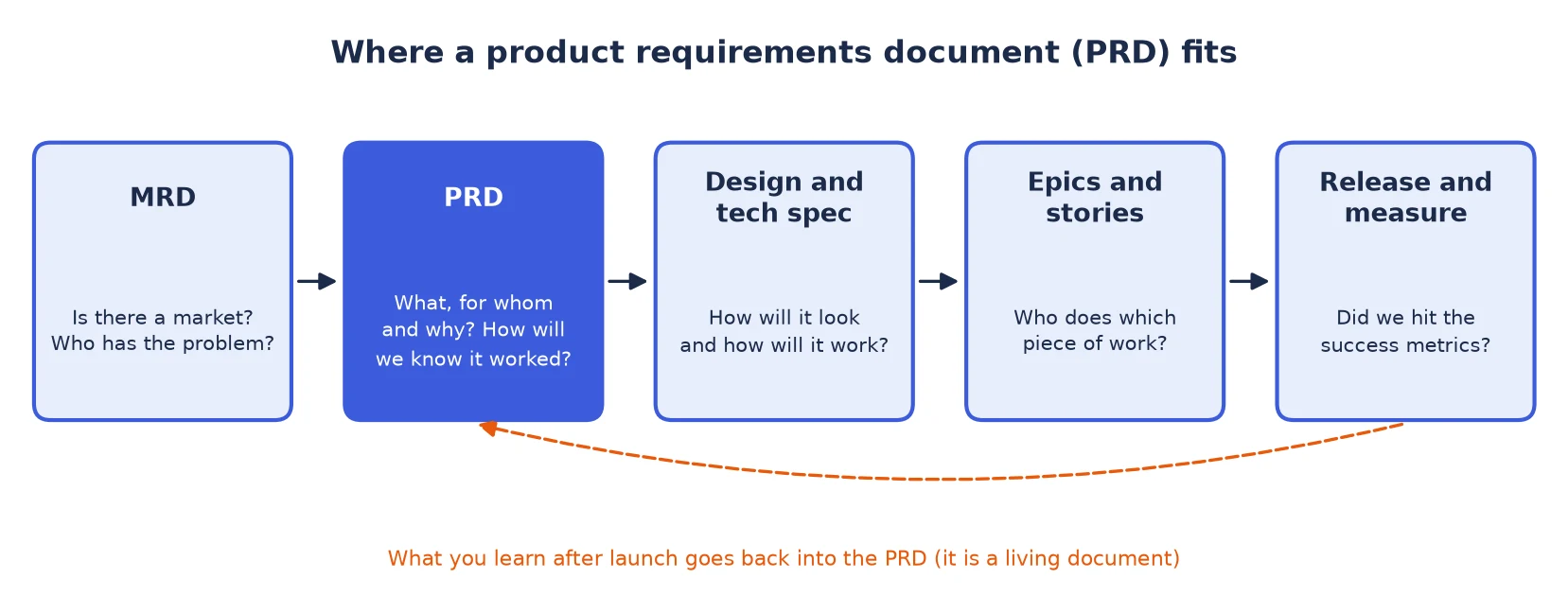
In practice the MRD comes first and justifies the investment; the PRD turns that opportunity into a specific product scope. If you need the earlier document, see how to write a market requirements document. Smaller teams often merge the MRD and PRD into one document, which is fine as long as the market evidence and the product requirements are in separate sections.
Do Agile Teams Still Need a PRD?
Yes, but not the 40-page version. Long, up-front PRDs fell out of favour because teams wrote them once, handed them over and never opened them again, while the product changed in every sprint. Product leaders such as Marty Cagan have long argued that prototypes and discovery should carry much of what a written spec used to.
What survives in agile teams is a shorter, living PRD:
- It fits in a few pages (often a one-pager for a single feature).
- It states the problem and the outcome firmly but keeps the solution open.
- It links to designs, prototypes and the epic in Jira, Linear or a similar tool instead of copying them.
- It changes as the team learns, with a change log so people can see what moved and why.
Keeping documentation in step with sprints is a skill of its own; maintaining documentation in an agile team covers the habits that help.
What to Include in a PRD
These are the sections most PRD templates share. Keep the order; reviewers learn where to look.
| Section | What it answers | Common mistake |
|---|---|---|
| Header | Owner, status (draft, in review, approved), last updated, links to design and epic | No owner, so nobody updates it |
| Problem statement | What is wrong today, for whom, with evidence | Describing a solution instead of a problem |
| Goals and success metrics | What changes if we succeed, with a baseline and a target | Goals like “improve engagement” with no number |
| Non-goals | What this release will not do | Leaving it out, which invites scope creep |
| Users and personas | Who the feature is for | Writing for “all users” |
| User stories / use cases | How users will use it, in their words | Stories that are really UI instructions |
| Functional requirements | What the product must do, each with an ID and priority | Requirements that can’t be tested |
| Non-functional requirements | Performance, security, accessibility, privacy, localisation | Forgetting them until QA |
| Acceptance criteria | When each requirement counts as done | Vague criteria such as “works well” |
| Assumptions, constraints, dependencies | What we believe, what limits us, what we wait on | Hidden dependencies on other teams |
| Release plan | Phases, feature flags, rollout percentage, launch date | One big-bang launch with no rollback plan |
| Open questions and change log | What is undecided, and what changed since the last review | Decisions made in chat and never recorded |
Prioritising requirements
Give every requirement a priority so the team knows what to drop if time runs short. MoSCoW (must have, should have, could have, won’t have this time) is the simplest scheme and maps neatly onto a release: the “must” items define the minimum release, and the “won’t” items become your non-goals. Scoring methods such as RICE (reach, impact, confidence, effort) help when you are choosing between many candidate features rather than ordering one feature’s requirements.
Writing requirements people can test
The fastest way to improve a PRD is to rewrite each requirement until someone in QA could write a test for it.
| Vague | Testable |
|---|---|
| The search should be fast. | Search results load in under 1 second for the 95th percentile of queries. |
| Users can easily save searches. | A signed-in user can save the current search with one click from the results page. |
| Alerts should not be spammy. | A user gets at most one alert email per saved search per day. |
| The page must be accessible. | The feature meets WCAG 2.2 level AA, including keyboard-only use. |
For acceptance criteria, the Given/When/Then format keeps each condition concrete: Given a starting state, when the user does something, then a specific result follows. It also translates directly into automated tests.
How to Write a PRD, Step by Step
- Start with the problem and its evidence. Collect support tickets, interview notes, analytics and sales feedback. Write a short problem statement before you think about features.
- Set measurable goals. Pick one primary metric and a few guardrail metrics (things that must not get worse). Record today’s baseline so the target means something.
- Write the non-goals. Listing what you won’t build is the cheapest scope control there is.
- Describe users and user stories. Use the form “As a [user], I want [action] so that [outcome]”, and keep the stories about needs, not screens.
- List functional and non-functional requirements. Give each an ID (R1, R2…) and a priority. IDs let designs, tickets and test cases refer back to the PRD.
- Add acceptance criteria. At least one per “must” requirement, ideally in Given/When/Then form.
- Record assumptions, constraints, dependencies and open questions. An open question with an owner and a due date is far better than a silent guess.
- Review with engineering and design early. Share a draft before it feels finished. Engineers spot infeasible requirements and missing edge cases; designers spot stories that don’t match real behaviour.
- Get sign-off, then keep it alive. Mark the status as approved, link the epic, and log every later change with a date and a reason.
Writing a PRD is technical writing: the same rules about audience, structure and plain language apply. If you are new to that discipline, what technical writing is is a good primer, and version control for documentation shows how to keep a reviewable history of changes.
Product Requirements Document Example
Below is a complete, short PRD for a single feature on a fictional job board called “JobNest”. The product and numbers are made up for illustration, but every section is one you would use in a real PRD.
Header
| Field | Value |
|---|---|
| Feature | Saved searches with email alerts |
| Owner | Product manager, Candidate Experience |
| Status | In review |
| Target release | Q1, behind a feature flag |
| Links | Design file, tech spec, epic JN-412 (placeholders) |
1. Problem statement
Job seekers repeat the same searches every few days to check for new listings. In the last quarter, 38% of returning candidates ran an identical search more than three times, and “notify me about new jobs” was the most requested feature in support tickets. Candidates who miss new listings apply later, when roles have more applicants, which hurts their chances and our employers’ time-to-hire.
2. Goals and success metrics
| Metric | Baseline | Target (90 days after launch) |
|---|---|---|
| Primary: weekly returning candidates | 41,000 | +10% |
| Applications started from alert emails | 0 | 8% of all applications |
| Guardrail: email unsubscribe rate | 0.4% | No higher than 0.6% |
| Guardrail: spam complaints | 0.02% | Below 0.1% |
3. Non-goals
- Push notifications in the mobile app (planned for a later release).
- Recommended jobs based on a candidate’s profile.
- Alerts for signed-out users.
4. Users and user stories
- As an active job seeker, I want to save a search so that I don’t have to rebuild my filters every time.
- As an active job seeker, I want an email when new matching jobs are posted so that I can apply early.
- As a passive candidate, I want a weekly summary instead of daily emails so that alerts don’t fill my inbox.
5. Functional requirements
| ID | Requirement | Priority |
|---|---|---|
| R1 | A signed-in user can save the current search (keywords, location, filters) from the results page. | Must |
| R2 | A user can have up to 10 saved searches and can rename or delete them. | Must |
| R3 | Each saved search has an alert frequency: daily, weekly or off. Default: daily. | Must |
| R4 | Alert emails list only jobs posted since the previous alert, newest first, up to 20 jobs. | Must |
| R5 | Every alert email has a one-click unsubscribe for that saved search. | Must |
| R6 | If a saved search has no new jobs, no email is sent. | Should |
| R7 | Users can edit the filters of a saved search. | Could |
6. Non-functional requirements
- Performance: saving a search completes in under 500 ms at the 95th percentile.
- Delivery: daily alerts are sent between 7:00 and 9:00 in the user’s time zone.
- Accessibility: the save and manage flows meet WCAG 2.2 AA.
- Privacy: alert emails include only job data, no personal data beyond the user’s first name.
7. Acceptance criteria (examples)
- R1: Given a signed-in user on a results page, when they click “Save search”, then the search appears in “My saved searches” with the same filters.
- R2: Given a user with 10 saved searches, when they try to save another, then they see a message asking them to delete one first, and nothing is saved.
- R6: Given a daily saved search with no jobs posted since the last alert, when the daily run happens, then no email is sent to that user for that search.
8. Assumptions, constraints and dependencies
- Assumption: most candidates prefer email to push notifications (to be checked in the beta).
- Constraint: the email provider’s sending limit is 500,000 messages a day.
- Dependency: the search team must expose a “posted since” filter in the search API.
9. Release plan
- Beta to 5% of signed-in candidates behind a feature flag for two weeks.
- Check guardrail metrics, then 50%, then 100%.
- Roll back by switching off the flag; saved searches are kept.
10. Open questions
- Should alerts include salary when the employer hasn’t published one? Owner: PM, due before design review.
- Do we need a separate consent step in the EU? Owner: legal, due before beta.
Notice how short each section is. The example is complete enough to design, build and test against, yet it never says which database to use or what the button looks like; those belong in the tech spec and the design file.
Common PRD Mistakes
- Writing the solution as the problem. “We need a saved-search button” hides the real problem (candidates miss new jobs), which might have a better solution.
- Goals with no numbers. If you can’t measure it, you can’t tell whether the release worked or should be rolled back.
- No non-goals. Every unlisted idea becomes a scope debate in the middle of a sprint.
- Too much “how”. Specifying UI layouts or database tables takes decisions away from the people best placed to make them.
- Untestable requirements. Words like “fast”, “easy”, “intuitive” and “secure” need a number or a standard next to them.
- A document nobody owns. A PRD without an owner and a change log is out of date within weeks.
- Skipping engineering review. Requirements that are cheap to write can be very expensive to build.
Using AI to Draft a PRD
AI assistants are good at turning rough notes into a first draft with the right sections, rewriting vague requirements into testable ones and suggesting edge cases you missed. They can’t supply your evidence. Baselines, research findings and constraints must come from your own data, and every requirement still needs a human owner to confirm it. Treat the AI draft as a starting point for the review step, not a replacement for it.
Conclusion
A product requirements document is the team’s agreement on what to build and why: the problem, the users, measurable goals, prioritised and testable requirements, and what is out of scope. Keep it short, leave the “how” to design and engineering, give every requirement an ID, a priority and acceptance criteria, and keep it alive with a status and a change log. Use the example above as a pattern, and if you are earlier in the process, start with the market requirements document.
FAQs
What is a PRD in product management?
A PRD (product requirements document) defines what a product or feature should do, who it is for, why it matters and how success will be measured. The product manager owns it, and design, engineering and QA use it to build and test the product.
Who writes the product requirements document?
The product manager writes and owns it, with input from engineering, design, QA and stakeholders. Engineers usually write a separate technical spec that explains how the requirements will be built.
What is the difference between a PRD and an MRD?
An MRD describes the market opportunity: segments, competitors and customer problems. A PRD turns that opportunity into a specific product scope with requirements, success metrics and acceptance criteria. The MRD comes first.
How long should a PRD be?
Usually a few pages. A single feature can fit in a one-page PRD. Link to designs, research and tickets instead of copying them in, so the document stays short enough to read.
What is the difference between a PRD and a technical spec?
A PRD says what to build and why, from the user and business side. A technical spec (or design doc) says how engineering will build it: architecture, data model, APIs and rollout.
Is a PRD still used in agile?
Yes, as a short, living document. Agile teams keep the problem, goals, non-goals and acceptance criteria in the PRD, link it to the epic and update it as they learn, instead of writing a long spec up front.