
I didn’t start as an automation expert. Four months before I first wrote this (August 2025), I was the person copy-pasting from sheets, chasing analytics, and nudging APIs with curl. Then I fell into n8n—self-hosted, source-available, and surprisingly fun—and it changed how I work. This is the story of going from zero to fanboy: how I use n8n to research topics, run audits, ship marketing, and do the kind of multi-channel work I’d usually need a team for. I’ll show you what clicked, what hurt, and where n8n beat every other tool I’ve tried.
Updated October 2026: this is a personal account, and the experience I describe is from mid-2025. I’ve left my story as it was and only corrected product facts that have since changed or were loosely worded: n8n is “fair-code” (source-available under its Sustainable Use License), not open source in the strict sense, and its free self-hosted Community edition is for your own internal or personal use; the old Function node is a legacy node, replaced by the Code node, and n8n’s v3.0 breaking-changes page lists the Function and Function Item nodes as being removed in n8n 3.0; and n8n 2.0 turned on task runners for Code nodes and now blocks environment-variable access from Code nodes by default, so some tips about extra packages and environment variables need adjusting on current versions. The time-saved figures later in the post are my own estimates from that period, not benchmarks, and AI steps I built with HTTP Request and OpenAI nodes could now use n8n’s built-in AI Agent node. For a current, step-by-step n8n setup, see my deployment guide.
Why did I even try n8n?
Because I wanted control without a bill for every click. I self-host most developer tools, so n8n’s “run it on your own box” promise fit my habits. I also wanted a builder where I could start no-code and drop into JavaScript when things got tricky. n8n is built exactly like that: visual blocks first, code when you need it. That combination is what kept me here.
Basically, I came for cost control and flexibility. I stayed because it let me ship real automations fast, without begging an API gateway for permission.
What did the first week actually look like?
I pulled n8n with Docker, mapped a volume, and was building on localhost:5678 in minutes. A reverse proxy and HTTPS later, I had a secure URL I could open on any device. The only speed bump: OAuth. Self-hosting means you create your own Google credentials. It’s not hard; it’s just… fussy. After the first setup, it’s muscle memory.
Takeaway: Install is quick. Your first OAuth will test your patience—once.
Getting Started with n8n (Self-Hosted Setup)
Setting up n8n was surprisingly straightforward. I opted for the self-hosted route (to avoid recurring costs), and with a single Docker command I had n8n up and running on my server. Within minutes, I was logging into the clean web interface at localhost:5678 and creating my admin account. The interface felt intuitive from the start – a left sidebar for workflows, credentials, etc., and a main canvas for building automations.
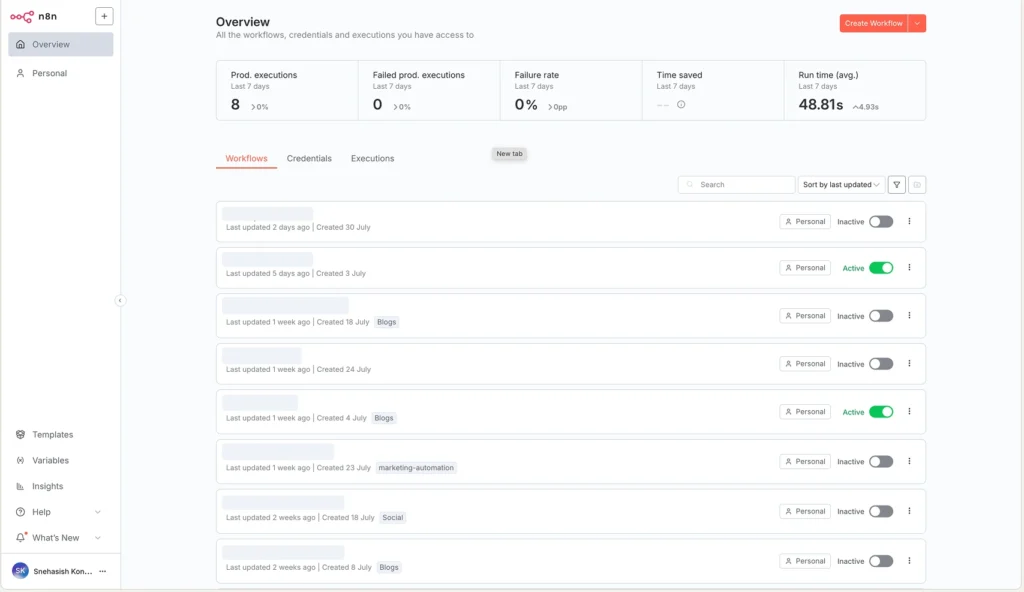
To make access easy, I set up a custom domain and secured it via HTTPS (using a reverse proxy and SSL). This took a bit of extra time, but it was worth it for convenient access anywhere. If you’re less technical or don’t want to host it yourself, n8n does offer a cloud service – but as a tinkerer, I enjoyed having full control on my own VPS. (Plus, self-hosting means no limits on workflow runs and no per-operation fees, unlike some SaaS automation tools.)
One thing to note during setup: if your workflows involve services like Google Sheets or Gmail, prepare for a slight hassle with OAuth. Using n8n in self-hosted mode requires creating your own Google API credentials for features such as Google Drive/Sheets nodes. The process isn’t difficult (n8n’s docs walk you through it), but it does take 15-20 minutes of fiddling with the Google Cloud console. I’ve done it a few times and it still feels tedious compared to the one-click authorization that platforms like Zapier or Make provide out of the box. This is a trade-off with self-hosting: a bit more upfront work for integration setup in exchange for freedom and privacy.
What’s the “aha” moment?
Two things happened.
- I stopped writing glue scripts. Cron → Dropbox for hourly backups? That became Cron + Dropbox nodes with logs and retries. No shell script, no fragile error emails.
- I could see the data move. Execution history shows inputs, outputs, timings—step by step. That visibility turned debugging into a normal part of building, not a weekend project.
Takeaway: Seeing every hop of your data with built-in logs flips a switch. You start designing confidently.
Can n8n actually replace a chunk of a team’s work?
For me, yes. Here’s how I run a mini-operation across research, audits, and marketing—solo.
1) Topic research and content pipeline
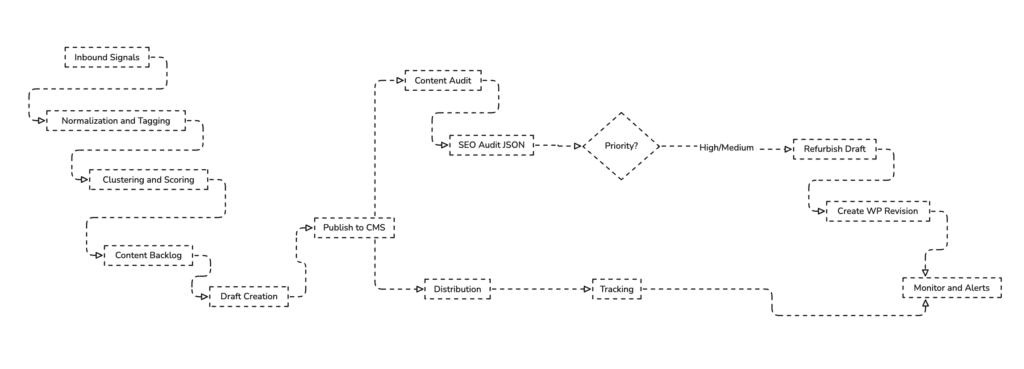
I use a bundle of triggers—RSS, webhooks, and scheduled API calls—to pull signals from docs, forums, and product changelogs. A Code node normalizes fields; an HTTP Request node hits an LLM endpoint to cluster topics; a Google Sheets/Notion node persists candidates with tags like “search intent,” “complexity,” and “SERP volatility.” A Webhook lets me push a seed URL and generate a quick outline or angle, then the workflow posts a card to my board with priority and examples.
Why this matters: I’m no longer “finding ideas.” I’m reviewing a ranked queue that updates itself.
2) Technical/SEO audits on published posts
A recurring workflow enumerates URLs from the CMS, then fans out:
- Search Console: pulls last-90-day clicks, impressions, CTR, position, top queries.
- PageSpeed Insights: fetches LCP/CLS/INP and Lighthouse categories.
- (Optional) GA4: sessions and engagement time.
A Code node composes a compact JSON bundle and sends it to an OpenAI node (“SEO Audit”) that returns prioritised actions. High/Medium priorities branch to a “Refurbish & Draft” sub-workflow that produces candidate updates (headline options, intro rewrite, FAQ suggestions). The workflow then creates a WordPress draft revision with fields prefilled. I review and publish.
Why this matters: I don’t “do audits” anymore; I supervise them.
3) Marketing and distribution
Once a post publishes, a “content ship” workflow takes over: generates platform-specific posts (LinkedIn, X, community forums), creates UTM’d short links, schedules posts, and drops everything into a shared sheet. If a post crosses a performance threshold, another workflow spawns experiments—new headlines, repurposed hooks, or a lightweight newsletter block.
Why this matters: Distribution keeps going while I move on to the next build.
Where did n8n beat other tools for me?
I’ve used Zapier and Make. They’re polished and great for quick wins. But at scale, my needs changed.
- No hard “operations” ceiling. Self-hosting removed the mental tax of counting steps. I chain what I need without trimming logic to dodge quotas.
- No-code first, code when needed. Code nodes (the successor to the older Function node) let me shape data with plain JavaScript, import external packages when the instance allows it (a self-hosting setting), and handle edge cases without leaving the canvas.
- Observability out of the box. Every execution is inspectable: inputs, outputs, timings, failures. Debugging is built-in, not a paid add-on.
- Ownership. Credentials live on my server. Backups are mine. If I want queue mode and workers, I flip the architecture—no vendor meetings required.
- HTTP Request is a superpower. If a node doesn’t exist, I still integrate in minutes with raw APIs, then wrap it with a Function node for reusability.
Takeaway: For complex, evolving workflows where I care about cost, control, and debuggability, n8n fit better than anything else I tried.
What made me sweat (and how I handled it)
- Learning curve. The editor is simple; data shapes are not. I got faster when I started sketching payloads and mapping fields intentionally.
- Credentials/OAuth. The first time with Google is fiddly. I wrote a mini runbook, saved client IDs securely, and moved on.
- Runaway flows. Early on, I built an accidental loop and pegged CPU. Now I test with “Execute last node,” add workflow timeouts, cap concurrency, and use queue mode for heavy jobs.
- Docs gaps. For edge cases, the community forum and example templates saved me more than once.
Takeaway: The rough edges are predictable. Add a few guardrails and you’ll barely notice them after week two.
What’s my current setup?
A modest server (4–8 GB RAM) with Docker, persistent volumes for data, reverse proxy + TLS, and queue mode for noisy tasks. I split big automations into sub-workflows, centralize error handling into an “On-Error” workflow that pings me with the execution URL, and store secrets in n8n credentials, not in nodes. Logs get exported weekly.
Takeaway: You don’t need a beefy machine. You need a clear separation between “fast paths” and “heavy jobs.”
Where does n8n sit against a “full-fledged team” — realistically?
Short answer: n8n doesn’t replace judgment, interviews, or taste. It replaces the repeatable operations that keep a team busy—collecting signals, enriching data, scoring ideas, drafting first passes, publishing updates, and reporting—so I can spend my time on decisions and polish. Think of it as an ops teammate that never forgets a step, works 24/7, and costs a VPS.
What a team would normally do—and what n8n takes over
In a content + growth loop, a small team typically covers five lanes: research, SEO/QA, writing/editing, publishing/distribution, and reporting. Here’s how my setup mirrors that reality.
- Research (Analyst/Researcher → n8n):
Daily, n8n pulls RSS, changelogs, docs, and community threads; normalizes fields; runs an LLM cluster for themes; and writes a backlog to Notion/Sheets with tags (intent, difficulty, SERP volatility, examples). I review a ranked queue, not an empty page. - SEO/QA (SEO Specialist → n8n):
On a schedule, n8n enumerates URLs, fetches GSC (clicks, impressions, CTR, position), PageSpeed (LCP/CLS/INP), and GA4 engagement. A Code node composes a compact audit JSON; an LLM returns prioritized fixes; high/medium items auto-spawn a “refurbish draft” sub-workflow. I approve or edit the diff. - Writing (Content Writer → n8n assists, I finish):
n8n generates first-pass outlines, intros, meta tags, FAQs, and alt-text from my patterns. I do the narrative, examples, and final voice. The machine gets me to a solid B-draft; I push it to A. - Publishing & Distribution (Content Ops/Social → n8n):
On publish, n8n generates platform-specific blurbs, builds UTM’d links, schedules posts, and updates a content calendar. Thresholds (e.g., CTR or dwell time) can auto-trigger experiments. - Reporting (Ops/Analytics → n8n):
Weekly, n8n emails me a one-pager: what shipped, what moved (by URL), what slipped, and where the next 3 wins likely are. No manual screenshots, no “pulling exports.”
The boundaries: what still needs me (and always will)
- Strategy & taste: picking angles, setting quality bars, deciding trade-offs.
- Originality: interviews, hands-on tests, fresh diagrams, product nuance.
- Risk & compliance: claims, privacy, brand tone, final accountability.
- Edge cases: when APIs change shape, when a new source needs a different parser, when intuition says “this draft isn’t it.”
n8n gives me consistent inputs and fast first passes. I make the calls.
A quick capacity snapshot (my real-world arc)
Before n8n, a single article’s ops (not writing) cost me ~3–4 hours: research wrangling, SEO checks, publishing steps, social, light reporting. After wiring the conveyor belt, that ops slice dropped to ~35–50 minutes—mostly review/approve. Over a month, that’s the difference between shipping 4 posts and shipping 8–10 with the same standards.
What’s fully automated vs. human-in-the-loop vs. human-only?
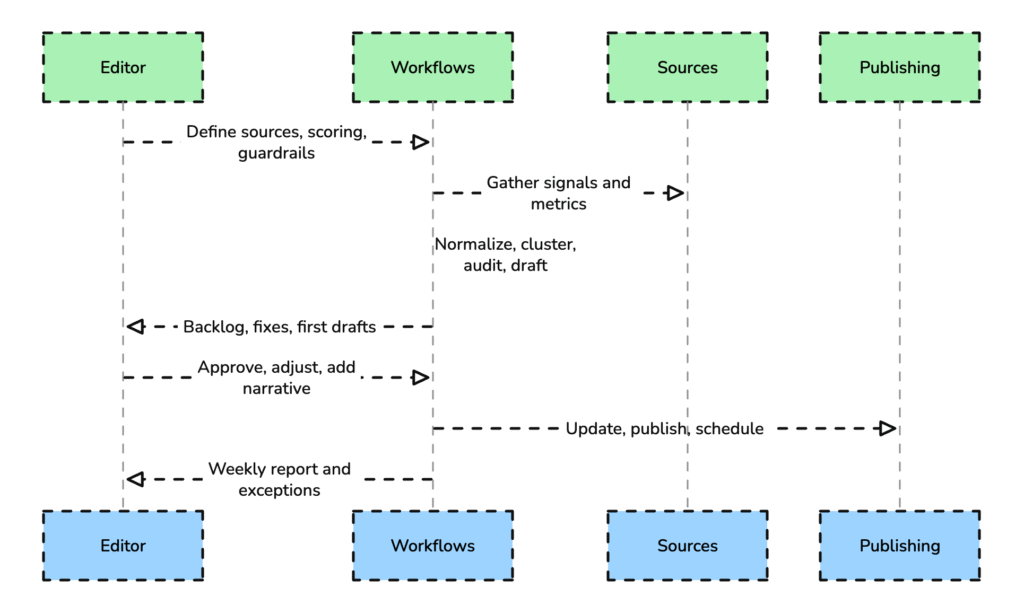
- Fully automated: source collection, normalization, clustering, backlog updates, recurring audits, diff creation, CMS draft updates, distribution, weekly digests.
- Human-in-the-loop: picking topics from the ranked queue, accepting/rejecting audit diffs, final edits, publish “go.”
- Human-only: voice, original insights, sensitive claims, visual storytelling choices, stakeholder alignment.
How it feels in practice (one loop)
You set the rules once (sources, scoring, thresholds). n8n keeps the belt moving: new signals in → ideas scored → drafts proposed → audits filed → diffs ready → distribution scheduled → results summarized. I step in for the parts that actually benefit from being human—and step out of everything that doesn’t.
The honest limitation
n8n won’t invent judgment or brand voice, and it won’t “self-heal” a broken integration without the guardrails you set (timeouts, retries, shape checks). That’s fine. I don’t want a black box; I want a reliable operator that follows my playbook perfectly.
Takeaway: n8n doesn’t replace a team’s thinking. It replaces their busywork. If the task is structured and repeatable, n8n will carry it end-to-end and hand you clean decisions. You add the last 10% that makes it worth publishing.
So… is n8n worth it?
If you’re even mildly technical and you like owning your stack, yes. You’ll spend a few hours learning, and you’ll get those hours back every week. If you need rigid guardrails and zero setup, start with a hosted automation tool and revisit n8n when your flows grow teeth.
For me, the arc was simple: curiosity → first wins → full pipelines → “I can’t work without this.” n8n didn’t just save time; it changed how I approach work. I plan the system once, then let the conveyor belt run while I focus on ideas and edits.
Final takeaway: n8n turned me from a manual operator into a one-person automation team. It’s the closest I’ve felt to having a silent partner who handles the boring parts so I can do the creative ones.
If you are evaluating other platforms for AI agents, see the best n8n alternatives for AI agents and MindStudio vs n8n.







