If you’re redesigning how your docs are organized — folders, modules, versioning, reuse — this is a practical guide you can use to plan and execute the change. I’ll answer the common questions I see when teams move from a single monolithic docs repo to a modular documentation architecture, share working examples, and give trade-offs so you can pick an approach that fits your product and team.
What exactly is a documentation architecture and why does it matter?
Documentation architecture is the set of decisions that define how documentation is organised, authored, versioned, built and published. It covers repository layout, folder structure, module/component boundaries, reuse mechanisms, the CI/CD pipeline, and access controls.
It matters because the architecture determines how fast writers and engineers can update docs, how consistently content is presented, how easily you reuse content across products, and how quickly your site builds and scales as content grows.
Takeaway: Documentation architecture is the foundation that makes docs maintainable, scalable, and trustworthy.
So, when should you stop using a monolith and move to modular docs?
Here’s what I typically see trigger a migration: multiple products or teams need independent release cadences, you have duplicated content across product docs, build times are exploding, or you want to reuse component-level content across several sites.
If one team owns and publishes all docs together and builds remain sub-minute, a monolith can work. But once cross-team friction or duplication becomes the norm, a modular approach usually reduces overhead.
Takeaway: Move to modular docs when cross-team releases, duplication, or build-time pain outweigh the simplicity of a single repo.
How should I design folder layout and module boundaries? What’s a practical doc structure?
Design modules around ownership and reuse: group content that changes together and that a single team or product area owns. Modules can be product docs, SDKs, platform features, or shared component libraries (snippets, API examples).
Below are two practical examples — one for a monolith folder layout and one for a modular multi-repo/component approach.
Example: Monolith doc structure
# monolith-docs/
├── docs/
│   ├── product-a/
│   │   ├── intro.md
│   │   └── api.md
│   ├── product-b/
│   └── guide/
├── website/
└── package.json
This keeps everything in a single repository and can be simple to operate when teams are small.
Example: Modular doc structure (multi-repo or mono-repo with components)
# repositories or folders
─ docs-site/                 # site shell and build pipeline
─ components/                # shared UI/MDX components or shortcodes
─ modules/
   ├── product-a-docs/       # owned by product-a team (versioned independently)
   ├── product-b-docs/
   └── shared-api-snippets/  # single source of truth for API examples
With this layout you can publish modules independently, reuse content from shared modules, and scale teams without stepping on each other.
Takeaway: Bound modules by ownership and reuse; keep a thin site shell that assembles components at build time.
How can I enable content reuse across modules without duplication?
There are four common reuse strategies: includes/transclusion, shortcodes/components, content fragments (single-source-of-truth), and a content registry or package manager. Each has trade-offs.
- Includes / transclusion: e.g., Sphinx “.. include::”, Jekyll/Liquid {% include %}, AsciiDoc include. Cheap to implement but can be harder to track dependencies across repos.
- Components / MDX shortcodes: import React/Vue components into MDX (Docusaurus, Gatsby). Great for dynamic, parameterized snippets and consistent UI.
- Content fragments / packages: treat reusable pieces as versioned packages (npm or a git submodule) that docs sites depend on. Offers clear versioning and review workflows.
- Documentation platform features: tools like Antora (component model) are built for multi-repo reuse and single-sourcing at scale.
Working examples
1) Sphinx include (reStructuredText)
.. include:: ../shared/snippets/setup-command.rst
   :literal:
Use this when your docs use Sphinx; includes pull the source file into the page at build time.
2) Docusaurus MDX component (recommended for JS-based sites)
// src/components/Note.jsx
import React from 'react';
export default function Note({children}) { return <aside className="note">{children}</aside> }

-- docs/using-note.mdx
import Note from '@site/src/components/Note';

# Using the note component

<Note>This is a shared note; update once, reuse everywhere.</Note>
MDX lets you author content as Markdown while importing React components for consistent blocks and logic.
3) Antora component model (multi-repo reuse)
# antora-playbook.yml (site shell)
site:
  title: "Company Docs"

content:
  sources:
    - url: ../product-a-docs
      branches: master
    - url: ../shared-components
      branches: master
Antora treats each repo as a component with its own docs; the site assembles them. This is explicitly designed for modular docs at enterprise scale. See Antora docs for details.
Takeaway: Prefer components/shortcodes for UI consistency and Antora or package-based fragments when you need cross-repo single-sourcing and clear ownership.
How should I version docs so users see the right docs for each product release?
Two common versioning patterns map to product release models: release-aligned static versions and continuously updated “latest” with per-release branches/tags.
- Git tags/branches mapped to site versions — each release has a tag and your docs build publishes a versioned snapshot. Works well when you must preserve historical docs for older releases.
- Release-candidate or trunk-based docs — keep “latest” live for docs that track mainline; publish versioned snapshots on official releases for stable docs. This works when you continuously ship and only need to preserve major release docs.
Takeaway: Choose versioning that mirrors your release process — tags for snapshot stability, “latest” for continuous delivery — and automate it in CI/CD.
What does a CI/CD pipeline for a modular docs site look like?
The core goals are reproducible builds, fast previews, and selective rebuilds. A pragmatic pipeline looks like this:
- Editor pushes change to a module repo (or mono-repo path).
- CI runs linting, link-checks, and unit tests for doc components.
- CI triggers a partial build for preview if only a single module changed; otherwise run a full site build.
- Deploy preview for PRs (Netlify, Vercel, or a cloud preview environment).
- On merge to main or a release tag, publish versioned site and update redirects/metadata.
Partial builds matter: rebuild only the changed module(s) and the site shell that consumes them. Netlify/Vercel and many CI systems support faster previews; Antora and similar tools can be optimized with caching strategies.
Takeaway: Build CI pipelines that validate content, provide fast previews, and only rebuild what changed to keep feedback loops short.
What performance and security considerations should I plan for?
Performance considerations:
- Large sites can have long build times. Use incremental or partial builds, and cache compiled assets between CI runs.
- Optimize assets (images, fonts), and enable CDN caching for static HTML. Generate static pages where possible for scaling reads.
- Pre-render or server-side-render heavy interactive components to avoid client-side slowdowns.
Security considerations:
- Never commit secrets or credentials to doc repos; enable secret scanning on GitHub or use tools like GitHub’s secret scanning and third-party scanners (GitHub docs).
- Restrict access to internal docs with SSO/SSO groups or VPN. Treat previews as potentially sensitive — use authenticated preview environments for private content.
- Sanitize any user-provided content and be careful when embedding external scripts in docs pages to avoid XSS or supply-chain risks.
Takeaway: Optimize builds and caching for performance; treat docs repos as code and enforce secret scanning and access controls for security.
What are the benefits and limitations of the main tooling choices?
| Tooling | Why it’s useful | Limitations |
|---|---|---|
| Docusaurus (MDX) | Great MDX + React components, easy versioning, strong ecosystem for JS teams. https://docusaurus.io | Tied to JS toolchain; build time grows with site size; requires React knowledge for custom components. |
| Antora (AsciiDoc) | Designed for multi-repo modular docs, component model, clear ownership boundaries. https://docs.antora.org | AsciiDoc learning curve; fewer front-end UI integrations out of the box compared to MDX sites. |
| Read the Docs | Managed hosting for Sphinx projects, automatic versions from branches/tags. https://docs.readthedocs.io/ | Tightest fit with Sphinx/reST; less flexible for MDX/JS-heavy UIs. |
| Hugo + Docsy | Fast static builds, good for large static sites and enterprise use with Docsy theme. https://www.docsy.dev/ | Requires familiarity with Go templating and theme conventions. |
Takeaway: Pick tooling that matches your team’s skills and content needs — Antora for multi-repo single-sourcing, Docusaurus for MDX/UI interactivity, Sphinx/ReadTheDocs for Python ecosystem docs.
How do I migrate incrementally from a monolith to a modular architecture?
Migrate in small, reversible steps to control risk. Here’s a tested plan I’ve used with teams:
- Audit your docs. Identify duplicate content, ownership boundaries, and slow builds. Create a content inventory or spreadsheet.
- Create a site shell repository that will assemble modules. Keep it minimal — a simple site that can render local modules.
- Extract one module (low-risk area) into its own repo or module folder. Publish it to the shell as a proof-of-concept and set up CI for previews.
- Standardize shared components (notes, warnings, code tabs) into a shared components package and reference it from each module.
- Iterate: move additional modules, set up versioning for each module, and expand CI to perform link-checking and automated checks across assembled content.
- When stable, switch production traffic to the assembled site and decommission the old monolith gradually.
Real-world tip: keep redirects and old URLs in place until you’re confident that traffic has shifted — this protects SEO and customers who rely on bookmarked pages.
Takeaway: Migrate one module at a time, validate with previews, and centralise shared components early to avoid rework.
Can you show an architecture diagram that ties repos, components, CI, and the site together?
Below is a simple Mermaid diagram that shows how modules, a components package, and the site shell interact through CI.
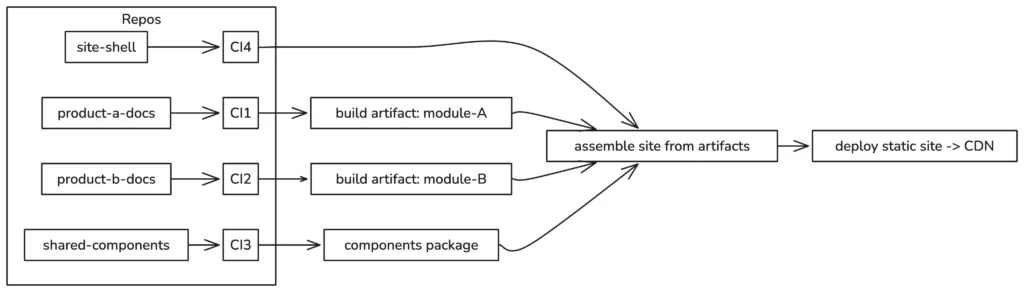
Takeaway: Treat the site as an assembler that consumes versioned artifacts from module pipelines and a components package.
What are common pitfalls and how do I avoid them?
Common pitfalls include:
- Moving too fast without auditing — you’ll break links and lose context. Perform a content inventory before you split.
- Not standardising shared components early — results in inconsistent UX and duplicate work.
- Failing to version reusable fragments — breaking changes propagate silently if fragments aren’t versioned.
- Neglecting previews — without preview builds, reviewers can’t validate changes in context.
Avoid these by keeping a migration plan, enforcing shared component usage via CI lint rules, and requiring previews for merges that touch assembly/configuration.
Takeaway: Audit first, standardize shared components, version fragments, and require previews to avoid common pitfalls.
What are some real-world use cases where modular docs made a measurable difference?
Example 1: A SaaS platform with separate product teams moved to Antora-style components. Each product team published independently, reducing merge conflicts by 80% and speeding up release-to-docs time from days to hours.
Example 2: A developer platform adopted MDX components with a shared snippets package and CI previews. The team eliminated duplicated API examples across three repos and reduced fix time for broken examples from hours to minutes.
These outcomes are typical when teams invest in ownership boundaries and automated validation.
Takeaway: Modular docs cut cross-team friction and reduce duplicated effort when combined with shared components and CI validation.
FAQ: Quick answers to common questions
How do I choose between Antora and Docusaurus?
If you need multi-repo assembly and strict component ownership with AsciiDoc, Antora is purpose-built. If your team prefers MDX, React components, and richer interactive UI blocks, choose Docusaurus. Both can produce static sites and support versioning; choose the one that aligns with your content format and front-end skills.
How do I handle translations in a modular architecture?
Keep translations alongside the module they document (same repo). Use a consistent keying strategy for shared fragments and integrate localization in CI. Tools like Crowdin or Lokalise support multi-repo workflows; ensure translators preview assembled pages during QA.
How do I stop leaking internal endpoints or secrets in docs?
Enable secret scanning, add pre-commit hooks to block common patterns, scan PRs, and run an automated link-safety check. Restrict access to internal doc previews until they pass a checklist that includes a secrets scan.
How do I map doc versions to product versions?
Use Git tags for release-aligned snapshots and map semantic versions (semver) to doc versions. Automate publishing on tag pushes so a build and publish step happens when you cut a release.
Takeaway: Utilize tooling that aligns with your repository strategy for translations, scanning, and version automation to minimize human error.
References and further reading
- Docusaurus docs — versioning and MDX: https://docusaurus.io/docs/
- Antora documentation — multi-repo component model: https://docs.antora.org/
- Read the Docs — automated version builds: https://docs.readthedocs.io/
- Google Developer Documentation Style Guide: https://developers.google.com/style
- GitHub Secret Scanning: https://docs.github.com/en/code-security/secret-scanning
Final thoughts: How should you get started this week?
If you only do three things this week, do these:
- Run a quick content inventory: identify duplicates, owners, and slow builds.
- Create a site shell and extract a single low-risk module as a proof-of-concept with CI previews.
- Standardize one shared component (note, warning, snippet format) and enforce its use with a lint rule or CI validation.
Start small, validate frequently, and prioritize ownership boundaries. That pattern will let you move from a fragile monolith to a maintainable modular documentation architecture without disruption.
Final takeaway: Design modules around ownership and reuse, automate versioning and previews, and standardize shared components early — those three moves will give you a robust documentation architecture that scales.