If you’ve ever joined a project and felt lost in a forest of services, you know the cost of missing architecture docs. In this guide, I’ll show you how to write software architecture documentation that actually helps people build, operate, and evolve your system—without turning it into shelfware.
What is software architecture documentation—and where does it fit in the SDLC?
Software architecture documentation describes the system’s structure, significant design decisions, and the forces behind those decisions. It explains the system’s building blocks (components), how they interact, the constraints you must respect, and the quality attributes (like performance, reliability, and security) that shape the design.
In the SDLC, architecture docs act as the bridge between product intent and implementation. They guide planning, communicate constraints to teams, steer design and code reviews, and keep operations, security, and compliance aligned with reality. Think of it as the “why” and “how” of the system—stable enough to guide teams, flexible enough to change as you learn.
I’ve seen teams move faster once they write this down because conversation starts from shared context, not guesswork.
Why should you document architecture if the code “tells the truth”?
- Maintainability: Code shows what exists; docs explain why it exists and what trade-offs you accepted. That context prevents “accidental rewrites.”
- Onboarding: New engineers ramp faster when they can see the big picture, not just a list of repos.
- Risk management: Explicit dependencies, constraints, and failure modes make outages rarer—and easier to fix.
- Consistency: Shared patterns (auth, messaging, observability) reduce one-off decisions and drift.
- Compliance and security: You can point auditors and security teams to a living description of data flows and controls.
Write it so your future self—and the next engineer—doesn’t have to reverse-engineer intent during an incident.
How do you create software architecture documentation step by step?
- Define scope and audiences.
- Who will read this? Developers, SREs, security, product, auditors.
- What’s in scope? Whole platform, a domain, or a single service.
- Capture goals, non-goals, and constraints.
- State business goals, quality attributes (e.g., 99.9% uptime), and deadlines.
- Call out constraints: tech stack, compliance rules, data residency, budgets.
- Describe context (C4: System/Context view).
- List users and external systems. Show high-level interactions.
- Explain why these boundaries exist.
- Map containers/services (C4: Container view).
- List deployable pieces: APIs, frontends, jobs, databases, queues.
- Define responsibilities and key interfaces between them.
- Detail key components and data.
- Zoom into critical components: algorithms, modules, schemas.
- Show data ownership, lifecycle, and boundaries.
- Record architecture decisions (ADRs).
- For each decision: context, options, consequences. Keep these short and linkable.
- Cover operational and security concerns.
- Deployment, scaling, observability, backup/disaster recovery.
- Threats, controls, secrets, data classification, compliance mapping.
- Explain failure modes and trade-offs.
- What breaks, how it degrades, and how you recover.
- Show sample flows.
- Sequence diagrams or request-response traces for core journeys.
- Publish, version, and keep it living.
- Store in the repo, review in PRs, link from READMEs, and tag with releases.
Short beats perfect. You can iterate, but you can’t iterate on a blank page.
What does a complete architecture doc template look like (with an example)?
Copy this template and replace the placeholders. I’ve included concise example content for a fictional “Orders Platform” so you can see the level of depth that works.
<!-- Architecture Doc Template (with example content) -->
# 1. Title and Status
Name: Orders Platform (API + Eventing)
Status: Draft (v0.3) — owned by Architecture Guild

# 2. Summary
One paragraph on purpose and scope.
Example: The Orders Platform processes customer orders, synchronizes inventory, and exposes order history via REST. It handles ~200 req/s, supports eventual consistency across warehouses, and prioritizes observability and data integrity over latency.

# 3. Goals and Non-Goals
Goals:
- Accept and validate orders via REST
- Publish order events for downstream systems (billing, fulfillment)
- Provide read-optimized queries for order history
Non-Goals:
- Real-time stock prediction
- Customer analytics dashboards

# 4. Quality Attributes
- Availability: 99.9%
- Consistency: Read-your-writes for customer session, eventual across warehouses
- Security: PII encrypted at rest and in transit; least-privilege IAM
- Observability: Trace 95% of requests end-to-end

# 5. Stakeholders
- Product (Ordering), Engineering (Orders), SRE, Security, Data Platform

# 6. Constraints
- Must run on Kubernetes (in-company standard)
- Postgres for OLTP; Kafka for events
- PCI scope: card tokens only, no raw PAN

# 7. Context (C4: System)
Actors: Customer App, Billing System, Fulfillment
System: Orders Platform
Interactions: Customer App -> Orders API; Orders Platform -> Billing via events

# 8. Container View (C4)
Containers:
- orders-api (REST service)
- orders-writer (async worker)
- orders-read (read model service)
- Postgres (orders-db)
- Kafka (events)
Relationships:
- orders-api writes to orders-db and publishes OrderCreated to Kafka
- orders-writer consumes Kafka for stock reservations
- orders-read maintains a denormalized view for history

# 9. Component Details
orders-api:
- Endpoints: POST /orders, GET /orders/{id}
- Validations: schema checks, idempotency keys
- Cross-cutting: tracing middleware, JWT auth
orders-writer:
- Subscribes: topic orders.created
- Side effects: inventory reservations, retry with DLQ

# 10. Data Model
- orders(id, customer_id, status, total_amount, created_at)
- order_items(order_id, sku, qty, price)
- events(OrderCreated v1, OrderReserved v1)

# 11. Interfaces
REST (OpenAPI): /orders, /orders/{id}
Events (Kafka): orders.created (value schema: OrderCreated v1)

# 12. Operational Concerns
Deploy: 3 replicas per service, HPA enabled
Reliability: circuit breakers to db; exponential backoff for Kafka
Backups: nightly Postgres backups; PITR enabled
Observability: traces with W3C Trace Context; SLO alerting on p95 latency

# 13. Security and Compliance
- OAuth2/OIDC for service-to-service
- Secrets in K8s with sealed-secrets
- PII fields encrypted with AES-256 (app-level) + storage encryption
- Data retention: orders 7 years, events 30 days

# 14. Risks
- Hot partitioning on Kafka by customer_id
- Read model staleness acceptable up to 5 seconds

# 15. ADRs (links)
ADR-001: Choose Postgres over MySQL for transactional semantics
ADR-002: Event-first integration with billing (vs. synchronous API)

# 16. Change Management
- Propose changes via RFC; update diagrams in the same PR
- Version interfaces with explicit deprecation windows

# 17. Glossary
- Read model: a denormalized, query-optimized view
- DLQ: Dead Letter Queue

# 18. References
- C4 Model, ADRs, Postgres docs, Kafka docs
This format stays small enough to read in one sitting, but dense enough to be useful during code reviews and incidents.
Which diagram should you include—and how do you explain it?
I prefer C4 diagrams because they start with people and context, then zoom into containers and components. Here’s a container view for the Orders Platform. You can render this with Mermaid in many docs platforms.
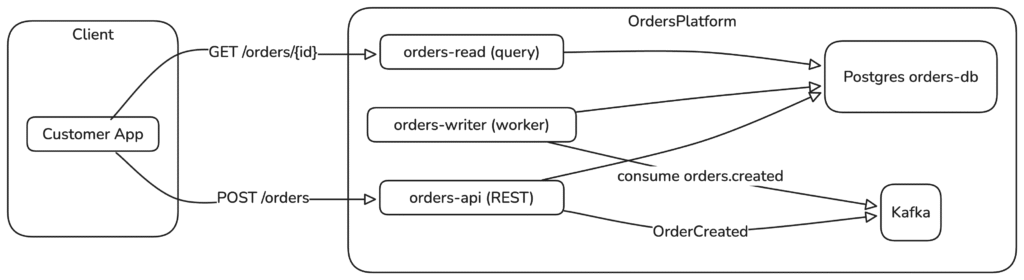
Explain it in words: customers hit orders-api to create orders; the service writes to Postgres and emits an event. A worker consumes that event to coordinate inventory. A separate read service serves queries and doesn’t block writes. That one paragraph turns a picture into shared mental model.
How do you map architecture to infrastructure and contracts?
Your documentation should connect to living config. Here’s a minimal Kubernetes and OpenAPI mapping the containers and interfaces above.
Kubernetes: containers and relationships
apiVersion: apps/v1
kind: Deployment
metadata:
  name: orders-api
spec:
  replicas: 3
  selector: { matchLabels: { app: orders-api } }
  template:
    metadata:
      labels: { app: orders-api }
    spec:
      containers:
        - name: orders-api
          image: ghcr.io/example/orders-api:1.12.0
          ports: [{ containerPort: 8080 }]
          env:
            - name: DATABASE_URL
              valueFrom:
                secretKeyRef: { name: orders-secrets, key: database_url }
            - name: KAFKA_BROKERS
              value: kafka:9092
          readinessProbe:
            httpGet: { path: /healthz, port: 8080 }
            initialDelaySeconds: 5
          livenessProbe:
            httpGet: { path: /livez, port: 8080 }
---
apiVersion: v1
kind: Service
metadata:
  name: orders-api
spec:
  selector: { app: orders-api }
  ports:
    - port: 80
      targetPort: 8080
      protocol: TCP
OpenAPI: contract for the write path
openapi: 3.1.0
info:
  title: Orders API
  version: "1.0.0"
paths:
  /orders:
    post:
      summary: Create an order
      operationId: createOrder
      requestBody:
        required: true
        content:
          application/json:
            schema:
              $ref: "#/components/schemas/NewOrder"
      responses:
        "201":
          description: Created
          content:
            application/json:
              schema:
                $ref: "#/components/schemas/Order"
components:
  schemas:
    NewOrder:
      type: object
      required: [customerId, items]
      properties:
        idempotencyKey:
          type: string
        customerId:
          type: string
        items:
          type: array
          items:
            type: object
            required: [sku, qty]
            properties:
              sku: { type: string }
              qty: { type: integer, minimum: 1 }
    Order:
      allOf:
        - $ref: "#/components/schemas/NewOrder"
        - type: object
          required: [id, status]
          properties:
            id: { type: string }
            status: { type: string, enum: [PENDING, CONFIRMED] }
When docs point at real deployments and real contracts, teams stop guessing and start integrating.
What are architecture documentation best practices?
- Keep it in the repo. Treat docs like code: PR reviews, versioning, and tests where possible (e.g., linting OpenAPI).
- Lead with context, then dive. Start with the “why,” then show flows and details.
- Prefer C4 or a similar view set. System → Containers → Components → Code. Don’t drown people in boxes.
- Use ADRs for decisions. Small, linkable records beat giant prose.
- Make operational reality visible. Production is the source of truth—connect to runbooks, dashboards, SLOs.
- Draw failure first. Note what breaks and how you degrade. Resilience lives here.
- Name owners. Every doc needs an owner and a review cadence. No orphaned pages.
- Cut fluff. If a sentence doesn’t help someone build, run, or change the system, delete it.
The best docs act like a teammate: helpful, current, and honest about trade-offs.
What common mistakes should you avoid?
- Writing for a tool, not people. A perfect diagram that nobody understands doesn’t help.
- Describing everything, prioritizing nothing. Focus on what’s significant for structure and behavior.
- Skipping the “why.” Without rationale, teams repeat old debates.
- Letting docs rot. Unversioned wikis drift within weeks. Tie docs to releases.
- Ignoring non-functional needs. Latency, cost, privacy, and operability drive architecture as much as features.
- Hiding risk. Make the scary parts visible so you can address them intentionally.
Be bold about cutting noise and clear about the sharp edges.
How does this tie back to established guidance?
Use a view-based approach that aligns with the ISO/IEC/IEEE 42010 standard for architecture descriptions. The C4 model gives a pragmatic way to structure those views. For a ready-made outline, the arc42 template is a strong baseline. Capture key choices as Architecture Decision Records (ADRs) so you preserve intent over time.
I’ve borrowed these ideas across teams because they scale: they encourage shared language without forcing one diagramming tool or stack.
Where can you read more?
- Document360: Software Architecture Documentation Guide (accessed 2025-10-27)
- Radixweb: Software Architecture Documentation Guide (accessed 2025-10-27)
- ISO/IEC/IEEE 42010: Systems and software engineering — Architecture description (accessed 2025-10-27)
- C4 Model: A lightweight approach to software architecture diagrams (accessed 2025-10-27)
- arc42 Template: arc42 Documentation (accessed 2025-10-27)
- ADRs: Architecture Decision Record (ADR) examples (accessed 2025-10-27)
- Mermaid: Mermaid diagramming (accessed 2025-10-27) and PlantUML: PlantUML (accessed 2025-10-27)
Closing reflection
Architecture lives in conversations, code, and incidents—documentation stitches those moments into a story your team can follow. Start with context, capture decisions, show the few diagrams that matter, and point to running systems. Done well, software architecture documentation doesn’t slow you down; it gives you the confidence to change the right things, for the right reasons.