We gave Emergent one prompt and its 10 free monthly credits, and asked for a real full-stack app: a UTM link manager with logins, a database and search. About 10 minutes later we had a working, tested app in Emergent’s Preview. It had one bug that Emergent’s own tests missed, and fixing it used up the last credits. Here is exactly what we asked for, what came back, what broke, and where the free plan stops.
Disclosure: some links in this article are affiliate links. If you sign up through them, scientyficworld.org may earn a commission at no extra cost to you. It does not change what we report.
Everything below comes from one build on 9 November 2026, on Emergent’s free plan, with the agent mode left on its default (“Auto”). Times are from the session; credit numbers are what Emergent’s interface showed.
The Result in 30 Seconds
| What we measured | Result |
|---|---|
| App | UTM Vault: sign-in, live UTM link builder, saved links with search and delete |
| Time to a working, tested app | About 10 minutes (23:40 to 23:50) |
| Including one bug fix | About 14 minutes |
| Credits used | About 7.5 of 10 for the build and testing, the remaining 2.5 for the fix |
| Code we wrote | None |
| Bugs we found by hand | 1 (spaces deleted while typing), fixed on the first try |
| Live URL | No. Publishing needed a paid plan |
Verdict: the free plan is enough to find out whether Emergent can build your idea, but not enough to put it online. If you have a small, well-defined app in mind, start a free Emergent project and give it one clear spec, like the one below.
What We Asked For
We picked a UTM link manager on purpose. Scientyfic World already has a client-side UTM builder, which only runs in your browser. A useful test of an AI app builder is whether it adds the parts that need a server: accounts, a database, and per-user data. We kept the scope small so it would fit in 10 credits. This is the full prompt, sent word for word:
Build a web app called "UTM Vault" for creating and saving UTM-tagged campaign links.

1. Email + password sign up and login. Each user sees only their own links.
2. Link builder: destination URL (required, must be a valid http/https URL), utm_source, utm_medium, utm_campaign (required), utm_term and utm_content (optional). Show the final tagged URL live as the user types, with a Copy button. Lowercase all UTM values and replace spaces with hyphens.
3. Saved links: save a built link with a name. Table with search, newest first, and delete.
4. Seed the demo account with 3 example links.

Keep the UI clean and minimal, and make it work on mobile. When done, tell me how to test each feature.
How the Build Went, Step by Step
1. The agent asked four questions first
Within a minute the agent replied and asked four setup questions before writing any code:
- Authentication: JWT email and password login (its recommendation, matching the spec) or Google sign-in.
- Demo account: a suggested demo login, or custom credentials.
- Visual style: clean light theme, dark theme, or “let the design agent decide”.
- Extras: just the specified features, or add QR codes, CSV export or a click counter.
We chose the options that matched the spec and declined the extras to save credits. Asking first is worth noting: it stops the agent from guessing on decisions that are expensive to undo, like the login method.
2. It built, ran and checked the app on its own
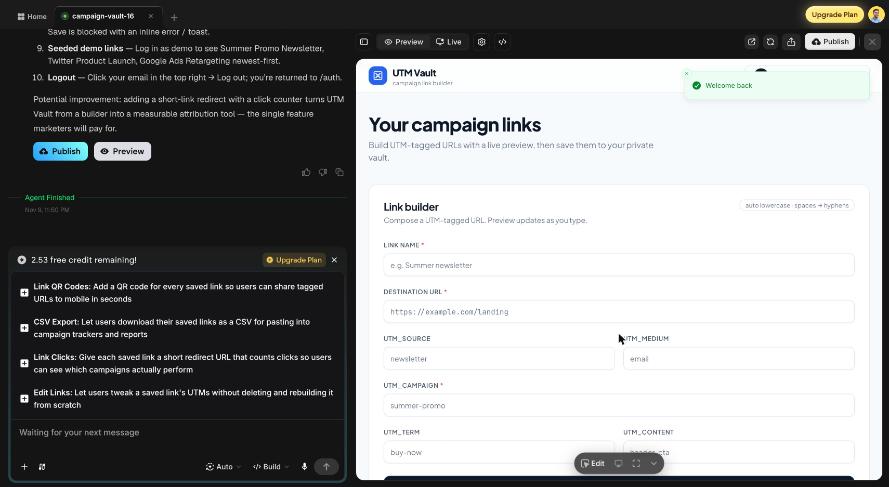
After that we did not type anything for about nine minutes. The session log shows the agent handing the design to a separate “design agent”, writing the backend and frontend, restarting the backend, and testing the API with its own requests before taking screenshots of the result. By about the eight-minute mark the Preview showed a working sign-in page, and the credit counter read 5.37.
It then handed the app to a “testing agent”, which reported all 21 backend checks and its end-to-end frontend checks passing. The agent finished by writing a short requirements document, a list of how to test each feature, and four suggested next features. The counter now read 2.53 credits.
3. Our own test: most of it worked
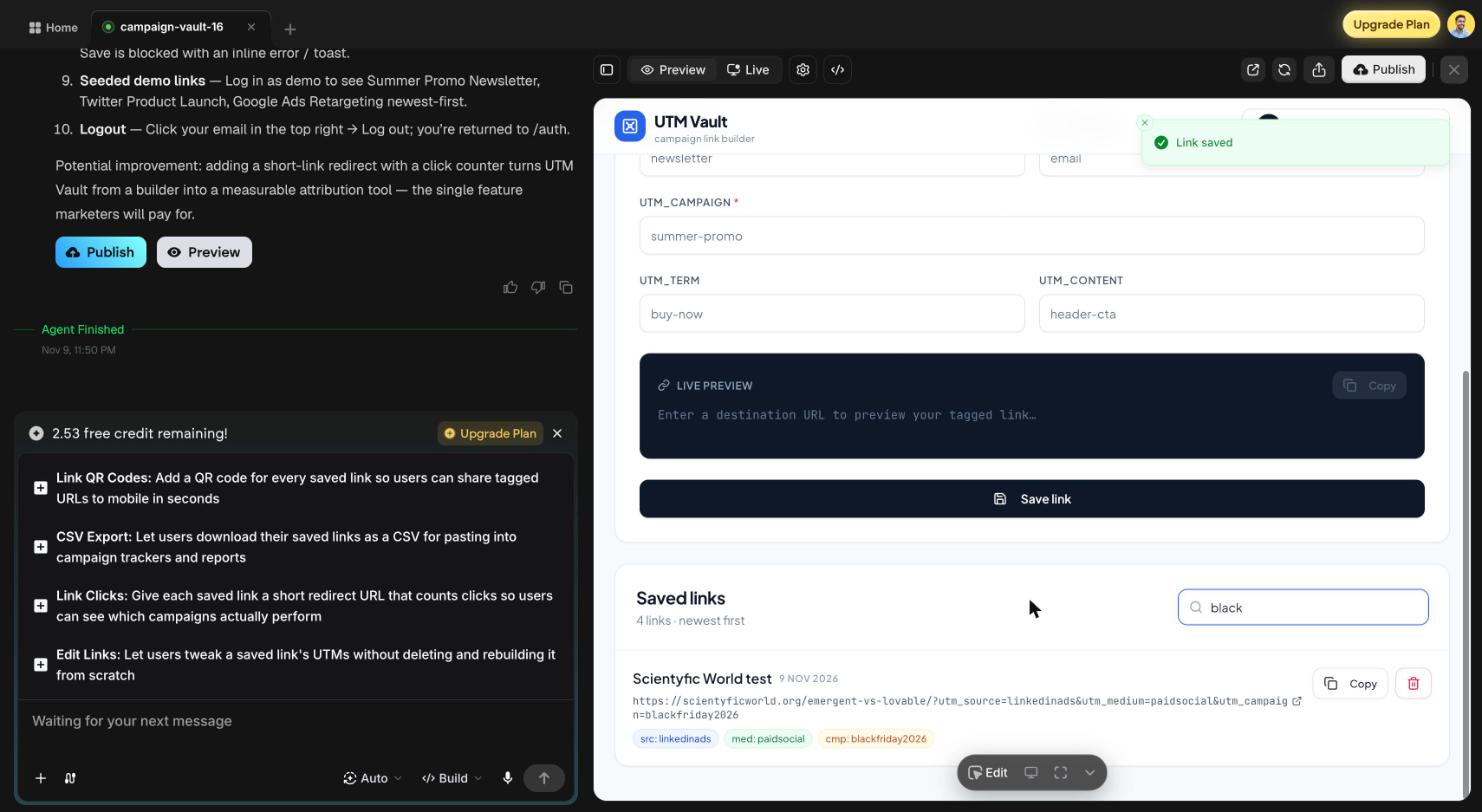
We signed in with the demo account, built a link, saved it and searched for it. Sign-in, the live preview of the tagged URL, saving (with a “Link saved” message), the search filter and the colored tags for source, medium and campaign all worked as asked.
The Bug Emergent’s Tests Missed
The spec said to lowercase UTM values and turn spaces into hyphens. When we typed LinkedIn Ads into the source field one key at a time, the app produced linkedinads, not linkedin-ads. The same happened to Paid Social and Black Friday 2026. For anyone tracking campaigns this matters, because reports would then show run-together names that do not match the rest of your data.
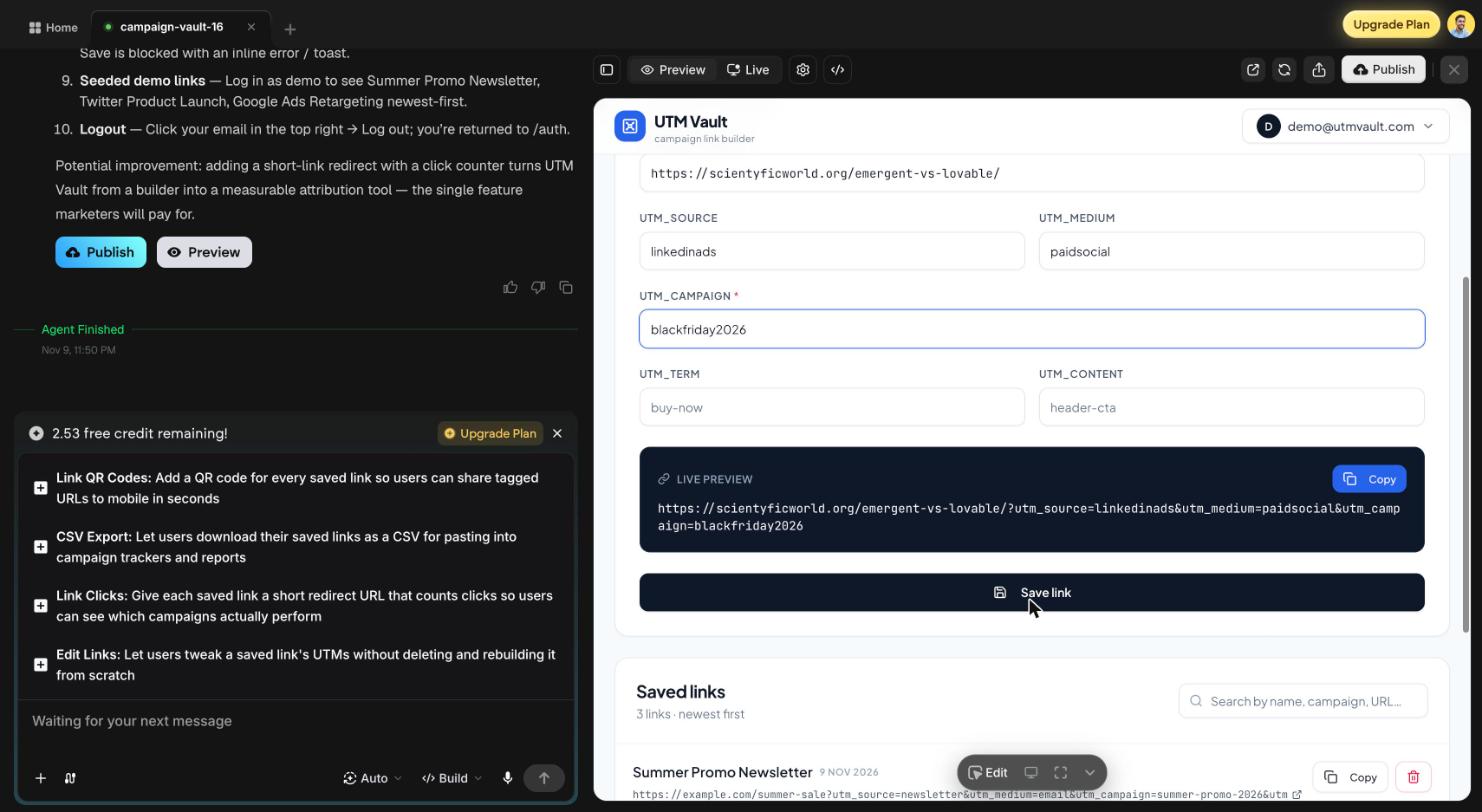
The likely cause is that the app cleaned up the value on every keystroke and trimmed the space you had just typed before the next letter arrived. The testing agent probably filled each field in one go (its own example was “Hello World” becoming “hello-world”), so it never saw the problem. We reported it in one message:
Bug: when I type "LinkedIn Ads" into utm_source key by key, the value becomes "linkedinads" instead of "linkedin-ads". The space is being removed while typing. Please keep the user's typed spaces in the input and apply the lowercase + spaces-to-hyphens rule to the preview URL and when saving, so "LinkedIn Ads" saves as "linkedin-ads". Apply the same fix to all UTM fields. Keep the change small.The agent fixed it in about two minutes on the first try, then reported that the free credits were used up. After reloading the Preview, the field kept what we typed and the tagged URL showed utm_source=linkedin-ads&utm_campaign=black-friday-2026.
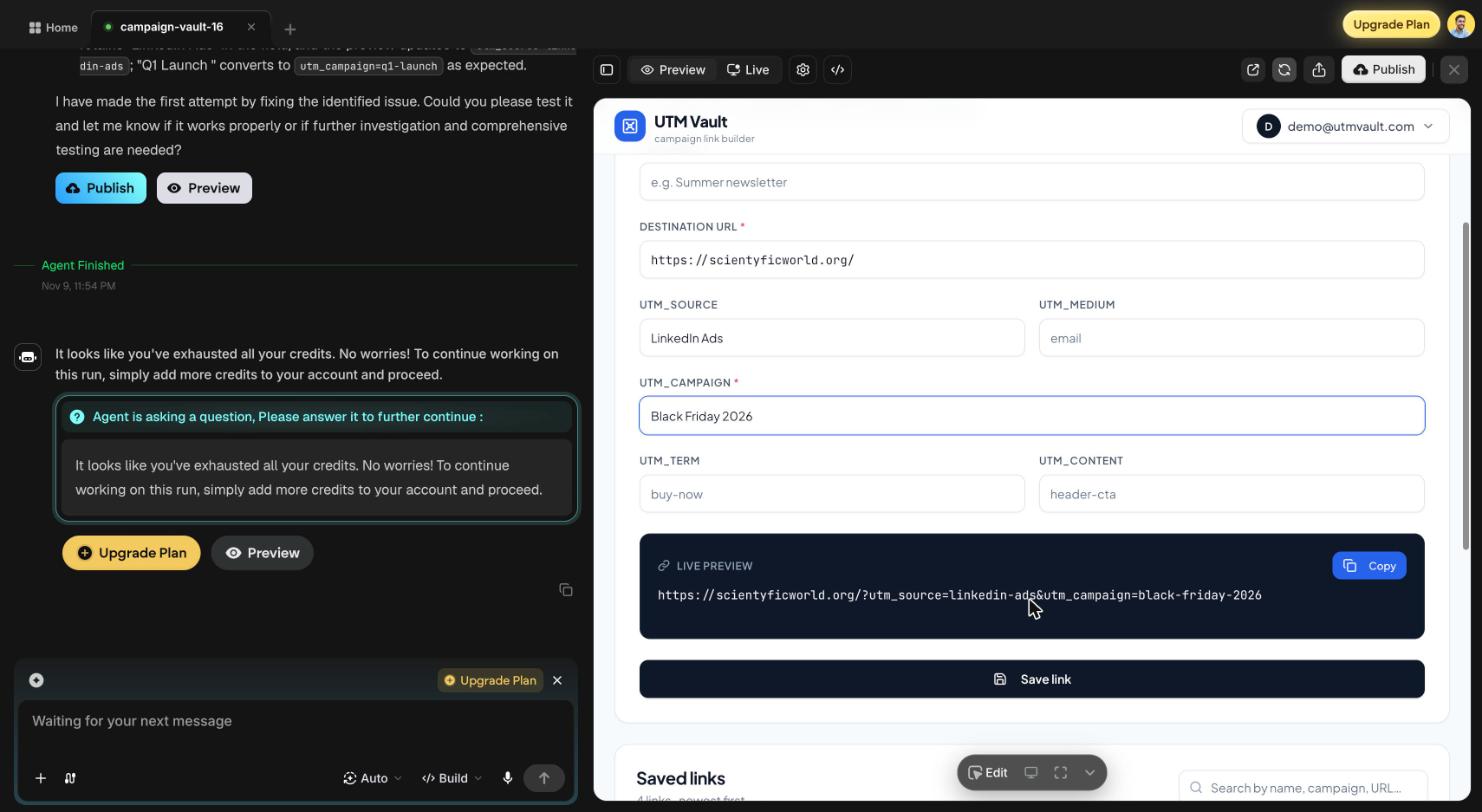
The lesson is not specific to Emergent: an agent’s own tests check what the agent thought to check. Type into your app the way a real user would before you trust it.
Where the Free Plan Stops
- No live URL. Clicking Publish opened the plan selection screen. On the free plan the app lives in Emergent’s Preview only, which is fine for trying an idea but not for sharing it with users.
- Credits go quickly. The automated testing step is useful, but it is part of what used about three quarters of the credits. Plan for one build and one or two fixes, not a long back-and-forth.
- GitHub sync is on paid plans. The plan screen lists GitHub integration under the paid plans, so we could not test exporting the code.
What we did not test by hand: signing up a second account to confirm each user only sees their own links, deleting a link, the mobile layout and logging out. Emergent’s testing agent reported covering these; we have not verified them ourselves.
Who Should Try Emergent (and Who Should Not)
Emergent fits people who want to describe an app in plain English and have agents build, test and run it, especially when the app needs logins and a database. It is less suited to developers who want to write the code themselves with AI help; for that, compare Claude Code vs Cursor. If you are choosing between app builders, see Emergent vs Lovable and Emergent vs Replit.
To get the most out of the free credits:
- Write the whole spec in one prompt, with numbered features and the rules each field must follow.
- Answer the agent’s setup questions in line with your spec, and decline extras.
- Test every field by typing, not pasting, before asking for changes.
- Report bugs in one specific message that says what you typed, what you got and what you expected.
If you have an app idea that fits that shape, try Emergent free and see how far your 10 credits get you.
Conclusion
On its free plan, Emergent built a working full-stack app from one prompt in about 10 minutes, tested it with its own agents, and fixed the one bug we found in a single round. The free credits are enough to prove an idea, not to publish it: putting the app on a live URL needs a paid plan. Treat the free plan as a test drive, write a tight spec, and do your own testing before you rely on the agent’s.
Can you build a full-stack app on Emergent’s free plan?
Yes. On the free plan we built a web app with email and password login, a database of saved links, search and validation in about 10 minutes, then fixed one bug. The app ran in Emergent’s Preview; publishing it to a live URL needed a paid plan.
How far do Emergent’s free credits go?
In our test, building the app and running Emergent’s automated tests used about 7.5 of the 10 free monthly credits. One bug fix used the rest. A smaller app, or skipping the testing step, would leave more room.
Can you publish an app on Emergent’s free plan?
Not in our test. Clicking Publish on the free plan opened the plan selection screen, so the app stayed in Preview.
Does Emergent test the apps it builds?
Yes. After building, the agent handed the app to a separate testing agent, which reported 21 of 21 backend checks and its frontend checks passing. It still missed a typing bug we found by hand, so test the app yourself too.
Is Emergent good for non-developers?
For a small app with a clear spec, yes: we never touched the code. You still need to describe what you want precisely and test the result like a user would.