
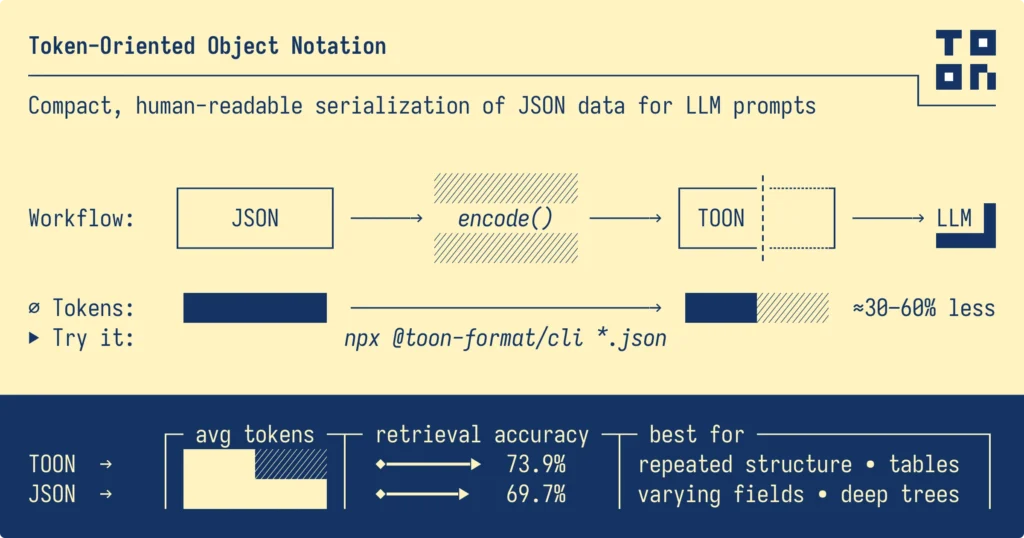
Every AI application developer faces the same challenge: LLM tokens cost real money, and a surprising share of them go on punctuation. JSON has served as the universal data format for two decades, but its syntax was designed for web APIs and human readability, not for token-sensitive AI systems.
TOON (Token-Oriented Object Notation) is a format built to fix that for one specific job: putting structured data into an LLM’s prompt. On uniform, table-like data it can cut tokens by well over half compared with pretty-printed JSON, and by roughly a third compared with minified JSON. On deeply nested data the advantage disappears, and independent testing shows real accuracy risks when models have to write TOON. This guide covers how the format works, the numbers I measured myself, what independent research found, and when it is worth using.
Updated October 2026: I rewrote this post. The original token counts for the sample datasets were far too high (a 100-row employee table does not cost 126,000 tokens), so I re-measured everything with a reproducible script. I also fixed the Python package (the official one is now toon-python, imported as toon), removed a “key folding” option that no longer exists in the current library, replaced the accuracy chart with the project’s current benchmark and two independent 2026 papers, and dropped the fixed pricing figures, which go stale within months.
Why Tokens Matter for Structured Data
LLM APIs bill by the token, with separate rates for input and output, and the rates differ a lot between models and change often, so check your provider’s current pricing page rather than trusting any number printed in an article. What stays constant is the arithmetic:
monthly input cost = input tokens per month ÷ 1,000,000 × your model’s input price per million tokens.
If your prompts carry a lot of structured data (database rows, API responses, logs, product catalogs), formatting overhead is a direct multiplier on that bill. Cutting the data portion of your prompts by 40% cuts that portion of your input cost by 40%. Fewer tokens also leave more room in the context window and usually mean a shorter time to first token. It matters less for short prompts and a lot for batch jobs and agents that repeatedly re-send large tables. (Output tokens, the text the model writes, are typically priced higher than input tokens, which is one reason TOON is mainly recommended for the input side. More on that below.)
JSON: Built for the Web, Not for AI
JSON emerged in the early 2000s as a lightweight alternative to XML. Douglas Crockford designed it for human readability and machine parsability across web APIs. For those purposes, JSON excels.
JSON’s Structural Overhead
Standard JSON requires explicit delimiters for every structural element:
- Curly braces
{}for objects - Square brackets
[]for arrays - Colons
:for key-value pairs - Commas
,for element separation - Quotes
""around all string keys and values
Each of these characters consumes tokens. For simple objects, the overhead remains negligible. For large datasets with repeated structures, the overhead compounds dramatically.
Consider this employee dataset in formatted JSON:
{
  "employees": [
    {
      "id": 1,
      "name": "Alice Chen",
      "department": "Engineering",
      "salary": 120000,
      "yearsExperience": 8,
      "active": true
    },
    {
      "id": 2,
      "name": "Bob Martinez",
      "department": "Marketing",
      "salary": 95000,
      "yearsExperience": 5,
      "active": true
    },
    {
      "id": 3,
      "name": "Carol Kim",
      "department": "Engineering",
      "salary": 110000,
      "yearsExperience": 6,
      "active": false
    }
  ]
}
This structure repeats field names ("id", "name", "department", etc.) for every single record. With 100 employee records, you write the same six field names 100 times. With 1,000 records, you write them 1,000 times.
For an LLM, these repeated keys provide no additional semantic value—the model already understood the schema from the first object. But you pay for every repetition.
Compact JSON: A Partial Solution
Minified JSON removes whitespace and newlines:
{"employees":[{"id":1,"name":"Alice Chen","department":"Engineering","salary":120000,"yearsExperience":8,"active":true},{"id":2,"name":"Bob Martinez","department":"Marketing","salary":95000,"yearsExperience":5,"active":true}]}
This removes the whitespace but keeps all the structural overhead. You still repeat every field name, keep every quote, and include every bracket and brace. In my measurements below, minified JSON used about 40-45% fewer tokens than pretty-printed JSON, so if you are sending pretty-printed JSON to a model today, minifying it is the free first win, before any new format. The cost is readability: debugging prompts and validating data becomes harder.
TOON: Purpose-Built for Token Efficiency
TOON takes a different approach: instead of repeating structure for every record, it states the structure once and then lists the values. The format combines YAML-style indentation for nested objects with CSV-style rows for uniform arrays, and maps directly onto the JSON data model, so any JSON value can be encoded to TOON and decoded back. It was created by Johann Schopplich and is MIT-licensed; the specification (github.com/toon-format/spec) is at version 4.1 as of July 2026 and is still marked as a working draft. Files use the .toon extension and the provisional media type text/toon.
Core Design Principles
TOON achieves token efficiency through three key strategies:
1. Indentation-Based Structure
Like YAML, TOON uses whitespace to represent nesting instead of explicit delimiters:
user:
  id: 123
  name: Ada Thompson
  created: 2025-01-15T10:30:00Z
No curly braces. No brackets for simple objects. The indentation clearly communicates hierarchy without consuming tokens for punctuation.
2. Minimal Quoting
TOON applies quotes only when necessary to prevent parsing ambiguity:
- Unquoted:
name: Ada Thompson - Quoted:
note: "Cost: $5.00" - Quoted:
status: "true"(prevents boolean interpretation)
This selective quoting maintains clarity while reducing token count. The format automatically handles the logic—developers don’t need to memorize quoting rules.
3. Tabular Array Format
This represents TOON’s most significant innovation. When processing arrays of uniform objects (same fields, primitive values), TOON declares the schema once and streams data as rows:
employees[3]{id,name,department,salary,yearsExperience,active}:
  1,Alice Chen,Engineering,120000,8,true
  2,Bob Martinez,Marketing,95000,5,true
  3,Carol Kim,Engineering,110000,6,false
The header line employees[3]{id,name,department,salary,yearsExperience,active}: communicates three critical pieces of information:
- Array length:
[3]indicates three records - Field schema:
{id,name,...}defines the structure - Delimiter scope: Following lines use comma separation
Each data row contains only values—no repeated keys, no extra quotes, no structural punctuation beyond the delimiter.
How TOON Compares to CSV
CSV (Comma-Separated Values) also uses tabular formatting. However, CSV lacks structural awareness:
- No nested object support
- No explicit type information
- No array length validation
- No delimiter declaration in the format itself
TOON provides CSV’s compactness while preserving JSON’s structural capabilities. You can nest objects, mix data types, and validate structure—capabilities CSV cannot offer.
For pure flat tabular data, CSV remains the smaller option: the TOON project’s own benchmark finds CSV about 6% smaller on flat datasets, and in my tests below the gap was 9-16%. What TOON adds on top of CSV is structure that the model can rely on: the declared length and field list, plus the ability to nest objects and arrays when your data is not perfectly flat.
Real-World Token Comparisons
I measured three typical datasets with the official @toon-format/toon library (version 4.1.1) and the o200k_base tokenizer used by recent OpenAI models, via the gpt-tokenizer package. The data is generated by a seeded generator so you can reproduce the exact numbers; the script is at the end of this section. Other models use different tokenizers, so absolute counts will differ for Claude or Gemini, but the relative picture is similar.
| Dataset | JSON (pretty) | JSON (compact) | TOON | TOON vs pretty | TOON vs compact |
|---|---|---|---|---|---|
| 100 flat employee records | 4,825 | 2,721 | 1,516 | -68.6% | -44.3% |
| 50 nested e-commerce orders | 6,006 | 3,402 | 3,597 | -40.1% | +5.7% (worse) |
| 60 days of analytics metrics | 3,661 | 2,337 | 1,511 | -58.7% | -35.3% |
CSV for the flat datasets came to 1,311 tokens (employees) and 1,386 (metrics), 9-16% smaller than TOON, as expected.
What the numbers say
- Uniform, flat data is TOON’s sweet spot. The employee and metrics tables cut tokens by 59-69% against pretty JSON and 35-44% against compact JSON. The savings grow with row count because the header is paid for once.
- Nested, semi-uniform data is not. The orders dataset has a nested customer object and a variable-length list of line items per order. TOON used about 6% more tokens than minified JSON, because the per-order structure cannot collapse into one table.
- Most of the win over “JSON” is really the win over pretty-printed JSON. Compare against what you actually send. If you already minify, the realistic gain on tabular data is roughly a third to a half, not the headline figure.
This lines up with the project’s own published benchmark, which reports about 33% fewer tokens than JSON across mixed-structure datasets, about 59% fewer on flat datasets, and a slight increase (+1.6%) against compact JSON on the mixed-structure set. Here is a small TOON example from the nested orders dataset, to show how nested objects and tabular line items combine:
orders[2]:
  - orderId: ORD-001
    customer:
      id: C-123
      name: John Smith
    items[2]{sku,qty,price}:
      A1,2,9.5
      B2,1,20
    total: 39
    status: shipped
  - orderId: ORD-002
    customer:
      id: C-124
      name: Jane
    items[1]{sku,qty,price}:
      A1,1,9.5
    total: 9.5
    status: new
(This output was produced by the real library.) And here is the script behind the table, so you can run it on your own data. Swap in a real payload from your application and the tokenizer for your model, because that is the only measurement that counts:
import { encode } from '@toon-format/toon';
import { encode as tok } from 'gpt-tokenizer/encoding/o200k_base';

// deterministic pseudo-random so results are reproducible
let seed = 42;
const rnd = () => (seed = (seed * 1664525 + 1013904223) % 4294967296) / 4294967296;
const pick = a => a[Math.floor(rnd() * a.length)];

const employees = Array.from({ length: 100 }, (_, i) => ({
  id: i + 1,
  name: `${pick(['Alice','Bob','Carol','Dan','Eve','Frank'])} ${pick(['Chen','Martinez','Smith','Patel','Kim'])}`,
  department: pick(['Engineering','Marketing','Sales','Support']),
  salary: 60000 + Math.floor(rnd() * 80) * 1000,
  yearsExperience: Math.floor(rnd() * 15),
  active: rnd() > 0.2,
}));

const orders = Array.from({ length: 50 }, (_, i) => ({
  orderId: `ORD-${String(i + 1).padStart(3, '0')}`,
  customer: { id: `C-${100 + i}`, name: `${pick(['John','Jane','Ravi','Mei'])} ${pick(['Smith','Doe','Rao','Lin'])}` },
  items: Array.from({ length: 1 + Math.floor(rnd() * 3) }, () => ({ sku: `SKU-${Math.floor(rnd()*900+100)}`, qty: 1 + Math.floor(rnd() * 4), price: +(rnd() * 90 + 5).toFixed(2) })),
  total: +(rnd() * 300 + 10).toFixed(2),
  status: pick(['shipped','pending','delivered']),
}));

const metrics = Array.from({ length: 60 }, (_, i) => ({
  date: new Date(Date.UTC(2025, 0, 1 + i)).toISOString().slice(0, 10),
  views: Math.floor(rnd() * 8000) + 2000,
  clicks: Math.floor(rnd() * 400),
  conversions: Math.floor(rnd() * 40),
  revenue: +(rnd() * 9000).toFixed(2),
  bounceRate: +rnd().toFixed(2),
}));

const csv = rows => { const k = Object.keys(rows[0]); return [k.join(','), ...rows.map(r => k.map(x => r[x]).join(','))].join('\n'); };
function report(name, data, rows) {
  const pretty = tok(JSON.stringify(data, null, 2)).length;
  const compact = tok(JSON.stringify(data)).length;
  const toon = tok(encode(data)).length;
  const c = rows ? tok(csv(rows)).length : null;
  const pct = (a, b) => ((1 - a / b) * 100).toFixed(1);
  console.log(`${name}: pretty ${pretty} | compact ${compact} | toon ${toon} | csv ${c} | vs pretty -${pct(toon,pretty)}% | vs compact ${toon<=compact?'-':'+'}${Math.abs(pct(toon,compact))}%` + (c? ` | vs csv ${toon>c?'+':'-'}${Math.abs((toon/c-1)*100).toFixed(1)}%`:''));
}
report('employees', { employees }, employees);
report('orders', { orders });
report('metrics', { metrics }, metrics);
Does the Model Still Understand It? What the Evidence Shows
Token savings are worthless if the model answers worse. There is now both the project’s own benchmark and independent research, and the honest summary is: for reading TOON as input, accuracy is about the same as JSON; for writing TOON as output, it can be considerably worse.
The project benchmark (input / retrieval)
The TOON repository’s benchmark asks 244 data-retrieval questions over 13 datasets across four models (Claude Haiku 4.5, Gemini 3.6 Flash, GPT-5.4 Nano and Grok 4.5), 5,856 LLM calls in total, comparing six formats. TOON scored 72.2% accuracy against 71.4% for JSON, with a margin of about ±2.8 points either side, which is a tie within noise, while using substantially fewer tokens. That is the result you want from an input format: no loss of understanding, lower cost. Treat it as the maintainers’ own benchmark on small, cheap models, not an independent audit. (Benchmark details in the repository)
Independent research (2026)
Two independent academic papers tested TOON in harder settings, and both counsel caution:
- Agentic tool use. Kutschka and Geiger (June 2026) tested TOON across four tool-calling and MCP benchmarks (BFCL, MCPToolBench++, MCP-Universe and StableToolBench) with five open-weight models of 17-32B parameters. TOON cut input tokens by up to 18%, but accuracy typically fell by 9-11 percentage points under full compression; one model dropped from 89% to 53% on a function-calling benchmark. Parse failures in multi-turn runs triggered extra reasoning that wiped out the savings, and in one reasoning-enabled configuration the total token count ended higher. The authors conclude TOON is “not safe as a default in multi-turn agentic systems.” There was one positive result (one model gained 13 points on one MCP benchmark while using 29% fewer tokens), so results vary by model and task.
- Generating TOON. Matveev (February 2026) asked 21 open and hosted models to generate structured data in JSON and TOON. Plain JSON was right on the first try 75% of the time against 50% for TOON, and ended at 83.5% against 73.1% after repair loops. The extra instructions the model needs to write TOON (a “prompt tax”) cancelled out the syntax savings on short outputs, and for a deeply nested record TOON never succeeded on the first attempt. The author recommends TOON for high-volume, shallow, tabular data and advises avoiding it for deep or recursive structures.
The pattern across all of this: models read TOON well because it is regular and the header tells them the shape, but they are much less practised at producing it, and strict-format failures cost you retries. The independent studies used smaller open-weight models than the project’s benchmark, so the gap may be narrower on frontier models, but nobody has shown that yet. Test with your model.
Why TOON tends to help when it is read
The explicit structure helps LLMs in several ways:
Array Length Declarations
The [N] notation tells the model exactly how many elements to expect:
users[3]: ...
This prevents counting errors and enables validation. If the declared length doesn’t match actual rows, the model can detect corruption or truncation.
Field Schema Headers
The {field1,field2,...} pattern declares which fields exist and their order:
users[3]{id,name,role}:
Models don’t need to infer schema from data—it’s explicitly stated. This reduces ambiguity and parsing errors.
Reduced Syntactic Noise
Fewer brackets, quotes, and punctuation means clearer signal-to-noise ratio. The model processes semantic content rather than structural overhead.
When to Use TOON vs JSON ?
Format selection depends on your specific data patterns and use case.
TOON Excels With:
- Large arrays of uniform objects with primitive values: logs, transactions, product catalogs, time series, query results. The more uniform and the longer the table, the greater the saving.
- Sending data into the model for analysis, classification, question answering or retrieval, where the model reads the data and answers in plain language or a small structured result.
- High-volume, cost-sensitive workloads where a 30-50% cut on the data portion of the prompt is worth an extra conversion step.
- Cases where truncation is a risk: the declared
[N]length and strict decoding make it easy to detect a cut-off table.
JSON Remains Better For:
- Deeply nested or non-uniform data: as the orders measurement shows, compact JSON can be smaller, and the project itself lists these cases as a poor fit.
- Model output you must parse reliably: if your code needs the model to return structured data, JSON with your provider’s structured-output (schema-constrained) feature is safer. The generation study above is the evidence.
- Tool calls and multi-turn agents: the independent agentic benchmark found parse failures and collapsed parallel tool calls. Keep tool arguments and results in JSON unless you have tested your own setup.
- Purely flat tabular data: CSV is smaller still, if you do not need nesting or length validation.
- Latency-dominated setups on local or quantized models: the project itself lists these as a case where JSON may still win. Measure end-to-end latency, not only token counts.
- Public APIs and mature JSON pipelines: universal compatibility matters more than prompt cost.
Hybrid Approach
Many production systems use both formats strategically:
- JSON for internal application logic and public APIs
- TOON for LLM interactions where token efficiency matters
Convert at the boundary between your application and AI services:
import { encode, decode } from '@toon-format/toon';

// Application uses JSON internally
const data = await fetchEmployeeData();

// Convert to TOON for LLM
const toonData = encode(data);
const prompt = `Analyze this employee data:\n${toonData}`;
const response = await callLLM(prompt);

// Work with results in JSON
const result = JSON.parse(response);
This is the pattern I recommend: JSON everywhere in your application, TOON only at the boundary where data enters a prompt, and JSON again for anything the model must return in a machine-readable form. That keeps compatibility where it matters and efficiency where it pays off.
How Can You Convert Your JSON Data to TOON?
If you just want to see what your data looks like in TOON, you can use the project’s official online playground or the command line (shown in the next section). The interactive walkthrough below shows a web-based converter; any converter works, but always check token counts on your own data with your own model’s tokenizer.
Converting existing JSON data to TOON requires no complex setup or library installation. You can transform your data instantly using a web-based converter.
Step 1: Navigate to app.too1s.tech
Open your browser and visit app.too1s.tech. This provides immediate access to the conversion tool without registration requirements.
Step 2: Search for Data Converter Tool
Use the search functionality or navigate through the Data Conversion section in the sidebar. Click on “Data Converter” to access the conversion interface.
Step 3: Select JSON → TOON
Configure the conversion settings:
1. Input type: Select “JSON” from the dropdown
2. Output type: Select “TOON” from the dropdown
The interface automatically detects your format preferences and adjusts accordingly.
Step 4: Input Your JSON Data
You have three options for providing source data:
1. Write directly: Paste your JSON into the input text area. This works best for quick tests or small datasets.
2. Upload from local: Click the upload button to select JSON files from your computer. Handles files up to several megabytes efficiently.
3. Upload from Google Drive: Connect your Google Drive account to access and convert JSON files stored in the cloud.
Step 5: Convert
Click the “Convert” button. The system processes your JSON and generates the TOON equivalent instantly—typically completing in under a second even for datasets with thousands of records.
The output appears immediately in the results panel. You can:
1. Copy the TOON output to your clipboard
2. Download it as a .toon file
Compare token counts between formats using the built-in statistics
This web-based approach lets you validate token savings before implementing TOON in your production code. Test with real data, verify accuracy, and measure actual token reduction for your specific use cases.
Implementing TOON in Your Stack
Official implementations exist in several languages. The TypeScript library and the Python library are the ones most AI developers will reach for; the project’s implementations page also lists stable Java, Julia, Rust and Swift versions, with .NET, Dart and Go in development. See the implementations list for the current status.
TypeScript / JavaScript
npm install @toon-format/toonimport { encode, decode } from '@toon-format/toon';
const data = {
users: [
{ id: 1, name: 'Alice', role: 'admin' },
{ id: 2, name: 'Bob', role: 'user' },
],
};
// JSON-compatible data -> TOON text for the prompt
const toon = encode(data);
console.log(toon);
// users[2]{id,name,role}:
// 1,Alice,admin
// 2,Bob,user
const prompt = `Given this data:\n${toon}\n\nHow many admins are there?`;
// TOON text -> plain JavaScript values
const roundTrip = decode(toon);I ran this against @toon-format/toon 4.1.1; decode(encode(data)) returned data identical to the original.
Python
The official Python package is toon-python, but you import it as toon. At the time of writing, its latest release on PyPI is a release candidate (1.0.0rc1), so use --pre or pin the version. The older toon-format package name on PyPI is a separate, much earlier release with a different interface (encode and decode functions in a toon_format module). Prefer the official one (repository):
pip install --pre toon-pythonimport toon
data = {
"users": [
{"id": 1, "name": "Alice", "role": "admin"},
{"id": 2, "name": "Bob", "role": "user"},
]
}
# Python data -> TOON text (the API mirrors the json module: dumps / loads)
toon_text = toon.dumps(data)
print(toon_text)
# users[2]{id,name,role}:
# 1,Alice,admin
# 2,Bob,user
prompt = f"Analyze this data:\n{toon_text}\n\nList all roles."
# TOON text -> Python data
assert toon.loads(toon_text) == dataTested with toon-python 1.0.0rc1 on Python 3.13. The functions are dumps and loads (with delimiter, indent_size and strict options); there is no toon.encode in this package.
Command line
npx @toon-format/cli input.json -o output.toonAlternative delimiters
TOON supports comma (the default), tab and pipe as the delimiter between values. The delimiter is declared in the array header, so a decoder always knows which one is in use:
encode(data, { delimiter: '\t' })Tab is sometimes suggested as a cheaper delimiter. On my test data with the o200k_base tokenizer it made no real difference (1,516 tokens for the employee table with either comma or tab) and the pipe delimiter was slightly worse (1,634). The better reason to pick tab or pipe is data that contains lots of commas, because fewer values then need quoting. Measure on your own data and tokenizer before switching.
Production Considerations
Encoding and decoding cost is small next to a network call and an LLM response, but do not take that on faith for large payloads: benchmark your own workload, especially if you encode very large datasets on a hot path. The library also offers streaming functions (encodeLines, decodeFromLines and decodeStream) for payloads you do not want to hold in memory as one string.
Remember that the model also needs a few tokens of explanation to work with an unfamiliar format. For a short payload, that instruction can cost more than the format saves, which is exactly the “prompt tax” the generation study measured. TOON pays off when the data portion is big enough to amortise it.
Error Handling
TOON’s strict mode (enabled by default) validates:
- Array length declarations match actual element counts
- Field counts match declared schema
- Delimiter consistency across rows
- Proper escape sequences in strings
Decoding is strict by default and throws when the data is malformed. For example, a header that declares three rows followed by only two throws an error (“Expected 3 tabular rows, but got 2” in the TypeScript library; “Declared length 3 but found 2” in Python). This catches truncated or corrupted data before it reaches your application. If you need to accept imperfect input, pass strict: false in TypeScript (strict=False in Python), and the decoder will return the rows it found.
decode(toonData, { strict: false })Prompt Engineering
When you give a model TOON, a one-line note about the format helps, and a tiny example of the shape helps more if you want the model to answer in TOON. Even so, for anything your code must parse, prefer asking for JSON output:
Data is in TOON format (2-space indent, arrays show length and fields).

users[3]{id,name,role}:
  1,Alice,admin
  2,Bob,user
  3,Carol,viewer

Task: Return only the admin users as a JSON array of objects.
Reading TOON needs very little explanation because the header is self-describing. Producing it is where models make mistakes (wrong row counts, stray delimiters), which is why the research above recommends TOON for input and JSON for output.
Migration Strategy
Adopt TOON incrementally:
- Measure a baseline: count tokens in your current JSON payloads with your target model’s own tokenizer (OpenAI publishes tiktoken; Anthropic and Google provide token-counting endpoints). Check first whether you are sending pretty-printed JSON, because minifying is free.
- Convert and compare: encode real payloads and compare token counts, including the instruction you add.
- Check quality, not just cost: run the same questions through both formats on a fixed evaluation set and compare answers.
- Start with one read-only, high-volume use case (such as analysing a big table) before touching tool calls or anything you parse.
- Re-evaluate when you change models: tokenizers differ, and so does how well each model handles the format.
The Future of Data Formats for AI
TOON reflects a broader realisation: prompts are not web payloads, and what is convenient for browsers and parsers is not always efficient for models. Other token-efficient formats exist (the agentic benchmark above also tested one called TRON, which scored better overall in that study), and the TOON specification itself is still evolving, so details such as syntax options can change between versions. That is a reason to pin library versions and re-test when you upgrade; the key-folding option that the earlier version of this post described, for example, is no longer part of the current API.
JSON is not going anywhere, and for model output, structured-output features keep it the safest choice. But for large uniform tables going into a prompt, a purpose-built format is a legitimate, measurable optimisation.
Recommendations
- Measure what you send today, including whether it is pretty-printed. Minified JSON alone may capture much of the saving.
- Use TOON for large, uniform, flat-ish tables that go into the model. Expect roughly 35-45% savings against minified JSON and more against pretty-printed JSON.
- Keep JSON (ideally with schema-constrained structured output) for anything the model returns that your code parses, and for tool calls in agents.
- Compare accuracy on your own questions and your own model, not only the token count.
- Skip it for deeply nested data, where compact JSON is as good or better, and for flat tables where CSV is enough.
- Pin the library version and re-test when you upgrade; the spec is a working draft.
TOON is a good tool for a specific job. If your prompts are full of long, uniform tables, it is worth an afternoon of measurement. If they are not, minified JSON is already doing most of what you need.
What is TOON?
TOON (Token-Oriented Object Notation) is a compact text format for the JSON data model, designed to carry structured data in LLM prompts with fewer tokens. It uses indentation for nesting and declares the fields of uniform arrays once in a header, followed by rows of values.
How many tokens does TOON actually save?
It depends on the data. In my measurements with the o200k_base tokenizer, flat tables used 59-69% fewer tokens than pretty-printed JSON and 35-44% fewer than minified JSON. Nested, semi-uniform data used about 6% more tokens than minified JSON. The project’s own benchmark reports about 33% fewer tokens than JSON on mixed-structure datasets.
Does TOON reduce LLM accuracy?
As model input on retrieval questions, the project benchmark found accuracy about equal to JSON (72.2% vs 71.4%). Independent 2026 studies found larger accuracy losses when models had to generate TOON or use it in multi-turn tool-calling, so use TOON for input and keep JSON for output and tool calls unless you have tested your own setup.
Should I use TOON or CSV?
For purely flat tables, CSV is smaller still (about 6-16% fewer tokens than TOON in the benchmarks above). TOON is the better choice when you also need nested objects, explicit array lengths for truncation detection, or one consistent format for mixed data.
Which Python package should I install for TOON?
Install toon-python (pip install –pre toon-python while it is a release candidate) and import it as toon, using toon.dumps and toon.loads. The older toon-format package on PyPI is a different, earlier release.







