Retrieval-Augmented Generation (RAG) allows you to supercharge an AI model with your own data. Instead of a chatbot relying only on pre-trained knowledge, a RAG-based assistant can ingest custom documents, index them in a vector database, and answer user questions by retrieving relevant information from those documents. This yields far more accurate, up-to-date, and context-specific answers with minimal hallucinations.
Updated October 2026: the first version of this guide stopped working on a fresh install. LangChain 1.0 removed the langchain.chains module (where create_retrieval_chain lived), requires Python 3.10+, and in 2026 the langchain-community package that supplied the FAISS wrapper and document loaders was archived. I rewrote the code on top of langchain-core, langchain-openai and pypdf only, and checked the pipeline end to end on a clean Python 3.13 environment (langchain 1.4, langchain-openai 1.6). I also fixed an inaccuracy in the original: OpenAIEmbeddings() does not default to text-embedding-3-small (it still defaults to the older text-embedding-ada-002), so the code below names the model explicitly. For the concepts without the code, see how to use RAG to ground LLM answers.
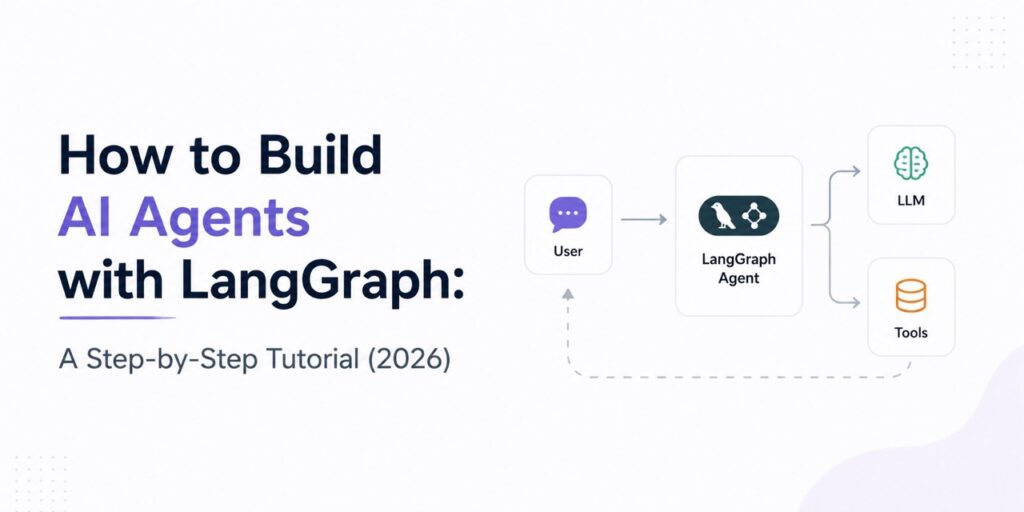
In this implementation-focused guide, we’ll walk through the entire process from input to output: ingesting documents (input), transforming them into embeddings and building a vector index (transformation), and finally using that index to answer questions with an LLM (output). We’ll minimize theory and focus on actionable steps, complete with code snippets you can copy-paste. By the end, you will have a working AI agent that can answer questions from your documents using Python code.
Project Setup and Requirements
Before diving into code, let’s set up our environment.
1. Create a Python environment
You need Python 3.10 or newer (LangChain 1.x dropped 3.9). Isolate the project in a virtual environment:
python -m venv venv
source venv/bin/activate   # On Windows: venv\Scripts\activate
2. Add the following files to your project directory
Create a new project folder and include the following files:
📄 requirements.txt
# RAG assistant dependencies
langchain-core>=1.0
langchain-openai>=1.0
langchain-text-splitters>=1.0
pypdf>=5.0
That is the whole list. Notice what is not there: no langchain-community (archived), no faiss-cpu (we use LangChain’s built-in in-memory vector store, with a note on when to graduate to a real one), and no PyPDF2 (long superseded by pypdf). Install with:
pip install -r requirements.txt📄 rag_agent.py
This is your main script: ingestion, indexing and question-answering in one file (about 90 lines). The full code is in the “Complete Example” section below; the next sections build it up piece by piece.
📁 docs/
This folder should contain the documents you want the assistant to learn from. For testing, create a few .txt or .pdf files like:
docs/
├── example.pdf
├── example.txt
...
(Optional) If you prefer step-by-step interaction, you can create a rag_agent.ipynb notebook and paste the code blocks into separate cells.
The file structure will look like this:
your_project/
├── rag_agent.py        # The RAG assistant
├── requirements.txt    # Dependencies
├── docs/               # Your .txt and .pdf files
│   ├── remote_work.txt
│   └── security.pdf
└── vector_index.json   # Created automatically on the first run
3. Set up your OpenAI API key
This project uses OpenAI’s models for both embedding and response generation. Set your API key as an environment variable:
export OPENAI_API_KEY="sk-YourAPIKeyHere"On Windows (CMD):
set OPENAI_API_KEY=sk-YourAPIKeyHereTip: For local development, you can also create a
.envfile and usepython-dotenvto load it.
With these files and setup complete, you’re ready to begin implementing your RAG-based knowledge assistant. Let’s now move to document ingestion.
How the RAG Pipeline Works?
Before coding, let’s briefly outline the RAG pipeline we are implementing:
A high-level RAG workflow: documents are ingested and indexed (left, offline), and at query time (right, online) relevant context is retrieved from the vector index to augment the LLM’s answer.
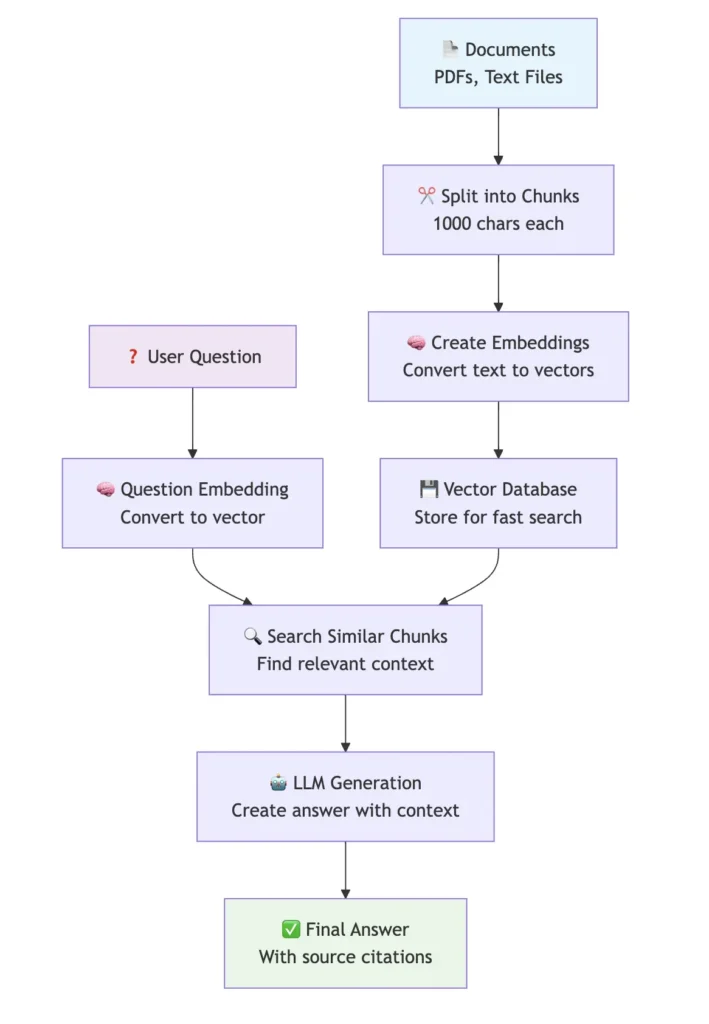
- Input (document ingestion): a collection of documents (PDFs, text files) is the knowledge source. They are loaded and split into smaller chunks.
- Transformation (vectorization and indexing): each chunk goes through an embedding model, which returns a high-dimensional vector. The vectors are stored in a vector store that supports similarity search: given a query vector, it quickly finds the most relevant chunks.
- Output (query to answer): the user’s question is embedded with the same model, the store returns the top chunks, and those chunks (the context) are passed to a chat model, which writes an answer grounded in them.
In summary, the RAG agent will search your documents for relevant info and use an LLM to answer questions based on that info. Now, let’s implement this step by step.
Step 1: Ingesting Documents (Input)
The goal here is to load your source documents into the program and split them into manageable chunks for embedding.
Organize your files first. The script expects a folder named docs/ next to it, containing the .txt and .pdf files you want the assistant to learn from (you can change the path in the code).
1. Loading documents
Older versions of this guide used LangChain’s DirectoryLoader, TextLoader and PyPDFLoader, which lived in the now-archived langchain-community package. You do not need them: reading text files and PDF pages and wrapping them in a Document (LangChain’s simple text-plus-metadata container) takes a few lines, and you can see exactly what is happening:
from pathlib import Path
from pypdf import PdfReader
from langchain_core.documents import Document

def load_documents(folder: Path) -> list[Document]:
    """Read every .txt and .pdf under `folder` into LangChain Documents."""
    docs = []
    for path in sorted(folder.rglob("*")):
        if path.suffix.lower() == ".txt":
            docs.append(Document(page_content=path.read_text(encoding="utf-8"),
                                 metadata={"source": str(path)}))
        elif path.suffix.lower() == ".pdf":
            for page_number, page in enumerate(PdfReader(path).pages, start=1):
                text = page.extract_text() or ""
                if text.strip():
                    docs.append(Document(page_content=text,
                                         metadata={"source": str(path), "page": page_number}))
    return docs
Each Document carries the text plus metadata (file path, and page number for PDFs). Keep that metadata: it is what lets the assistant tell users where an answer came from. One limitation worth knowing: extract_text() only works on PDFs that contain real text. A scanned PDF is just images and will come back empty, so those need OCR first.
2. Splitting into chunks
Large documents need to be split into smaller pieces to fit into the embedding model’s token limit and to improve search granularity. We’ll use LangChain’s text splitter to break documents into chunks of a few hundred words each. We also allow some overlap between chunks to avoid cutting important context. For example:
from langchain_text_splitters import RecursiveCharacterTextSplitter

splitter = RecursiveCharacterTextSplitter(chunk_size=1000, chunk_overlap=200)
chunks = splitter.split_documents(documents)
print(f"{len(documents)} documents -> {len(chunks)} chunks")
chunks is a list of smaller Document objects. We chose a chunk size of 1000 characters (roughly 200–250 words) with 200 characters of overlap. The overlap keeps a sentence that straddles a boundary from losing its context. Tune both numbers to your documents; text-embedding-3-small accepts up to about 8,000 tokens per input, so 1000 characters is far below the limit. Chunking is the setting that most affects answer quality, so it is the first thing to experiment with.
Logging
It’s good practice to log progress. For example, we printed the number of documents loaded and chunks created. In a real application, you might use Python’s logging library for more control:
import logging
logging.basicConfig(level=logging.INFO)
logger = logging.getLogger(__name__)
logger.info(f"Loaded {len(documents)} documents and split into {len(docs)} chunks.")
This ensures you know the ingestion step succeeded and how many chunks will be indexed next.
Step 2: Embedding and Indexing (Transformation)
The main goal is to convert each document chunk into a vector embedding and store all embeddings in a vector index for fast similarity search.
We’ll use OpenAI’s embedding model to vectorize the text. text-embedding-3-small is inexpensive (about $0.02 per million tokens) and good enough for most document search. Name the model explicitly: if you omit it, LangChain’s OpenAIEmbeddings falls back to the older text-embedding-ada-002.
1. Initialize the embedding model
from langchain_openai import OpenAIEmbeddings

embeddings = OpenAIEmbeddings(model="text-embedding-3-small")
Make sure OPENAI_API_KEY is set (see above). Whatever embedding model you choose, you must use the same one for indexing and for querying, because vectors from different models are not comparable.
2. Build the vector store
We’ll use InMemoryVectorStore, which ships in langchain-core, so there is nothing extra to install. It keeps vectors in memory and finds neighbours with cosine similarity, which is perfectly adequate for thousands of chunks. Build it straight from the chunks:
from langchain_core.vectorstores import InMemoryVectorStore

vector_store = InMemoryVectorStore.from_documents(chunks, embeddings)
This embeds every chunk through the OpenAI API and stores the results. Embedding is the slow, billable step, and the time scales with the number of chunks and your rate limits (a few hundred chunks typically takes seconds to a minute).
3. Persist the index (important!)
An in-memory store disappears when the script exits, so you would re-embed (and re-pay) on every run. Save it to disk once and reload it afterwards:
from pathlib import Path

INDEX_PATH = Path("vector_index.json")

# save after building
vector_store.dump(str(INDEX_PATH))

# on later runs, reload instead of re-embedding
vector_store = InMemoryVectorStore.load(str(INDEX_PATH), embedding=embeddings)
The file stores the vectors and chunk text but not the embedding model, so pass the same embeddings object when you load. It is plain JSON, which also means loading it can never execute code, unlike pickle-based indexes.
When to move on from this store: it holds everything in memory and does a brute-force search, so it suits prototypes and corpora up to roughly tens of thousands of chunks. If you have more data, need to add and delete documents incrementally, or want filtering and multi-user access, switch to a real vector database (Chroma, pgvector, Qdrant, Pinecone and similar all have maintained LangChain integrations). The rest of the code does not change, because every store exposes the same as_retriever() interface. Our own n8n version of this project, a RAG knowledge-base assistant built with n8n, shows the same pipeline with a hosted vector store.
Step 3: Querying and Generating Answers
Goal: Accept a user’s question, retrieve relevant document chunks from the vector store, and generate an answer using an LLM.
Now comes the interactive part – turning the indexed knowledge into an actual Q&A agent.
1. Set up the LLM and create the QA chain
We use a chat model through LangChain’s ChatOpenAI, at temperature 0 so factual answers stay consistent. The model name is a variable on purpose: OpenAI’s lineup changes every few months, and any current small chat model is fine for RAG, because the answer comes from the retrieved context rather than the model’s memory.
from langchain_core.output_parsers import StrOutputParser
from langchain_core.prompts import ChatPromptTemplate
from langchain_core.runnables import RunnableLambda, RunnablePassthrough
from langchain_openai import ChatOpenAI

llm = ChatOpenAI(model="gpt-4o-mini", temperature=0)   # swap in any current OpenAI chat model

def format_context(docs):
    return "\n\n".join(f"[{d.metadata.get('source')}] {d.page_content}" for d in docs)

retriever = vector_store.as_retriever(search_kwargs={"k": 4})

prompt = ChatPromptTemplate.from_messages([
    ("system",
     "Answer the question using only the context below. "
     "If the context does not contain the answer, say you don't know. "
     "Keep the answer to three sentences.\n\nContext:\n{context}"),
    ("human", "{question}"),
])

rag_chain = (
    {"docs": retriever, "question": RunnablePassthrough()}
    | RunnablePassthrough.assign(context=RunnableLambda(lambda x: format_context(x["docs"])))
    | RunnablePassthrough.assign(answer=prompt | llm | StrOutputParser())
)
A few notes on this setup:
- This is a plain LangChain Expression Language (LCEL) pipeline, not a legacy “chain” class. The
|operator connects steps; each step receives the previous step’s output. We use it becausecreate_retrieval_chainnow lives in the separatelangchain-classicpackage, and plain LCEL is easier to read and debug. retrieverembeds the question with the same embedding model and returns thek=4most similar chunks. A higherkgives the model more context but also more chances to include irrelevant text.RunnablePassthrough.assign(...)adds a key to the running dictionary without dropping the others. That is how we keep the retrieveddocsaround, so we can show sources after the answer is generated.- The system prompt tells the model to answer only from the context and to say it doesn’t know otherwise. That instruction does most of the work of reducing hallucinations.
2. Ask questions
Now we can query our assistant. For example:
question = "What does our company policy say about remote work?"
result = rag_chain.invoke(question)
print("Q:", question)
print("A:", result["answer"])
invoke embeds the question, runs the similarity search, fills the prompt with the retrieved chunks, calls the model, and returns a dictionary containing answer along with docs, context and question. You should see something like:
Q: What does our company policy say about remote work?
A: Employees may work remotely up to three days per week with manager approval.
(The actual answer depends on the content of your documents.)
You can now ask any question about the content in your docs/. The assistant will retrieve the relevant info and use it to answer. If the answer seems incomplete or the agent says it doesn’t know, you might try increasing k (number of chunks) or ensure your query is specific enough.
3. Source citations
Because we kept the retrieved chunks in the result, citing sources takes two lines:
result = rag_chain.invoke(question)
print("Answer:", result["answer"])
print("Sources:", sorted({d.metadata["source"] for d in result["docs"]}))
Each retrieved chunk carries the source (and, for PDFs, page) metadata we attached during loading. Showing it alongside the answer lets users verify the information, which is the biggest trust upgrade you can make to a RAG assistant.
Complete Example
Here’s a full working script that puts it all together:
import os
from pathlib import Path

from pypdf import PdfReader
from langchain_core.documents import Document
from langchain_core.output_parsers import StrOutputParser
from langchain_core.prompts import ChatPromptTemplate
from langchain_core.runnables import RunnableLambda, RunnablePassthrough
from langchain_core.vectorstores import InMemoryVectorStore
from langchain_openai import ChatOpenAI, OpenAIEmbeddings
from langchain_text_splitters import RecursiveCharacterTextSplitter

DOCS_DIR = Path("docs")
INDEX_PATH = Path("vector_index.json")
EMBEDDING_MODEL = "text-embedding-3-small"
CHAT_MODEL = os.environ.get("RAG_CHAT_MODEL", "gpt-4o-mini")  # any current OpenAI chat model


def load_documents(folder: Path) -> list[Document]:
    """Read every .txt and .pdf under `folder` into LangChain Documents."""
    docs = []
    for path in sorted(folder.rglob("*")):
        if path.suffix.lower() == ".txt":
            docs.append(Document(page_content=path.read_text(encoding="utf-8"),
                                 metadata={"source": str(path)}))
        elif path.suffix.lower() == ".pdf":
            for page_number, page in enumerate(PdfReader(path).pages, start=1):
                text = page.extract_text() or ""
                if text.strip():
                    docs.append(Document(page_content=text,
                                         metadata={"source": str(path), "page": page_number}))
    return docs


def build_or_load_index(embeddings) -> InMemoryVectorStore:
    """Load the saved index if it exists; otherwise embed the documents and save it."""
    if INDEX_PATH.exists():
        return InMemoryVectorStore.load(str(INDEX_PATH), embedding=embeddings)
    documents = load_documents(DOCS_DIR)
    if not documents:
        raise SystemExit(f"No .txt or .pdf files found in {DOCS_DIR}/")
    splitter = RecursiveCharacterTextSplitter(chunk_size=1000, chunk_overlap=200)
    chunks = splitter.split_documents(documents)
    store = InMemoryVectorStore.from_documents(chunks, embeddings)
    store.dump(str(INDEX_PATH))
    return store


def format_context(docs: list[Document]) -> str:
    return "\n\n".join(f"[{d.metadata.get('source')}] {d.page_content}" for d in docs)


def build_rag_chain(store: InMemoryVectorStore, llm):
    retriever = store.as_retriever(search_kwargs={"k": 4})
    prompt = ChatPromptTemplate.from_messages([
        ("system",
         "Answer the question using only the context below. "
         "If the context does not contain the answer, say you don't know. "
         "Keep the answer to three sentences.\n\nContext:\n{context}"),
        ("human", "{question}"),
    ])
    answer_chain = prompt | llm | StrOutputParser()
    return (
        {"docs": retriever, "question": RunnablePassthrough()}
        | RunnablePassthrough.assign(context=RunnableLambda(lambda x: format_context(x["docs"])))
        | RunnablePassthrough.assign(answer=answer_chain)
    )  # returns {"docs": [...], "question": ..., "context": ..., "answer": ...}


def main() -> None:
    embeddings = OpenAIEmbeddings(model=EMBEDDING_MODEL)
    llm = ChatOpenAI(model=CHAT_MODEL, temperature=0)
    chain = build_rag_chain(build_or_load_index(embeddings), llm)

    while True:
        question = input("\nAsk a question (or 'exit'): ").strip()
        if question.lower() in {"exit", "quit", ""}:
            break
        result = chain.invoke(question)
        print("\nAnswer:", result["answer"])
        print("Sources:", sorted({d.metadata["source"] for d in result["docs"]}))


if __name__ == "__main__":
    main()
Run it with python rag_agent.py. The first run embeds your documents and writes vector_index.json; later runs load the saved index and start immediately. Delete the file whenever you change the documents, so the next run rebuilds it.
Testing the System
After setting everything up, it’s important to test your RAG assistant to verify it works as expected:
- Basic functionality test: run the script and ask a question you know is answered in your documents, such as “How many vacation days do employees get per year?” if you have an employee handbook. The answer should match the document and the printed source should point to the right file.
- Edge cases: ask something unrelated to your documents. Our prompt tells the model to say it doesn’t know, so it should decline rather than invent an answer. If it still hallucinates, tighten the prompt or add a check that skips the model call when retrieval returns nothing relevant.
- Multiple queries: try several questions in a row. This simple implementation has no conversational memory, so each question is independent. Follow-ups like “and what about contractors?” will not work unless you add chat history, which is beyond the scope here.
- Performance check: time a query. The vector search takes milliseconds; the chat-model call dominates latency, typically a second or two for a short answer. If it is too slow, retrieve fewer chunks or use a smaller model.
Monitor your console logs for any errors or warnings during tests. If you encounter issues, use the troubleshooting tips below.
Performance and Cost Considerations
Speed: ingestion and embedding happen once, up front. After that, each question costs one vector search (nearly instant) and one model call, so for a handful of documents the assistant feels immediate. Larger models are slower and more expensive; for RAG a small, fast model is usually enough, since the answer comes from your retrieved text.
If you need to scale to many concurrent queries or very large document sets, consider:
- Move to a hosted or server-side vector database once you outgrow the in-memory store.
- Use asynchronous calls (
ainvoke) or batching when you put this behind a web app. - Cache answers to frequently repeated questions.
Cost: there are two billable pieces, embeddings and chat calls. Prices change often, so check OpenAI’s pricing page before you budget, but the orders of magnitude are stable:
- Embeddings (one-time per document):
text-embedding-3-smallis about $0.02 per million tokens. A 100,000-token document set (roughly 75,000 words) costs around $0.002 to index. Even a million tokens is about two cents. - Chat calls (per question): a typical query sends the question plus four retrieved chunks, around 1,000–1,500 input tokens, and gets back about 150 output tokens. Small chat models currently cost roughly $0.15–$0.25 per million input tokens and $0.60–$1.20 per million output tokens, which works out to a few hundredths of a cent per question. A thousand questions land well under a dollar. Flagship models cost many times more per token, so reserve them for cases where you have measured that the small model is not accurate enough.
To put it in perspective: indexing 50 pages of documentation (about 20,000 tokens) costs a fraction of a cent, and answering a few hundred questions costs cents. The expense that actually grows is usually query volume, so monitor usage in OpenAI’s dashboard and set a spending limit before you expose the assistant to other people.
Tip: During development, load only a few documents while prototyping and use a small model. Index the full dataset once the pipeline behaves.
FAQ and Troubleshooting
I get ModuleNotFoundError: No module named 'langchain.chains'.
That module was removed in LangChain 1.0. This guide’s code doesn’t use it. If you are running older code that calls create_retrieval_chain or create_stuff_documents_chain, either install langchain-classic and import them from langchain_classic.chains, or move to the LCEL pipeline shown above, which has no legacy dependency.
The script can’t find langchain_openai or pypdf.
Install the requirements inside your virtual environment (pip install -r requirements.txt) and make sure the same environment is active when you run the script. LangChain 1.x needs Python 3.10 or newer, so check python --version as well.
I get an authentication error or a rate-limit error from OpenAI.
An authentication error usually means OPENAI_API_KEY is missing in the environment that runs the script; check with python -c "import os; print(bool(os.getenv('OPENAI_API_KEY')))". A rate-limit or “insufficient quota” error often means the account has no active billing or credit, even with a valid key.
The assistant says it doesn’t know, or the answer is incomplete.
Retrieval probably missed the relevant chunk. Try raising k to 5 or 6, check that your chunks aren’t so small that context is fragmented, and confirm the document actually contains the answer. If it doesn’t, “I don’t know” is the correct behaviour.
The answers are irrelevant or hallucinated.
Debug retrieval first. Call vector_store.similarity_search("your question", k=4) and read the returned chunks. If they don’t match the question, the problem is chunking or embeddings, not the model. Also make sure the same embedding model is used for indexing and querying, and that the index wasn’t built from different documents than you expect. If retrieval is fine but the model still invents things, tighten the system prompt.
How do I update the index when documents change?
With the in-memory store, delete vector_index.json and rerun so it rebuilds; embedding is cheap at this scale. For incremental updates, vector_store.add_documents(new_chunks) adds to a loaded store (then dump it again). If documents change often, use a vector database that supports upserts and deletes.
Can I use a different LLM or embedding model?
Yes. Swap ChatOpenAI and OpenAIEmbeddings for another provider’s LangChain integration (Anthropic, Google, Ollama for local models, Hugging Face embeddings and so on). The retrieval code is unchanged. If you change the embedding model, delete the saved index and re-embed, because old vectors are incompatible with the new model.
How do I put this behind a chatbot UI or an API?
Build rag_chain once at startup, then call rag_chain.invoke(question) inside a FastAPI or Flask route and return result["answer"] and the sources. Don’t rebuild or reload the index per request.