To draw a LaTeX horizontal line across the page, put a rule the width of the line on its own paragraph and stop LaTeX from indenting it. Inside a table, use \hline for a full-width line or the booktabs package for cleaner, publication-style rules. This guide shows every common way to make a horizontal line in LaTeX, when to use each one, and the errors you will hit if you use the wrong command in the wrong place.
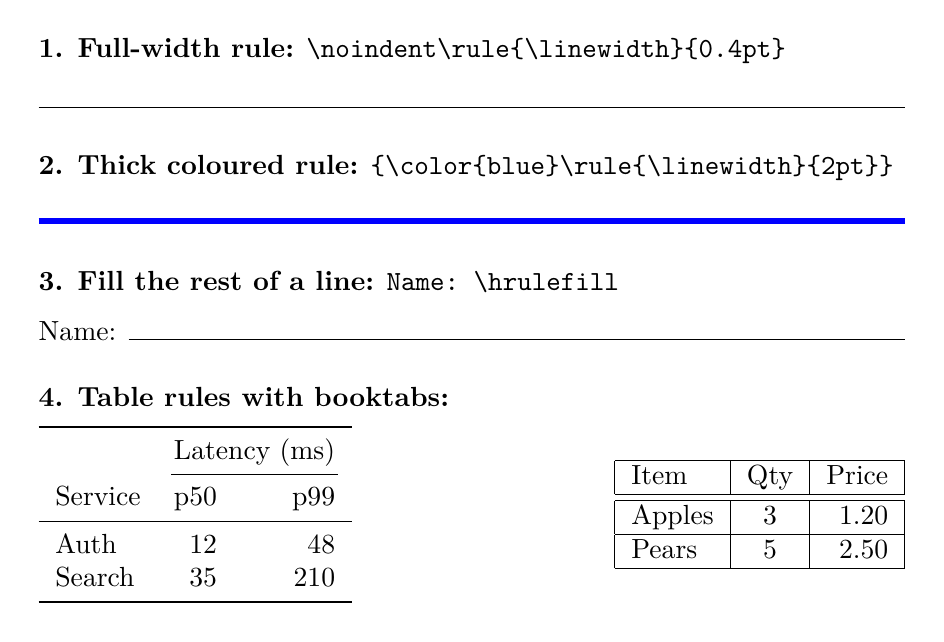
Every snippet on this page was compiled with Tectonic 0.17 (a self-contained TeX engine) on 13 November 2026, and the image below is the real output. The same code works in Overleaf and any standard TeX Live or MiKTeX install. If you are new to LaTeX, start with our beginner’s LaTeX tutorial.
TL;DR: Which Command to Use
| You want | Use | Where it works |
|---|---|---|
| A line across the full text width | \noindent\rule{\linewidth}{0.4pt} | Normal text |
| A line that fills the rest of the current line | \hrulefill | Normal text |
| A line of an exact length | \rule{6cm}{0.4pt} | Normal text |
| A line between table rows | \hline | Inside tabular |
| A line under some table columns only | \cline{2-3} or \cmidrule{2-3} | Inside tabular |
| Professional-looking table rules | \toprule, \midrule, \bottomrule | Inside tabular, with booktabs |
LaTeX Horizontal Line Across the Page With \rule
The \rule command draws a filled rectangle. Its syntax is \rule[raise]{width}{thickness}: the width and thickness are lengths, and the optional raise moves the rule up from the baseline (or down, if negative). A rule as wide as the line and 0.4pt thick looks like a normal horizontal line. See the LaTeX2e reference entry for the full definition.
\documentclass{article}
\begin{document}
Text above the line.

\noindent\rule{\linewidth}{0.4pt}

Text below the line.
\end{document}
Three details matter here:
- The blank lines. They put the rule in its own paragraph. Without them the rule sits on the same line as the surrounding text.
\noindent. A new paragraph starts with an indent (15pt in the default article class). A rule that is a full line wide plus that indent no longer fits, and LaTeX reports anOverfull \hbox (15.0pt too wide)warning. We reproduced exactly that warning by removing\noindent.\linewidthvs\textwidth. Both give the full width in normal one-column text.\linewidthadapts to the current context, so it is the safer choice inside lists, minipages and two-column layouts.
Thicker, shorter, coloured or centred lines
Change the arguments to change the look. Colour needs the xcolor package; wrap the rule in braces so the colour does not leak into the text that follows.
\documentclass{article}
\usepackage{xcolor}
\begin{document}
\noindent\rule{\linewidth}{2pt}            % thick line

\noindent{\color{blue}\rule{\linewidth}{1pt}}  % blue line

\noindent\rule{0.5\linewidth}{0.4pt}       % half-width, left-aligned

\begin{center}
\rule{0.5\linewidth}{0.4pt}                % half-width, centred
\end{center}
\end{document}
A double line under a title
Stack two rules with a small negative space between them. This is a common look for report title blocks and resume headers.
\documentclass{article}
\begin{document}
\begin{center}
{\Large\bfseries Project Report}\\[4pt]
\rule{\linewidth}{0.8pt}\\[-6pt]
\rule{\linewidth}{0.4pt}
\end{center}
Body text starts here.
\end{document}
The \\[-6pt] pulls the second rule up so the pair reads as one double line. Adjust the value to change the gap.
Fill the Rest of a Line With \hrulefill
\hrulefill is stretchy space that LaTeX fills with a line instead of leaving it blank. It is the easiest way to make form fields, signature lines and separators between words. The default thickness is 0.4pt (reference).
\documentclass{article}
\begin{document}
\noindent Name: \hrulefill

\noindent Start \hrulefill{} Middle \hrulefill{} End

\noindent Signature: \rule{6cm}{0.4pt}
\end{document}
When there are two \hrulefill commands on one line, they share the free space equally. Use a fixed \rule{6cm}{0.4pt} instead when the line must be a set length, such as a signature field. \dotfill works the same way with dots, which is handy for tables of contents or menus.
The Plain TeX \hrule
\hrule is the low-level TeX primitive. It must be used between paragraphs (in vertical mode), and it spans the full width automatically:
\documentclass{article}
\begin{document}
Text above the line.
\par\hrule\medskip
Text below the line.
\end{document}
It works, but it adds no space above or below the line, so text sits close to it unless you add \medskip or \vspace yourself. In LaTeX documents, \noindent\rule{\linewidth}{0.4pt} is usually easier to control.
Horizontal Lines in LaTeX Tables With \hline
Inside a tabular environment, \hline draws a line across the full width of the table. Put it at the start of a row, after the previous row’s \\. Two in a row give a double line. Overleaf’s tables guide covers the rest of the tabular syntax.
\documentclass{article}
\begin{document}
\begin{tabular}{|l|c|r|}
\hline
Item & Qty & Price \\
\hline\hline
Apples & 3 & 1.20 \\
\hline
Pears & 5 & 2.50 \\
\hline
\end{tabular}
\end{document}
Partial lines with \cline
\cline{a-b} draws a line under columns a to b only. It is most useful under a heading that spans several columns:
\documentclass{article}
\begin{document}
\begin{tabular}{lcc}
\hline
 & \multicolumn{2}{c}{Score} \\
\cline{2-3}
Team & Round 1 & Round 2 \\
\hline
Red & 12 & 15 \\
Blue & 9 & 18 \\
\hline
\end{tabular}
\end{document}
Better Table Lines With booktabs
The booktabs package replaces \hline with three rules of different weights and adds proper spacing around them. Tables built this way are easier to read, which is why many publishers and style guides recommend this style. The package’s own advice is to avoid vertical lines entirely.
\documentclass{article}
\usepackage{booktabs}
\begin{document}
\begin{tabular}{lrr}
\toprule
 & \multicolumn{2}{c}{Latency (ms)} \\
\cmidrule(lr){2-3}
Service & p50 & p99 \\
\midrule
Auth & 12 & 48 \\
Search & 35 & 210 \\
\bottomrule
\end{tabular}
\end{document}| Command | What it draws |
|---|---|
\toprule | A thick line at the top of the table |
\midrule | A thinner line, usually under the header row |
\bottomrule | A thick line at the bottom |
\cmidrule(lr){2-3} | A partial line under columns 2 to 3; (lr) trims it slightly at both ends so neighbouring partial lines do not touch |
Compare the two tables in the image near the top: the booktabs version on the left has more space around each rule and no boxed grid.
Common Errors and How to Fix Them
| Message or problem | Cause | Fix |
|---|---|---|
! Misplaced \noalign. | \hline (or a booktabs rule) used outside a table | Use \noindent\rule{\linewidth}{0.4pt} in normal text |
Overfull \hbox (15.0pt too wide) | A full-width \rule with the paragraph indent in front of it | Add \noindent before \rule |
| The line appears next to the text, not under it | No blank line before or after the rule | Leave an empty line on both sides, or use \par |
\hrulefill draws nothing | Nothing on the line gives it space to fill, for example inside a box with no width | Give the container a width, e.g. \makebox[5cm]{\hrulefill} |
Undefined control sequence on \toprule | booktabs is not loaded | Add \usepackage{booktabs} to the preamble |
We triggered the first error on purpose by putting \hline in a normal paragraph. Tectonic stopped with Misplaced \noalign at the line of the \hline, the standard TeX error for this mistake.
Using These Lines in Overleaf
Nothing changes in Overleaf: paste any snippet into a new blank project and recompile. booktabs and xcolor are part of the standard TeX Live distribution that Overleaf uses, so you only need the \usepackage line. Our Overleaf guide explains projects, compiling and sharing if you have not used it before. For keeping table and rule styles consistent across a team’s documents, a short house style guide saves a lot of review comments, and our list of technical writing tools covers editors that work well with LaTeX.
Conclusion
For a horizontal line in running text, use \noindent\rule{\linewidth}{0.4pt} on its own paragraph, and change the width or thickness as needed. Use \hrulefill when the line should fill the remaining space, such as form fields. Inside tables, \hline and \cline work, but booktabs’ \toprule, \midrule and \bottomrule produce cleaner tables with less effort. And if you see Misplaced \noalign, you have used a table rule outside a table.
FAQ
How do I make a horizontal line in LaTeX?
Put a full-width rule in its own paragraph, with noindent in front so the paragraph indent does not push it past the margin: noindent, then rule with width linewidth and thickness 0.4pt. In tables, use hline instead.
What is the difference between hline and rule in LaTeX?
hline only works inside table environments such as tabular and draws a line across the whole table. The rule command works in normal text and draws a line of any width and thickness you choose.
How do I make a thicker horizontal line in LaTeX?
Increase the second argument of the rule command, for example 1pt or 2pt instead of 0.4pt. In booktabs tables, toprule and bottomrule already use a heavier line than midrule.
Why do I get Misplaced noalign in LaTeX?
You used hline, cline or a booktabs rule outside a table. These commands only work between rows of a tabular-like environment. In normal text, use the rule command instead.
How do I add a line under only some columns of a table?
Use cline with a column range, such as cline{2-3}. With the booktabs package, cmidrule{2-3} does the same with better spacing, and cmidrule(lr) trims the ends.
Does this work in Overleaf?
Yes. All examples use standard LaTeX and the booktabs and xcolor packages, which Overleaf includes by default. Paste a snippet into a blank project and recompile.