A browser’s rendering engine is the component that turns HTML, CSS and images into the pixels you see. It parses HTML into the DOM and CSS into the CSSOM, works out the computed style of every element, calculates where everything goes (layout), records what to draw (paint), and hands layers to the GPU to put on screen (compositing). Chrome and Edge use the Blink rendering engine, Safari uses WebKit, and Firefox uses Gecko.
This guide explains what a rendering engine is, how it differs from the “browser engine” and the JavaScript engine, and what happens at each stage of the rendering pipeline. To make it concrete, I ran four small experiments in a Chromium 156-based browser (Brave, headless) and include the measured results, because they show why some code is fast and some is slow.
What Is a Rendering Engine?
A web browser is several programs working together. The parts that matter here:
| Component | What it does | Examples |
|---|---|---|
| User interface | Address bar, tabs, buttons, settings | Chrome’s UI, Safari’s UI |
| Rendering engine | Parses HTML and CSS, computes styles and layout, paints the page | Blink, WebKit, Gecko |
| JavaScript engine | Parses, compiles and runs JavaScript | V8 (Chrome, Edge), JavaScriptCore (Safari), SpiderMonkey (Firefox) |
| Networking | Fetches HTML, CSS, scripts and images over HTTP | |
| Storage | Cookies, cache, localStorage, IndexedDB |
The rendering engine calls into the JavaScript engine whenever a script runs, and scripts in turn read and change the DOM and styles through the rendering engine. If you want to see these parts in miniature, building a toy browser using Python is a fun exercise.
Browser engine vs rendering engine
The two terms are often used interchangeably, and today “browser engine” usually means the same thing as rendering engine (also called a layout engine): Blink, WebKit or Gecko. In older reference architectures of a browser, though, the “browser engine” was a separate layer that sits between the user interface and the rendering engine and passes actions such as “load this URL” or “go back” between them. When you see a comparison of “browser engines”, it’s almost always comparing rendering engines.
Which Rendering Engine Does Each Browser Use?
| Engine | Used by | History |
|---|---|---|
| Blink | Chrome, Edge, Opera, Brave, Vivaldi, Samsung Internet and other Chromium-based browsers | Forked from WebKit by Google in 2013; Microsoft Edge switched to it in 2020 |
| WebKit | Safari on macOS and iOS | Started by Apple in 2001 from KDE’s KHTML engine. On iOS, every browser had to use WebKit until Apple began allowing other engines in the EU with iOS 17.4 (2024) |
| Gecko | Firefox | Mozilla’s engine, heavily rebuilt in the “Quantum” project with a parallel style system and the WebRender GPU renderer |
| Trident / EdgeHTML | Internet Explorer, the original Edge | Retired |
| Servo, Ladybird | Not yet in a mainstream browser | Independent engines in development: Servo (written in Rust) and Ladybird, which planned its first alpha for 2026 |
Because Blink powers most desktop and Android browsers, testing in Chrome, Safari and Firefox covers the three engines that matter for almost all users.
The Rendering Pipeline, Step by Step
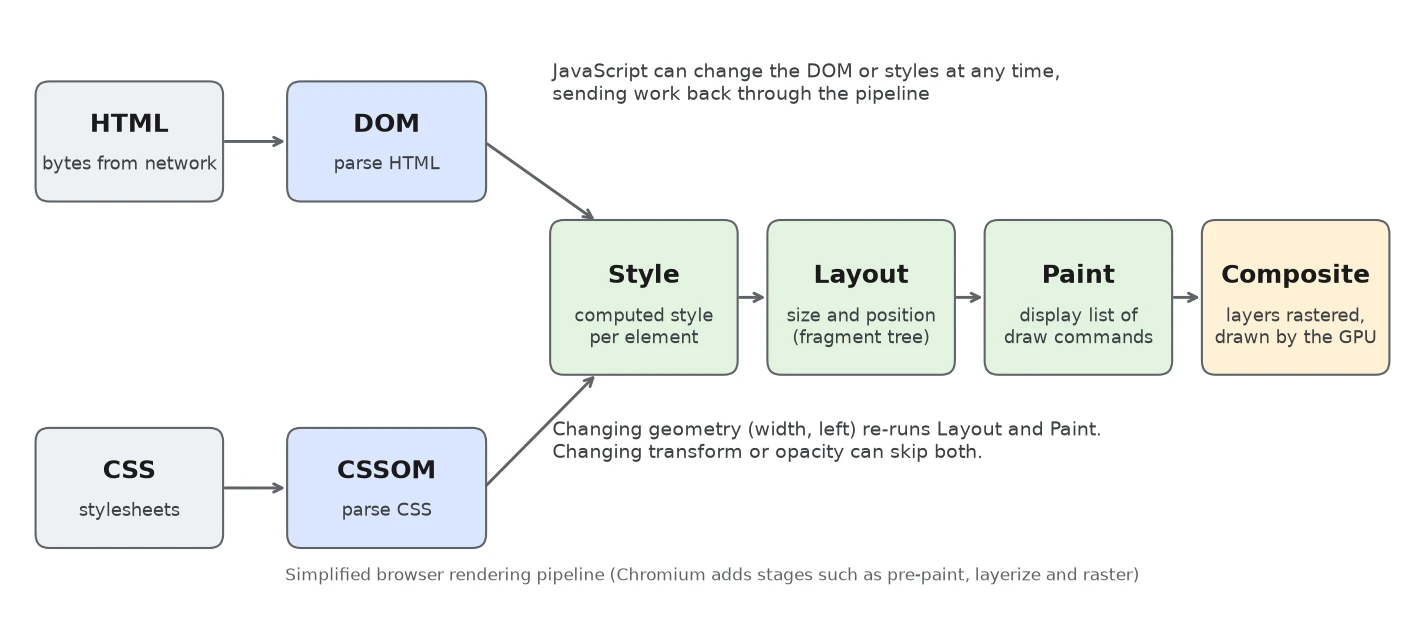
1. Parsing HTML into the DOM
The engine reads the HTML bytes, decodes them into characters, splits them into tokens (start tags, end tags, attributes, text) and builds the Document Object Model tree. The HTML parser is unusually forgiving: it never stops on an error, it fixes invalid markup according to rules in the HTML standard, for example by moving a <div> out of a <p>. I showed these corrections in the DOM tree structure, and parsing itself is covered in what HTML parsing means.
While the main parser is blocked, a preload scanner looks ahead in the HTML for images, stylesheets and scripts and starts downloading them early.
2. Parsing CSS into the CSSOM
Stylesheets are tokenized and parsed into the CSS Object Model, a tree of rules, selectors and declarations. Invalid declarations are dropped rather than breaking the whole stylesheet. The details, including how the parser recovers from errors, are in CSS parsing explained.
3. Style: computing styles for each element
The engine matches every CSS selector against the DOM and resolves the cascade (origin, specificity, order and !important), inheritance and default values to produce a computed style for each element. That’s what the Computed tab shows in Chrome DevTools.
Elements with display: none get no box at all. Older explanations call the result the “render tree”: the DOM minus everything that isn’t rendered. My first experiment shows the difference between the ways of hiding something:
<div id="none" style="display:none">display: none</div>
<div id="hidden" style="visibility:hidden">visibility: hidden</div>
<div id="transparent" style="opacity:0">opacity: 0</div>| CSS | Layout boxes (getClientRects) | Height | Text in innerText |
|---|---|---|---|
display: none | 0 | 0 | No |
visibility: hidden | 1 | 18 px | No |
opacity: 0 | 1 | 18 px | Yes |
Only display: none removes the element from layout; the other two still take up space.
4. Layout
Layout (called “reflow” in Firefox) calculates the exact size and position of every box from the computed styles and the viewport size: block and inline flow, flexbox, grid, floats and positioning. Blink produces an immutable “fragment tree” from it. Layout is expensive on large pages, and it has to run again whenever something that affects geometry changes, such as width, font size, added content or the window size.
5. Paint
Paint doesn’t draw pixels directly. It records a display list: an ordered list of drawing commands (“fill this rectangle”, “draw this text”, “draw this image”) in the correct stacking order: backgrounds, borders, content, then positioned elements in z-index order.
6. Compositing
The page is split into layers (for example, a fixed header, a scrolling area, an element being animated with transform), each layer is rasterized into GPU textures, and the compositor combines them into the final frame. Because the compositor runs on its own thread, scrolling and transform or opacity animations can stay smooth even while the main thread is busy. Chromium’s full pipeline has more stages (pre-paint, layerize, raster, draw), documented in RenderingNG architecture.
What This Means for Your Code: Measured
Scripts and stylesheets can block the first paint
I served a small page whose <head> loaded a script or stylesheet that took 1 second to arrive, and measured First Contentful Paint (FCP) and DOMContentLoaded:
| Page | First Contentful Paint | DOMContentLoaded |
|---|---|---|
| No external resources | 20–44 ms | 9–26 ms |
<script src="slow.js"> in head | 1,048–1,052 ms | 1,017–1,024 ms |
<script src="slow.js" defer> | 24–28 ms | 1,018–1,027 ms |
<link rel="stylesheet" href="slow.css"> | 1,036–1,040 ms | 9 ms |
A normal script stops the HTML parser until it downloads and runs, so nothing is painted. With defer, the page painted in about 25 ms and the script still ran before DOMContentLoaded. A stylesheet doesn’t stop parsing, but the browser won’t paint until it arrives, to avoid showing unstyled content. Use defer (or type="module") for scripts and keep critical CSS small.
Layout thrashing: reading layout after every write
Reading a geometry property such as offsetWidth forces the engine to run layout immediately if anything has changed. Doing that in a loop that also writes styles forces a layout on every iteration:
// Interleaved: read, write, read, write... forces a layout on every read
function interleaved() {
  for (const box of boxes) {
    const width = box.offsetWidth;          // read (needs up-to-date layout)
    box.style.width = width + 1 + 'px';     // write (invalidates layout)
  }
}

// Batched: all reads first, then all writes, so layout runs once
function batched() {
  const widths = boxes.map((box) => box.offsetWidth);       // reads
  boxes.forEach((box, i) => { box.style.width = widths[i] + 1 + 'px'; });   // writes
}| Version (1,000 elements) | Time, 5 runs |
|---|---|
| Interleaved read and write | 127.8–134.6 ms |
| All reads, then all writes | 2.1–2.7 ms |
That’s about 55 times slower for identical results. The fix is to batch reads before writes (or use requestAnimationFrame to schedule writes). Properties that force layout include offsetWidth/offsetHeight, getBoundingClientRect(), scrollTop, clientWidth and getComputedStyle().
Animating transform instead of left
// Version A: moves the element by changing its position
ball.style.left = x + 'px';

// Version B: moves it with a transform
ball.style.transform = `translateX(${x}px)`;
I animated a circle for one second each way with requestAnimationFrame and counted events in a performance trace:
| Animation | Layout events | Paint events |
|---|---|---|
left | 61 | 122 |
transform | 1 | 2 |
Changing left re-ran layout and paint on every frame. Changing transform only needed the compositor to move an already-painted layer, so layout and paint ran once. That’s why animations should use transform and opacity wherever possible. For more on keeping the main thread free, see how to speed up JavaScript, and for reducing layout cost in large apps, how to optimize DOM size in React.
Summary: How a Page Gets on Screen
- The network delivers HTML; the parser builds the DOM while the preload scanner fetches resources.
- CSS is parsed into the CSSOM; render-blocking stylesheets delay the first paint.
- Style resolves a computed style for every element.
- Layout calculates each box’s size and position.
- Paint records drawing commands into display lists.
- Layers are rasterized and composited by the GPU into the frame you see.
- JavaScript and user input change the DOM or styles, and the engine re-runs only the stages that are affected.
Conclusion
The rendering engine is the part of the browser that turns code into pixels: Blink in Chrome and Edge, WebKit in Safari, Gecko in Firefox. Knowing its pipeline (parse, style, layout, paint, composite) explains most front-end performance advice: in my tests, a blocking script delayed the first paint by a full second, interleaved layout reads made a loop about 55 times slower, and animating transform instead of left cut 61 layouts a second to one. For a deeper, engine-level walkthrough, Tali Garsiel’s classic How browsers work and MDN’s overview are good next reads.
FAQs
What is a rendering engine in a browser?
The component that parses HTML and CSS, computes styles, lays out the page and paints it to the screen. Examples are Blink (Chrome, Edge), WebKit (Safari) and Gecko (Firefox).
What is the difference between a browser engine and a rendering engine?
Today the terms usually mean the same thing. In older browser architecture diagrams, the browser engine was a separate layer that coordinates actions between the user interface and the rendering engine.
Which rendering engine does Chrome use?
Blink, which Google forked from WebKit in 2013. Edge, Opera, Brave, Vivaldi and other Chromium-based browsers use Blink too. Chrome’s JavaScript engine is V8.
What are the steps of the browser rendering process?
Parse HTML into the DOM, parse CSS into the CSSOM, compute styles, run layout to calculate sizes and positions, paint display lists, then rasterize and composite layers on the GPU.
What is the difference between reflow and repaint?
Reflow (layout) recalculates the size and position of elements and is triggered by geometry changes. Repaint redraws pixels without changing layout, for example after a color change. Transform and opacity changes can often skip both.
Why does a script in the head slow down page rendering?
A normal script blocks the HTML parser until it is downloaded and executed, so the browser cannot paint. In my test a 1-second script delayed the first paint by about a second, while the same script with defer let the page paint in about 25 ms.